AI agent for biomedical engineers
Design Verification Traceability Agent
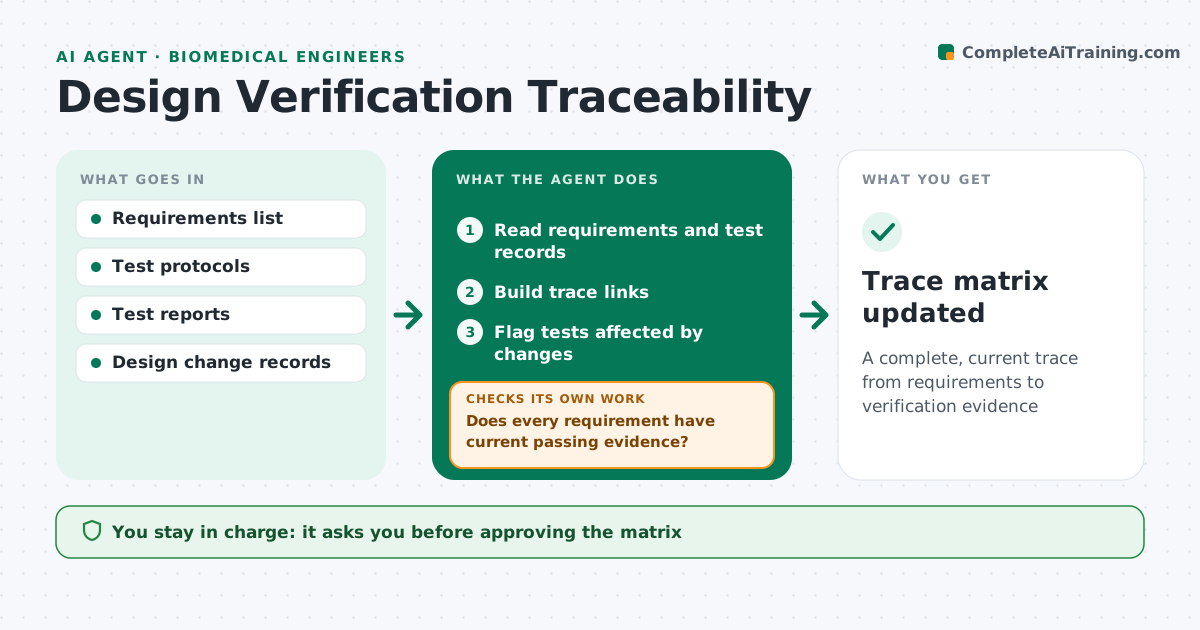
A complete, current trace from requirements to verification evidence
What it does
Medical device design controls require every requirement to be traced to verification evidence, and gaps found by an auditor can delay a launch. Each week this agent reads the requirements list, test protocols and test reports and builds the trace matrix. It checks that every requirement has a test, that the test covers the current requirement version, and that the report shows a pass with the right sample size. Gaps are listed with owners, and the agent checks again after they are fixed. When requirements change, it flags tests that may no longer cover them. The engineer approves the matrix before it goes into the design history file. Edge case: a test that passed on an earlier prototype is flagged if the design has changed since, so old evidence is not reused by mistake.
How it works
Follow the arrows from top to bottom. The orange dashed arrow is the loop: when a check fails, the agent goes back and tries again.
Read the steps as a list
- Weekly trace update
- Read requirements and test records
- Build trace links
- Does every requirement have current passing evidence?If not: list gaps with owners. Back to step 3.
- Flag tests affected by changes
- Engineer approves the matrixThe agent waits here for your OK.
- Trace matrix updated
How it decides
It links tests to requirements by ID and version and checks results and sample sizes against the protocol.
- Match requirement versions
- Check sample sizes
- Flag tests on old prototypes
Make it yours
Every agent is a starting point. You choose these settings for your own situation.
- Requirement sources
- Sample size rules
- Report format
- Update frequency
What keeps you in control
It always asks you first
- Approving the matrix
- Closing gaps
Hard limits
- Never changes records in the quality system
It stops when
- Done: matrix approved
- Stop: system unavailable
Set it up
We guide you through the set-up, step by step
Members get the full set-up guide for this agent. No technical skills needed: you copy, paste and upload.
- One set of instructions to paste into your AI, with the clicks for ChatGPT, Claude, Microsoft 365 Copilot, Gemini and Grok
- The agent then walks you through connecting your own data, one source at a time
- A downloadable copy with the flow chart, the rules and the full guide