AI agent for qa managers
Product Requirement Change Impact Agent
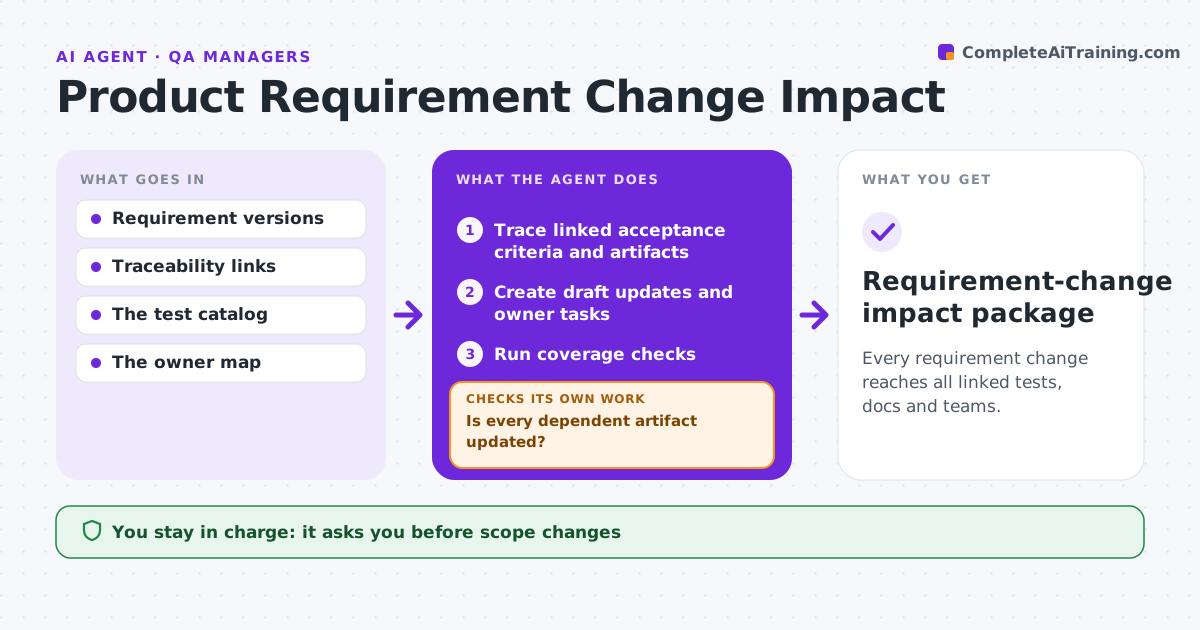
Every requirement change reaches all linked tests, docs and teams.
What it does
When a product requirement changes, linked tests, documents and dependent teams often miss the update. When a requirement revision is approved, this agent follows the traceability links to every acceptance criterion, test, help article and team that depends on it. It drafts updates and creates tasks for each owner. After owners report back, it runs coverage checks to confirm each dependent item now matches the new requirement. Any item still out of date gets a new task. Tests that still check removed behavior are flagged. It retires only items explicitly made obsolete. Product operations approves scope and acceptance changes. Edge case: two linked tests still require a removed export option, so tasks are created to update them.
How it works
Follow the arrows from top to bottom. The orange dashed arrow is the loop: when a check fails, the agent goes back and tries again.
Read the steps as a list
- Requirement revised
- Trace linked acceptance criteria and artifacts
- Create draft updates and owner tasks
- Run coverage checks
- Is every dependent artifact updated?If not: create tasks for the uncovered ones. Back to step 3.
- Product ops approves scope and acceptance changesThe agent waits here for your OK.
- Requirement-change impact package
How it decides
It walks traceability links and verifies coverage before closing.
- Retire only items explicitly made obsolete.
- Every dependent item must pass a coverage check before closing.
- Tests that check removed behavior are always flagged.
Make it yours
Every agent is a starting point. You choose these settings for your own situation.
- Traceability sources (requirements tool, test suite, docs)
- Owner map per artifact type
- Deadline for owner updates (default 5 working days)
- Who approves scope changes
What keeps you in control
It always asks you first
- Scope changes
- Test acceptance
- Release approval
Hard limits
- Drafts only.
It stops when
- Done: coverage complete.
Set it up
We guide you through the set-up, step by step
Members get the full set-up guide for this agent. No technical skills needed: you copy, paste and upload.
- One set of instructions to paste into your AI, with the clicks for ChatGPT, Claude, Microsoft 365 Copilot, Gemini and Grok
- The agent then walks you through connecting your own data, one source at a time
- A downloadable copy with the flow chart, the rules and the full guide