AI agent for freight brokers
Detention and Accessorial Billing Agent
Every valid detention or accessorial charge is billed with proof
What it does
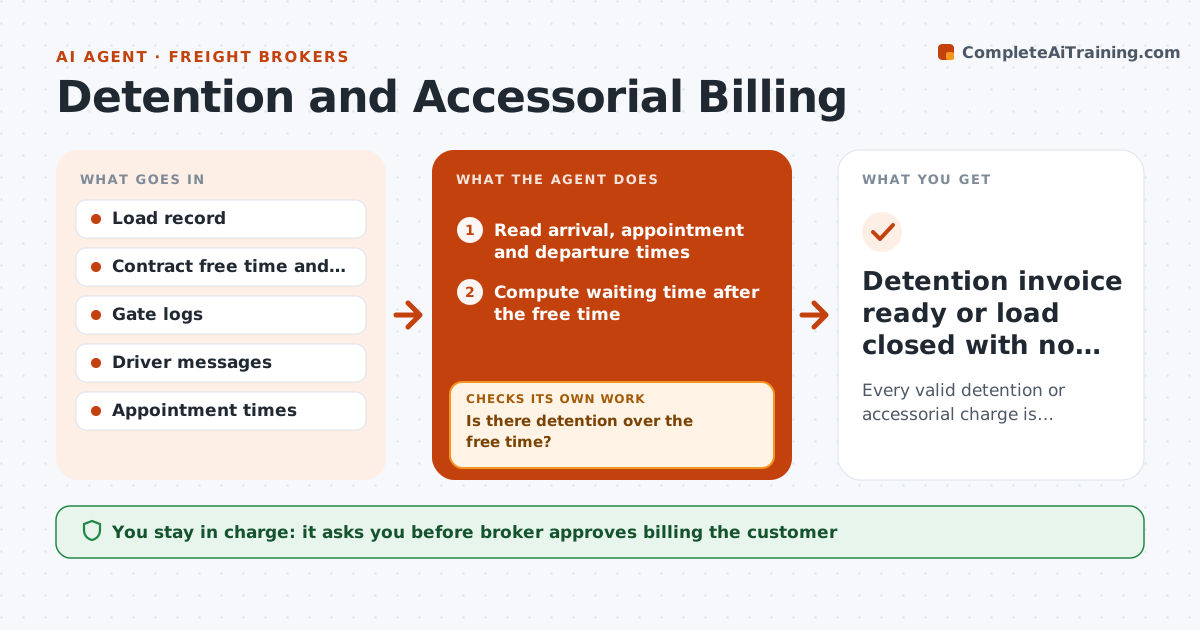
Detention charges are easy to lose: no one timestamps the wait, the proof is in a driver's text, and the customer disputes the bill weeks later. After each delivery, this agent reads pickup and delivery times and compares the waiting time with the free time in the contract. When the wait goes over, it builds a claim: it gathers gate logs, check-in times and messages, and checks that each claim is backed by at least two sources. If proof is missing it asks the driver or shipper and rechecks. It then drafts the invoice line with the evidence attached. The broker approves billing the customer. Edge case: the driver arrived before the appointment window, so the free time starts at the window.
How it works
Follow the arrows from top to bottom. The orange dashed arrow is the loop: when a check fails, the agent goes back and tries again.
Read the steps as a list
- Delivery or pickup completed
- Read arrival, appointment and departure times
- Compute waiting time after the free time
- Is there detention over the free time?If not: close the load with no claim. Back to step 2.
- Gather gate logs, messages and check-in records
- Do at least two sources confirm the times?If not: ask the driver or shipper for proof and recheck. Back to step 4.
- Build the claim with the rate and total
- Draft the invoice line with the evidence attached
- Broker approves billing the customerThe agent waits here for your OK.
- Detention invoice ready or load closed with no claim
How it decides
A claim is built only when waiting time after free time is positive and at least two sources agree on the times. Missing proof triggers a request before billing.
- Start free time at the appointment window, not at early arrival
- Require two sources that agree before claiming
- Bill the contract rate per hour, rounded as the contract says
- Skip claims below the minimum amount set
Make it yours
Every agent is a starting point. You choose these settings for your own situation.
- Free time rule
- Hourly rate
- Minimum claim amount
- Proof sources required
What keeps you in control
It always asks you first
- Broker approves billing the customer
- Broker approves waiving any charge
Hard limits
- Never bill without approval
- Do not include charges without proof
- Keep records for each claim
It stops when
- Done: claim billed or no claim recorded
- Stop: the customer disputes and the broker takes over
Set it up
We guide you through the set-up, step by step
Members get the full set-up guide for this agent. No technical skills needed: you copy, paste and upload.
- One set of instructions to paste into your AI, with the clicks for ChatGPT, Claude, Microsoft 365 Copilot, Gemini and Grok
- The agent then walks you through connecting your own data, one source at a time
- A downloadable copy with the flow chart, the rules and the full guide