AI agent for customs brokers
Origin Documentation Check Agent
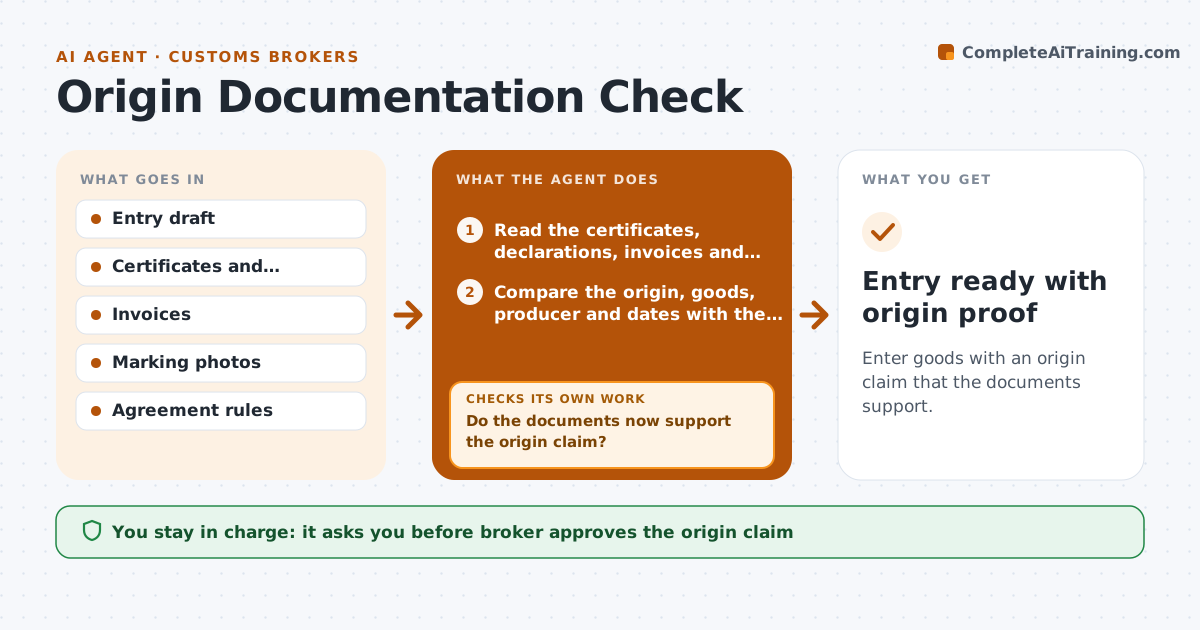
Enter goods with an origin claim that the documents support.
What it does
A client claims a trade agreement preference, and the broker discovers at audit that the supplier's declaration is missing and the label says another country. Before the entry, the agent reads the certificates, supplier declarations, marking details and invoices, and checks them against the origin claimed in the entry. It looks at inconsistencies, such as different manufacturer names, unmatched dates, missing signatures or goods marked with a different country. It lists each gap and requests the missing document from the client with a clear description. After the response, it checks again. When the file supports the claim, it prepares a summary for the broker. If not, it recommends entering without the preference. Edge case: a certificate that covers a period which excludes the shipment date. The broker approves the origin claim.
How it works
Follow the arrows from top to bottom. The orange dashed arrow is the loop: when a check fails, the agent goes back and tries again.
Read the steps as a list
- Entry with an origin claim is drafted
- Read the certificates, declarations, invoices and marking details
- Compare the origin, goods, producer and dates with the claim
- List gaps and inconsistencies
- Request the missing documents from the client
- Do the documents now support the origin claim?If not: read the new documents and list the remaining gaps. Back to step 2.
- Check the agreement rules for the goods
- Prepare the file summary and recommendation
- Broker approves the origin claimThe agent waits here for your OK.
- Save the documents with the entry
- Entry ready with origin proof
How it decides
A claim is supported when the document names the right goods, producer and period, is signed, and matches the marking and invoice. Gaps are requested before filing.
- Require a signature and a valid period on every certificate
- Compare producer names across all documents
- Recommend entry without preference when gaps remain at the deadline
- Request documents in one message, not several
Make it yours
Every agent is a starting point. You choose these settings for your own situation.
- Agreements covered
- Document checklist
- Request wording
- Deadline rule
- Clients included
What keeps you in control
It always asks you first
- Broker approves the origin claim
- Broker approves requests to the client
Hard limits
- Never claim a preference without support
- Do not edit or recreate documents
It stops when
- Done: origin claim approved with proof filed
- Stop: documents conflict on country, hold the entry and ask the broker
Set it up
We guide you through the set-up, step by step
Members get the full set-up guide for this agent. No technical skills needed: you copy, paste and upload.
- One set of instructions to paste into your AI, with the clicks for ChatGPT, Claude, Microsoft 365 Copilot, Gemini and Grok
- The agent then walks you through connecting your own data, one source at a time
- A downloadable copy with the flow chart, the rules and the full guide