AI agent for preschool teachers
Developmental Observation Agent
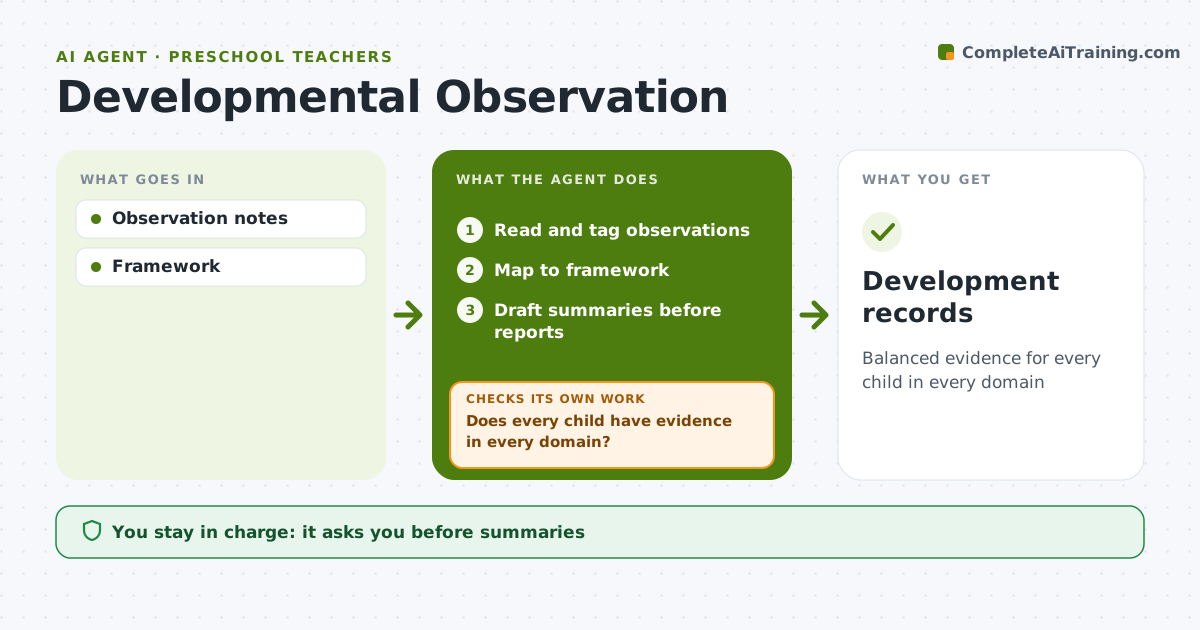
Balanced evidence for every child in every domain
What it does
Preschool teachers record observations across domains like language, motor skills, social-emotional growth and early math, but evidence piles up unevenly. This agent reads observation notes and photos tagged by child, maps each one to the developmental framework, and shows which children or domains have too little evidence. It aims for at least two observations per domain per child each month. Each week it checks coverage; when a child is missing evidence, it suggests who to observe next week and in which activity, such as block play for spatial skills, then checks again. Before parent reports, it drafts a summary per child with strengths written first and evidence for each point. The teacher reviews and edits every summary. Edge case: a child with a possible developmental concern is flagged for the teacher to discuss with the director, and the agent never labels or diagnoses the child.
How it works
Follow the arrows from top to bottom. The orange dashed arrow is the loop: when a check fails, the agent goes back and tries again.
Read the steps as a list
- Week ends
- Read and tag observations
- Map to framework
- Does every child have evidence in every domain?If not: suggest observations for next week. Back to step 2.
- Draft summaries before reports
- Teacher reviewsThe agent waits here for your OK.
- Development records
How it decides
Evidence count per child and domain.
- At least 2 observations per domain per month
- Concerns go to the director
- Strengths written first
Make it yours
Every agent is a starting point. You choose these settings for your own situation.
- Framework
- Minimums
- Report dates
- Summary style
What keeps you in control
It always asks you first
- Summaries
- Concern discussions
Hard limits
- No labels or diagnoses
It stops when
- Done: reports
- Stop: child leaves
Set it up
We guide you through the set-up, step by step
Members get the full set-up guide for this agent. No technical skills needed: you copy, paste and upload.
- One set of instructions to paste into your AI, with the clicks for ChatGPT, Claude, Microsoft 365 Copilot, Gemini and Grok
- The agent then walks you through connecting your own data, one source at a time
- A downloadable copy with the flow chart, the rules and the full guide