AI agent for biomedical engineers
Device Software Anomaly Triage Agent
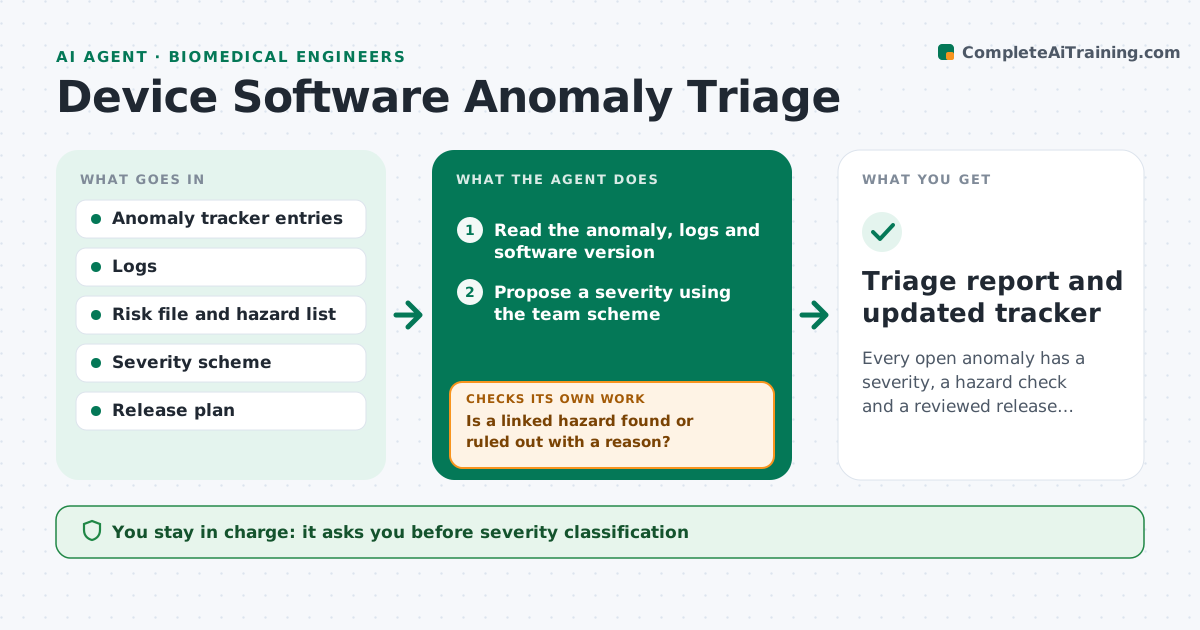
Every open anomaly has a severity, a hazard check and a reviewed release decision
What it does
Software anomalies on a medical device are often logged as plain bugs, with no severity and no check against the hazard analysis. This agent reads each new anomaly in the tracker, classifies severity using the team's scheme, and looks up linked hazards in the risk file. If the anomaly could touch a hazard, it flags the item for safety review and asks for reproduction steps, logs and software version. When new information arrives it reclassifies and rechecks the hazard link. It also lists anomalies that are open against a planned release. The engineer approves the severity and the release decision. Edge case: an intermittent display glitch has no reproduction yet, so the agent keeps it at the higher provisional severity until evidence says otherwise.
How it works
Follow the arrows from top to bottom. The orange dashed arrow is the loop: when a check fails, the agent goes back and tries again.
Read the steps as a list
- New anomaly logged in the tracker
- Read the anomaly, logs and software version
- Propose a severity using the team scheme
- Search the risk file for linked hazards
- Is a linked hazard found or ruled out with a reason?If not: widen the search to related functions and request input from the engineer. Back to step 4.
- Flag items needing safety review
- Request reproduction steps and logs from the reporter
- Is the anomaly reproduced or explained?If not: keep the higher provisional severity and set a follow-up date. Back to step 3.
- Build the release impact list
- Engineer approves severity and release decisionThe agent waits here for your OK.
- Triage report and updated tracker
How it decides
Severity follows the worst credible harm in the risk file. Missing evidence keeps the higher provisional severity.
- Classify by worst credible harm, not by how often it happens
- Keep provisional severity when not reproduced
- Send any anomaly with a hazard link to safety review
- Block listing as fixed until a verification record is linked
Make it yours
Every agent is a starting point. You choose these settings for your own situation.
- Severity scheme and levels
- Hazard source file location
- Days before a follow-up request (default 3)
- Releases to monitor
What keeps you in control
It always asks you first
- Severity classification
- Release decision for open anomalies
Hard limits
- Never downgrades severity without evidence
- Never closes an anomaly
It stops when
- Done: all open anomalies triaged and reviewed
- Stop: risk file is unavailable
Set it up
We guide you through the set-up, step by step
Members get the full set-up guide for this agent. No technical skills needed: you copy, paste and upload.
- One set of instructions to paste into your AI, with the clicks for ChatGPT, Claude, Microsoft 365 Copilot, Gemini and Grok
- The agent then walks you through connecting your own data, one source at a time
- A downloadable copy with the flow chart, the rules and the full guide