AI agent for authors
Dialogue Voice Consistency Agent
Dialogue where every character keeps their voice.
What it does
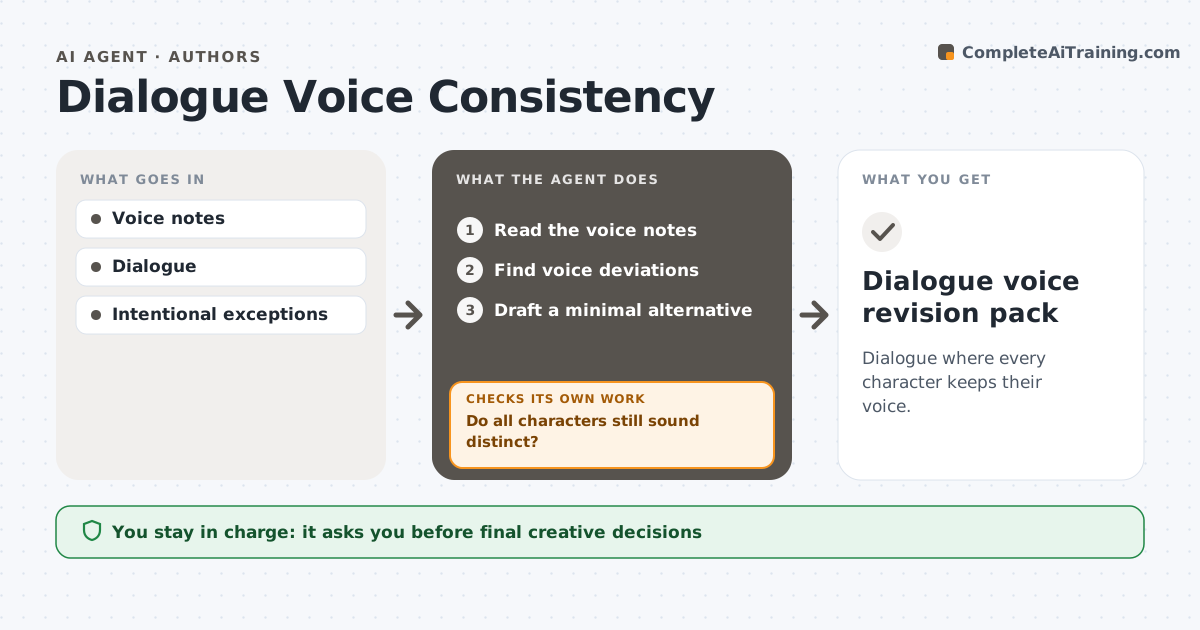
Heavy revisions can flatten the distinct voices of characters, so everyone starts to sound like the author. This agent compares the dialogue in a revised chapter against the author's voice notes for each character, such as vocabulary, sentence length and verbal habits. When a line drifts, it drafts the smallest edit that restores the voice while keeping the scene's intent. It then rechecks the surrounding dialogue, because a fix for one character can make two characters sound the same. If that happens, it revises again or returns the choice to the author. The author decides on every edit. Edge case: a character whose voice changes on purpose as part of their arc is checked against the notes for that point in the story.
How it works
Follow the arrows from top to bottom. The orange dashed arrow is the loop: when a check fails, the agent goes back and tries again.
Read the steps as a list
- Chapter revised
- Read the voice notes
- Find voice deviations
- Draft a minimal alternative
- Do all characters still sound distinct?If not: revise again or return to the author. Back to step 4.
- Author decidesThe agent waits here for your OK.
- Dialogue voice revision pack
How it decides
Minimal edits that preserve intent and distinctness.
- Edits keep the scene's intent.
- Choose the smallest edit that restores the voice.
- Intended arc changes follow the notes for that chapter.
- The author decides every edit.
Make it yours
Every agent is a starting point. You choose these settings for your own situation.
- Voice notes per character
- Arc changes and the chapters they apply from
- Maximum edits per chapter (default 15)
- Output format (default: margin suggestions)
- Who decides (default: the author)
What keeps you in control
It always asks you first
- Final creative decisions
Hard limits
- Suggestions only.
It stops when
- Done: pack ready.
Set it up
We guide you through the set-up, step by step
Members get the full set-up guide for this agent. No technical skills needed: you copy, paste and upload.
- One set of instructions to paste into your AI, with the clicks for ChatGPT, Claude, Microsoft 365 Copilot, Gemini and Grok
- The agent then walks you through connecting your own data, one source at a time
- A downloadable copy with the flow chart, the rules and the full guide