AI agent for authors
Serialized Fiction Release Preparation Agent
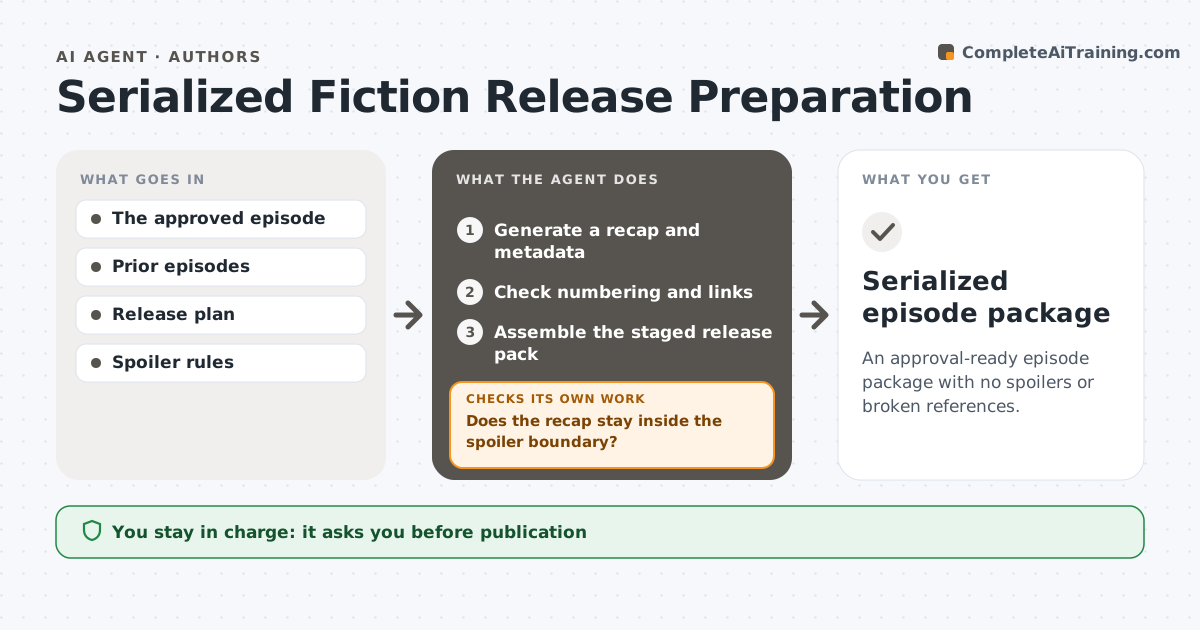
An approval-ready episode package with no spoilers or broken references.
What it does
Each episode of a serialized story needs a recap, metadata and continuity checks before release, and it is easy to spoil later events or break links. This agent runs when an episode is approved. It writes a recap using only published episodes inside the spoiler boundary the author set. It then checks the recap for any detail beyond that boundary and rewrites it if needed. It checks episode numbering, titles, links to previous episodes and content warnings, and corrects any errors. It assembles a staged release pack with recap, metadata and links. The author approves publication. Edge case: a detail mentioned in an unpublished bonus chapter counts as a spoiler, even if it seems minor.
How it works
Follow the arrows from top to bottom. The orange dashed arrow is the loop: when a check fails, the agent goes back and tries again.
Read the steps as a list
- Episode approved
- Generate a recap and metadata
- Does the recap stay inside the spoiler boundary?If not: revise the recap. Back to step 2.
- Check numbering and links
- Do all links and numbers check out?If not: correct and recheck. Back to step 4.
- Assemble the staged release pack
- Author approves publicationThe agent waits here for your OK.
- Serialized episode package
How it decides
It uses only events inside the spoiler boundary.
- Recaps use only published episodes inside the boundary.
- Unpublished bonus material counts as a spoiler.
- Every link and number is checked.
- Nothing is published without the author.
Make it yours
Every agent is a starting point. You choose these settings for your own situation.
- Spoiler boundary (default: published episodes only)
- Recap length (default 120 words)
- Metadata fields and content warnings
- Publishing platform
- Who approves publication (default: the author)
What keeps you in control
It always asks you first
- Publication
- Schedule changes
- Story rewrites
Hard limits
- Never publishes.
It stops when
- Done: pack staged.
Set it up
We guide you through the set-up, step by step
Members get the full set-up guide for this agent. No technical skills needed: you copy, paste and upload.
- One set of instructions to paste into your AI, with the clicks for ChatGPT, Claude, Microsoft 365 Copilot, Gemini and Grok
- The agent then walks you through connecting your own data, one source at a time
- A downloadable copy with the flow chart, the rules and the full guide