AI agent for film composers
Director Feedback Cue Revision Agent
Cue revisions that address every director note on the first try
What it does
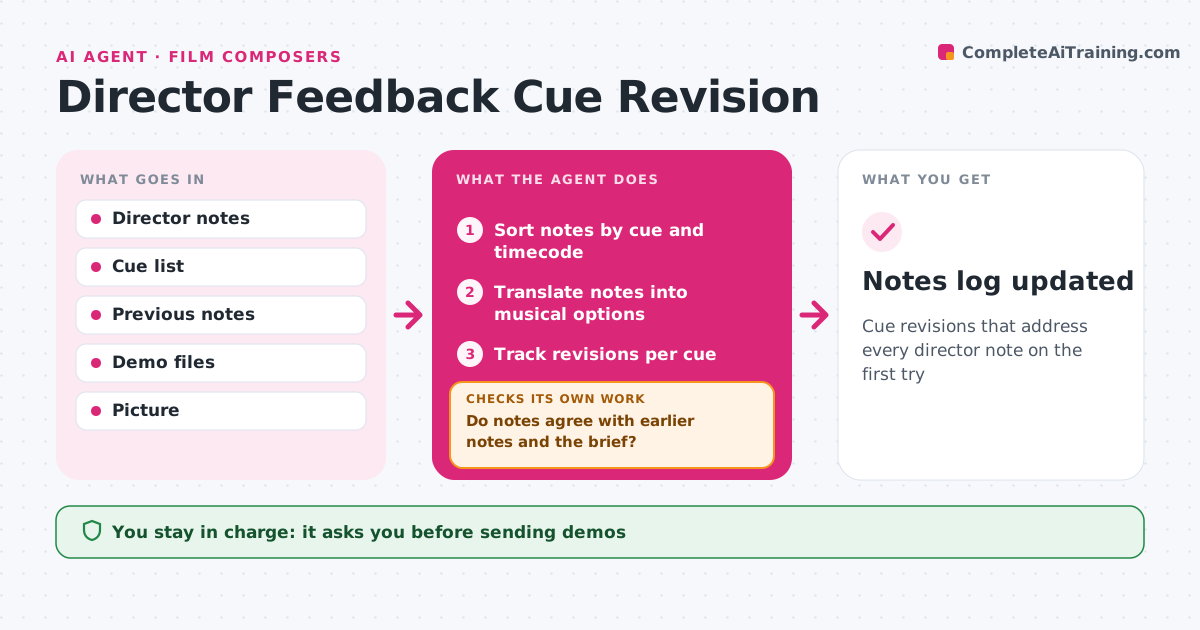
Director notes on music are often emotional and sometimes contradict earlier notes, which can send a composer in circles. When the director sends notes on demo cues, this agent sorts them by cue and timecode and translates emotional language into musical options, such as lighter instrumentation for a note that says too sad. It checks each note against earlier notes on the same cue and against the overall brief. Contradictions are listed for a quick conversation rather than guessed at. It tracks revisions and, before the next demo goes out, checks every note is addressed and the cue still fits the picture length. The composer approves each send. Edge case: a note that needs a picture edit is sent to the editor, not treated as a music change.
How it works
Follow the arrows from top to bottom. The orange dashed arrow is the loop: when a check fails, the agent goes back and tries again.
Read the steps as a list
- Director notes arrive
- Sort notes by cue and timecode
- Translate notes into musical options
- Do notes agree with earlier notes and the brief?If not: list contradictions for a conversation with the director. Back to step 3.
- Track revisions per cue
- Is every note addressed and does the cue fit picture length?If not: list open notes for the composer. Back to step 5.
- Composer approves sending the next demoThe agent waits here for your OK.
- Notes log updated
How it decides
It maps notes to musical options and flags notes that conflict with earlier ones.
- Picture edit notes go to the editor
- Contradictions need a conversation
- Every note gets an outcome
Make it yours
Every agent is a starting point. You choose these settings for your own situation.
- Note channels
- Musical vocabulary
- Log format
- Who gets contradiction lists
What keeps you in control
It always asks you first
- Sending demos
Hard limits
- Never sends music without approval
- Never contacts the editor without approval
It stops when
- Done: cue approved
- Stop: film re-cut, re-spot
Set it up
We guide you through the set-up, step by step
Members get the full set-up guide for this agent. No technical skills needed: you copy, paste and upload.
- One set of instructions to paste into your AI, with the clicks for ChatGPT, Claude, Microsoft 365 Copilot, Gemini and Grok
- The agent then walks you through connecting your own data, one source at a time
- A downloadable copy with the flow chart, the rules and the full guide