AI agent for director of its
Disaster Recovery Readiness Review Agent
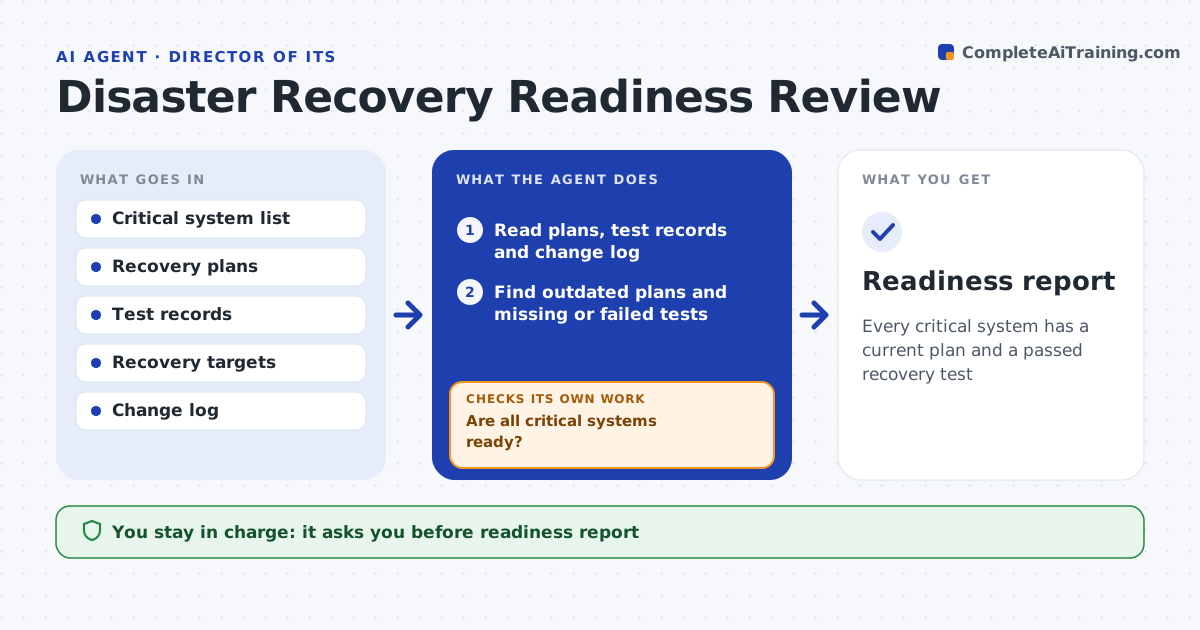
Every critical system has a current plan and a passed recovery test
What it does
Leadership must know whether critical systems can really be recovered after a major failure, and a plan on paper is not proof. Each quarter this agent reads every critical system's recovery plan, test records and the change log. A system counts as ready only when its plan is current and its last test, within 12 months and after any major change, met its targets. It finds outdated plans, missing tests and tests that missed their targets, then drafts a test schedule with owner requests. After each test it updates the status and checks again. Systems that still fail get a follow-up action and loop back into the schedule. The IT leader approves the readiness report and schedule. Edge case: a system that moved to a new hosting region since its last test needs a new test, even if the old one passed.
How it works
Follow the arrows from top to bottom. The orange dashed arrow is the loop: when a check fails, the agent goes back and tries again.
Read the steps as a list
- Quarterly review
- Read plans, test records and change log
- Find outdated plans and missing or failed tests
- Draft test schedule and owner requests
- Update status after each test
- Are all critical systems ready?If not: draft follow-up actions for systems still failing. Back to step 4.
- IT leader approves the report and scheduleThe agent waits here for your OK.
- Readiness report
How it decides
A system is ready when its plan is current and its last test, within 12 months and after any major change, met its targets.
- Tests older than 12 months do not count
- Major changes require a new test
- Missed targets count as failures
Make it yours
Every agent is a starting point. You choose these settings for your own situation.
- Test interval (default 12 months)
- Critical systems list
- Recovery targets
- Report audience
What keeps you in control
It always asks you first
- Readiness report
- Test schedule
Hard limits
- Never triggers a production failover
- Never deletes or replaces plans
It stops when
- Done: all critical systems ready
- Stop: test needs budget or downtime the business has not agreed
Set it up
We guide you through the set-up, step by step
Members get the full set-up guide for this agent. No technical skills needed: you copy, paste and upload.
- One set of instructions to paste into your AI, with the clicks for ChatGPT, Claude, Microsoft 365 Copilot, Gemini and Grok
- The agent then walks you through connecting your own data, one source at a time
- A downloadable copy with the flow chart, the rules and the full guide