AI agent for employee relations specialists
Discrimination Complaint Pattern Review Agent
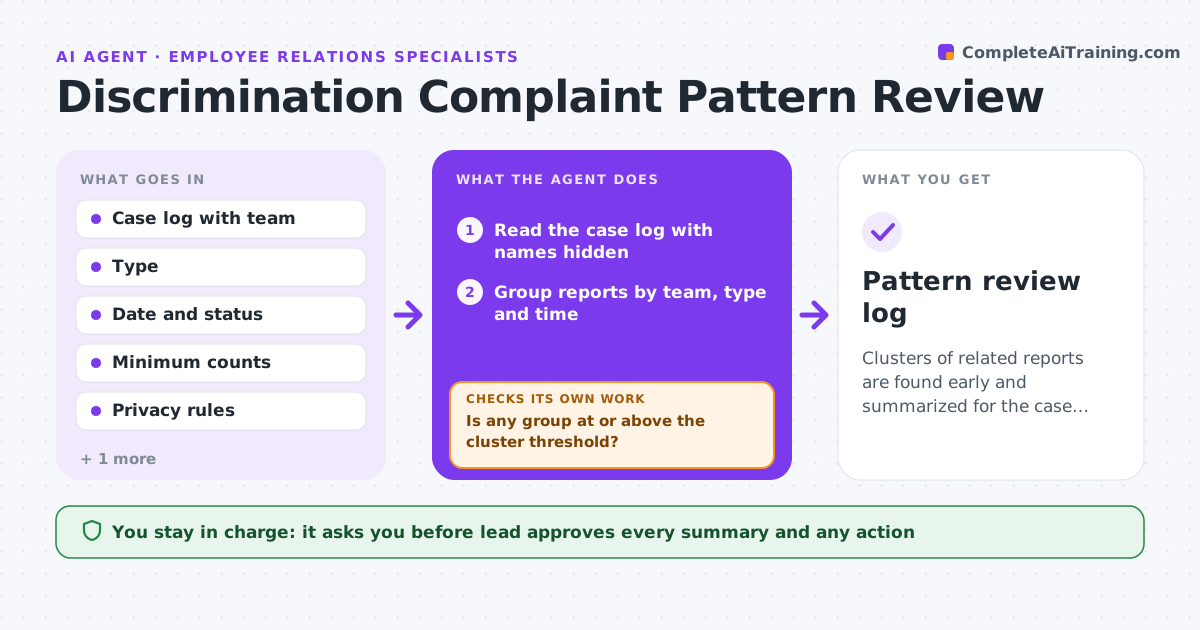
Clusters of related reports are found early and summarized for the case owner, and nothing is acted on without the lead.
What it does
Reports about the same team or manager are handled separately, so patterns stay hidden. The agent groups reports by team, type and time with identities protected, flags clusters, and checks the status of each case. It drafts a summary for the case owner showing counts, dates and status, never names. It rechecks after each new report and notes how old each open case is, because slow cases are part of the pattern. It never suggests an outcome for any case. The employee relations lead approves any action. Edge case: three reports about one manager filed under different categories, so the agent groups them by the team and time, not the label.
How it works
Follow the arrows from top to bottom. The orange dashed arrow is the loop: when a check fails, the agent goes back and tries again.
Read the steps as a list
- Weekly review or new report
- Read the case log with names hidden
- Group reports by team, type and time
- Is any group at or above the cluster threshold?If not: Keep it on watch and recheck next week. Back to step 3.
- Check the status and age of each case in the group
- Draft a summary for the case owner
- Lead approves the summary and who receives itThe agent waits here for your OK.
- Send the summary and log it
- Read new reports in the next week
- Has the pattern grown or changed?If not: Update the summary and ask for review. Back to step 3.
- Pattern review log
How it decides
It groups reports by team and period and flags a cluster at the set count, always without names, and treats an old open case as a risk.
- Cluster is 3 reports about one team in 6 months
- Flag a case open longer than 60 days
- Never include names in group summaries
- Group by team and time and not by the report label
Make it yours
Every agent is a starting point. You choose these settings for your own situation.
- Cluster threshold (default 3 in 6 months)
- Open case age alert (default 60 days)
- Who receives summaries
- Privacy rules
What keeps you in control
It always asks you first
- Lead approves every summary and any action
Hard limits
- Never include names
- Never decide the outcome of a case
It stops when
- Done: pattern reviewed and action decided by the lead
- Stop: a report shows an immediate safety risk and goes directly to the lead
Set it up
We guide you through the set-up, step by step
Members get the full set-up guide for this agent. No technical skills needed: you copy, paste and upload.
- One set of instructions to paste into your AI, with the clicks for ChatGPT, Claude, Microsoft 365 Copilot, Gemini and Grok
- The agent then walks you through connecting your own data, one source at a time
- A downloadable copy with the flow chart, the rules and the full guide