AI agent for warehouse managers
Dock Appointment Conflict Resolver Agent
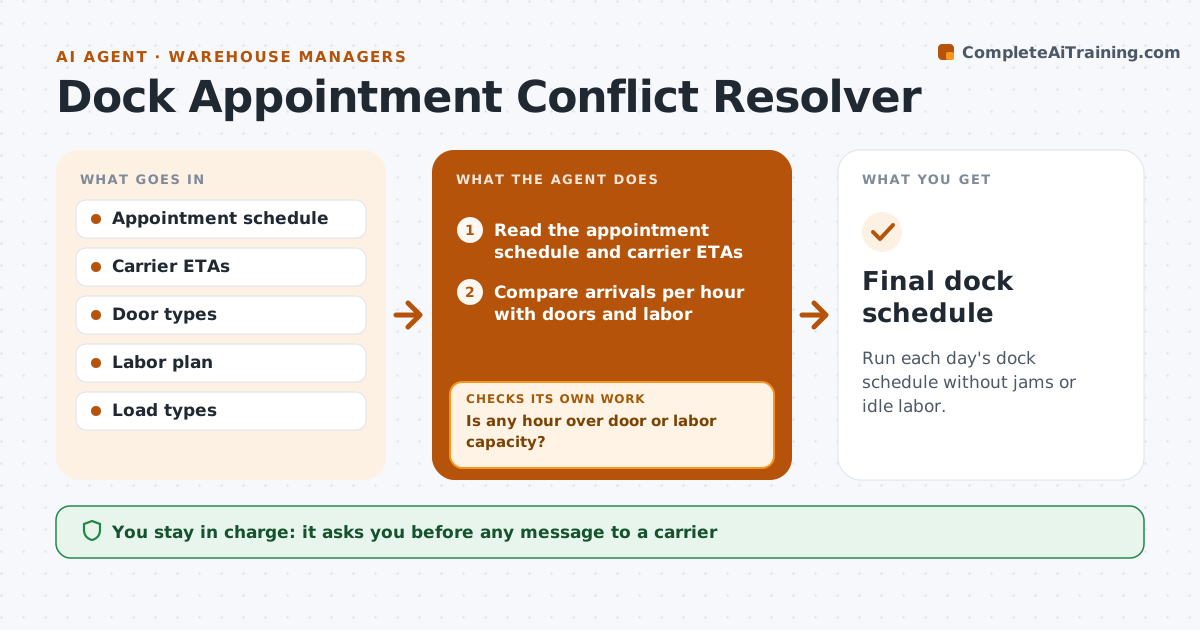
Run each day's dock schedule without jams or idle labor.
What it does
At 8 a.m. six trucks arrive for four doors, and two carriers show up two hours early. Trailers wait and labor stands idle. Each morning, this agent reads the appointment schedule and the carrier ETAs, checks door and labor capacity per hour, and proposes reshuffles for conflicts. After each change it rechecks that the new schedule still fits doors and labor with the latest ETAs, and it notes carriers likely to be late so later slots can move forward. Cold loads and loads with penalty clauses are protected first. The manager approves any rescheduling message to carriers. Edge case: a refrigerated load is never moved to a door without a cold dock.
How it works
Follow the arrows from top to bottom. The orange dashed arrow is the loop: when a check fails, the agent goes back and tries again.
Read the steps as a list
- Daily dock planning begins
- Read the appointment schedule and carrier ETAs
- Compare arrivals per hour with doors and labor
- Is any hour over door or labor capacity?If not: Propose moving the lowest-priority load to the nearest free window. Back to step 2.
- Check load type rules such as cold doors
- Draft rescheduling messages to carriers
- Manager approves rescheduling messagesThe agent waits here for your OK.
- Send and read replies
- Does the updated schedule fit capacity with the new ETAs?If not: Rebuild the affected hours and propose the next change. Back to step 3.
- Final dock schedule
How it decides
Checks demand against door and labor capacity per hour and moves the lowest-priority load to the nearest free window.
- Priority order: refrigerated, appointments with penalties, then others
- Early arrivals wait unless a door is free
- No more than 1 door per labor team at once
- Late carriers over 60 minutes lose their slot
Make it yours
Every agent is a starting point. You choose these settings for your own situation.
- Doors and labor per hour
- Priority rules
- Late limit (default 60 minutes)
- Messaging channel
- Check frequency
What keeps you in control
It always asks you first
- Any message to a carrier
- Any change in door assignment
- Any detention charge dispute
Hard limits
- Never message a carrier without approval
- Never put cold loads at dry doors
It stops when
- Done: schedule fits capacity
- Stop: dock closed
- Stop: carrier cancels all loads
Set it up
We guide you through the set-up, step by step
Members get the full set-up guide for this agent. No technical skills needed: you copy, paste and upload.
- One set of instructions to paste into your AI, with the clicks for ChatGPT, Claude, Microsoft 365 Copilot, Gemini and Grok
- The agent then walks you through connecting your own data, one source at a time
- A downloadable copy with the flow chart, the rules and the full guide