AI agent for fleet managers
Driver Compliance Document Agent
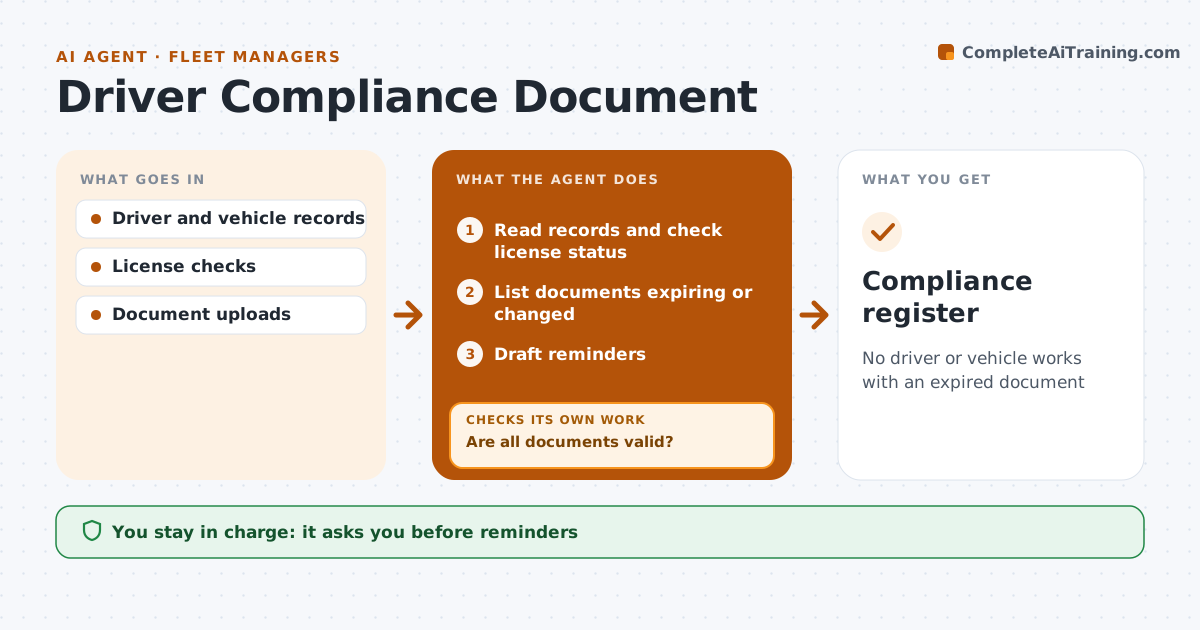
No driver or vehicle works with an expired document
What it does
Drivers need valid licenses, medical certificates and training, and vehicles need inspections, registration and insurance. One lapse can put an unlicensed driver on the road. Each week this agent reads the records and checks license status with the official source where allowed. It lists documents expiring within 60 days and any license with new restrictions, and drafts reminders at 60 and 30 days. The fleet manager approves reminders. When a new document arrives, the agent verifies the dates, names and numbers. It then checks that every document is valid. If something has expired without renewal, it alerts the fleet manager, who decides whether the driver or vehicle can work. Edge case: a license with new restrictions is flagged even when it is not expired, because the driver may no longer be allowed on some vehicles.
How it works
Follow the arrows from top to bottom. The orange dashed arrow is the loop: when a check fails, the agent goes back and tries again.
Read the steps as a list
- Weekly check
- Read records and check license status
- List documents expiring or changed
- Draft reminders
- Fleet manager approves remindersThe agent waits here for your OK.
- Verify new documents
- Are all documents valid?If not: alert the fleet manager about expired items. Back to step 4.
- Compliance register
How it decides
Expiry within 60 days starts reminders; expired documents trigger an alert.
- 60 and 30-day reminders
- Restrictions flagged
- Expired items need a decision
Make it yours
Every agent is a starting point. You choose these settings for your own situation.
- Reminder days
- Documents tracked
- Check frequency
- Alert contacts
What keeps you in control
It always asks you first
- Reminders
- Decisions to stand down drivers or vehicles
Hard limits
- Never stands down drivers itself
- Handles personal data only for compliance
It stops when
- Done: all valid
- Stop: license check service unavailable
Set it up
We guide you through the set-up, step by step
Members get the full set-up guide for this agent. No technical skills needed: you copy, paste and upload.
- One set of instructions to paste into your AI, with the clicks for ChatGPT, Claude, Microsoft 365 Copilot, Gemini and Grok
- The agent then walks you through connecting your own data, one source at a time
- A downloadable copy with the flow chart, the rules and the full guide