AI agent for medical records clerks
Duplicate Patient Record Agent
Duplicate charts are found within a day and merged only with clear evidence
What it does
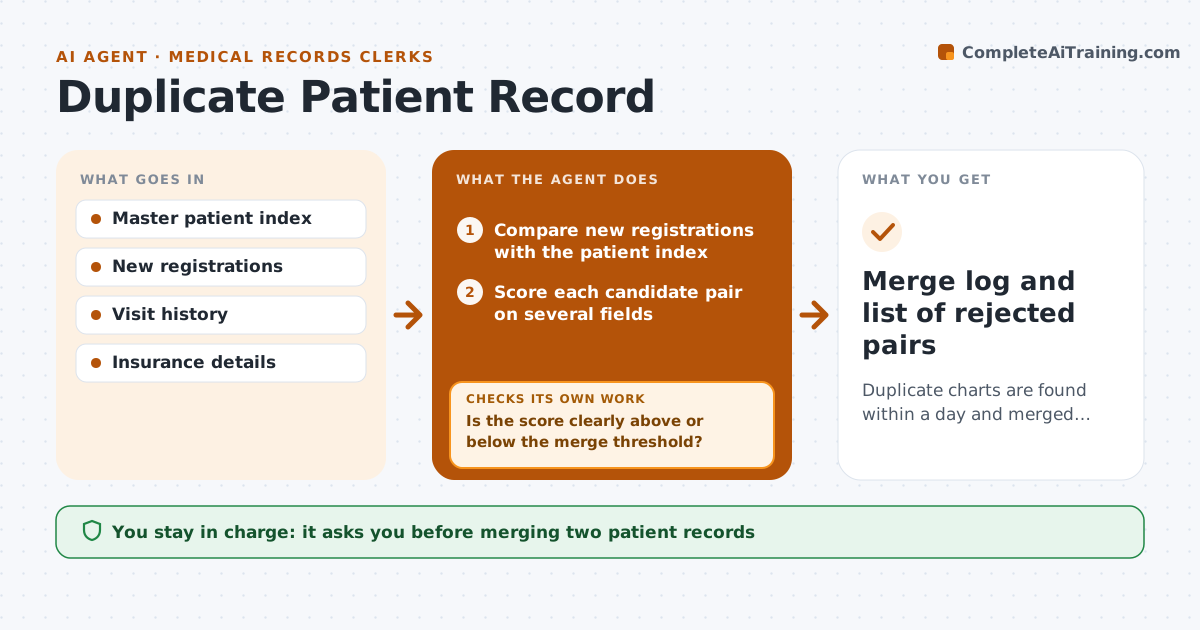
A patient registered twice ends up with two charts, and results can land in either one, creating care and billing errors. Each day this agent compares new registrations with the master patient index. It scores likely pairs on name, birth date, address, phone and insurance number, allowing for typos and nicknames. If a pair lands in the uncertain band, it pulls more fields such as visit history and guarantor and scores again. Twins share a birth date, address and phone, so a different first name with the same birth date is never proposed without a manual check. It drafts a merge request showing both records side by side with the evidence. The clerk approves every merge, since merging the wrong people is hard to undo.
How it works
Follow the arrows from top to bottom. The orange dashed arrow is the loop: when a check fails, the agent goes back and tries again.
Read the steps as a list
- Daily registrations close
- Compare new registrations with the patient index
- Score each candidate pair on several fields
- Is the score clearly above or below the merge threshold?If not: pull visit history, guarantor and insurance data and score again. Back to step 3.
- Could the pair be twins or family members?If not: send the pair for manual check instead of a merge request. Back to step 3.
- Draft merge request with side-by-side evidence
- Clerk approves or rejects each mergeThe agent waits here for your OK.
- Log merges and rejected pairs
- Merge log and list of rejected pairs
How it decides
It proposes a merge only when the match score is above the set threshold and no field points to a different person, such as a different first name with the same birth date.
- Never propose a merge when first names differ and birth dates match
- Uncertain scores get more data before a decision
- Rejected pairs are remembered so they are not proposed again
Make it yours
Every agent is a starting point. You choose these settings for your own situation.
- Merge threshold score (default 90)
- Fields used for matching
- Uncertain band range
- Daily or twice-daily scan
What keeps you in control
It always asks you first
- Merging two patient records
Hard limits
- Never merges records itself
- Never deletes either record
It stops when
- Done: all candidate pairs merged or rejected
- Stop: a pair has clinical results in both charts on the same day; send to the records supervisor
Set it up
We guide you through the set-up, step by step
Members get the full set-up guide for this agent. No technical skills needed: you copy, paste and upload.
- One set of instructions to paste into your AI, with the clicks for ChatGPT, Claude, Microsoft 365 Copilot, Gemini and Grok
- The agent then walks you through connecting your own data, one source at a time
- A downloadable copy with the flow chart, the rules and the full guide