AI agent for accounts payable specialists
Early Payment Discount Capture Agent
Capture the discounts worth taking before their windows close, without breaking cash limits.
What it does
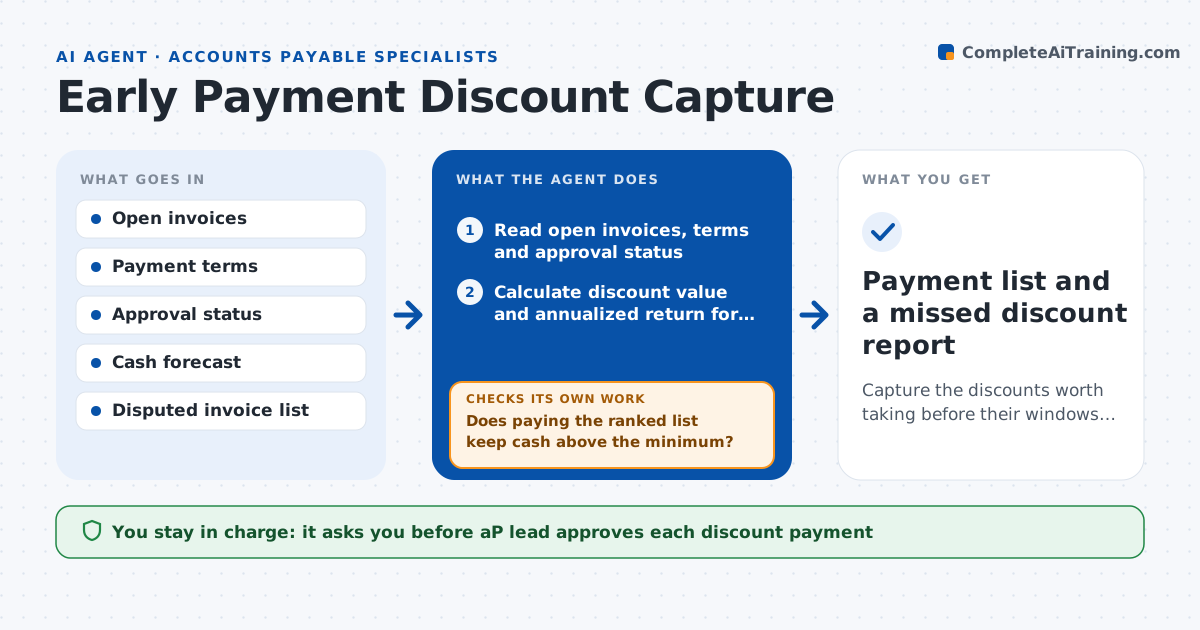
Terms like 2 percent in 10 days are worth far more than most bank rates, yet invoices sit in approval until the window closes. This agent reads open invoices and their payment terms and works out the annualized return of each discount. It checks approval status and the cash forecast, then ranks invoices by return and days left. It nudges the approvers of the best ones and recalculates every day as dates pass. If an invoice is still unapproved with two days left, it flags it as at risk. It also checks that taking a discount would not leave the cash balance below the minimum. Edge case: a disputed invoice is skipped. The AP lead approves every discount payment.
How it works
Follow the arrows from top to bottom. The orange dashed arrow is the loop: when a check fails, the agent goes back and tries again.
Read the steps as a list
- Daily run begins
- Read open invoices, terms and approval status
- Calculate discount value and annualized return for each
- Rank by return and days left in the window
- Check the cash forecast against the minimum balance
- Does paying the ranked list keep cash above the minimum?If not: drop the lowest return invoices and rerank. Back to step 3.
- Send nudges to approvers for invoices still awaiting approval
- Is each top invoice approved with at least 1 day left?If not: mark it at risk and nudge the approver's backup. Back to step 4.
- AP lead approves discount paymentsThe agent waits here for your OK.
- Payment list and a missed discount report
How it decides
It ranks invoices by annualized return and takes those above the hurdle rate that fit within the cash limit.
- Take a discount only if the annualized return exceeds the company hurdle rate
- Skip disputed or unmatched invoices
- Mark at risk when 2 days or fewer remain and approval is missing
- Never drop cash below the set minimum balance
Make it yours
Every agent is a starting point. You choose these settings for your own situation.
- Hurdle rate for discounts (default 12 percent)
- Minimum cash balance
- Days before window that count as at risk (default 2)
- Approver backup list
What keeps you in control
It always asks you first
- AP lead approves each discount payment
- CFO approves changes to the hurdle rate
Hard limits
- Never releases a payment
- Does not approve invoices
It stops when
- Done: all eligible discounts paid or listed as missed with a reason
- Stop: cash forecast unavailable
Set it up
We guide you through the set-up, step by step
Members get the full set-up guide for this agent. No technical skills needed: you copy, paste and upload.
- One set of instructions to paste into your AI, with the clicks for ChatGPT, Claude, Microsoft 365 Copilot, Gemini and Grok
- The agent then walks you through connecting your own data, one source at a time
- A downloadable copy with the flow chart, the rules and the full guide