AI agent for accounts payable specialists
Vendor Onboarding and Master Data Setup Agent
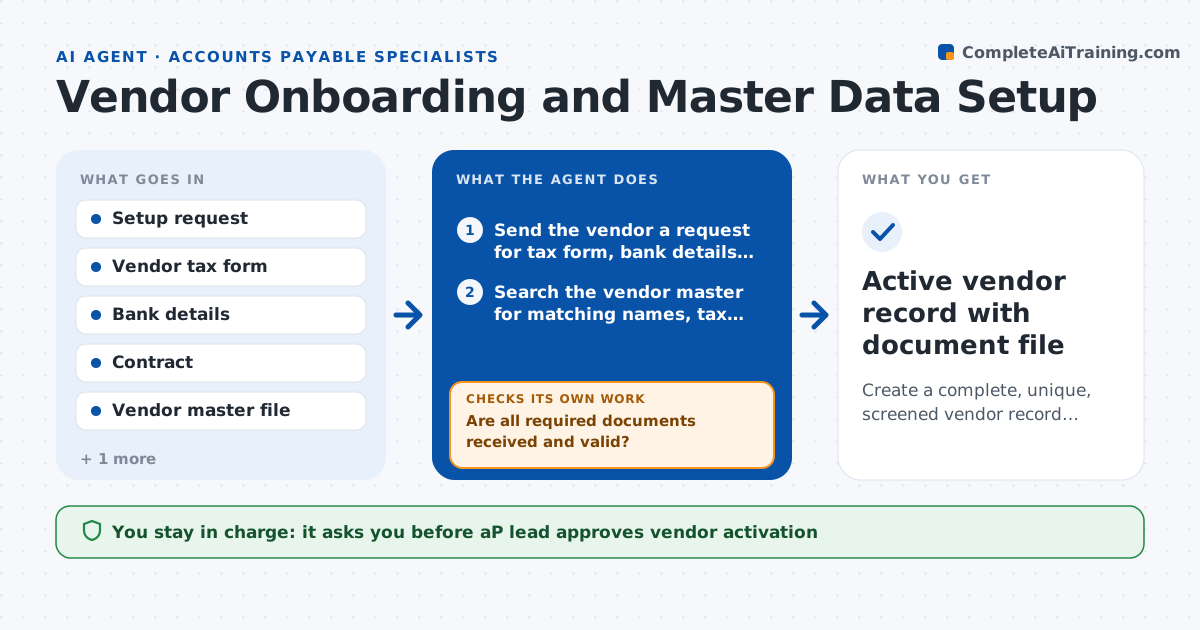
Create a complete, unique, screened vendor record ready for activation.
What it does
A new vendor request arrives and the setup gets rushed, so a tax form is missing, or the vendor already exists under a slightly different name. Payments then stall or go out twice. This agent takes the request and asks the vendor for the tax form, bank details and signed contract. It searches the vendor master for duplicates by name, tax number, address and bank account, and screens the vendor against sanction lists. It builds the draft vendor record and rechecks for missing items each day until the file is complete. If the bank details differ from what the contract shows, it stops and asks the AP lead. The AP lead approves activation.
How it works
Follow the arrows from top to bottom. The orange dashed arrow is the loop: when a check fails, the agent goes back and tries again.
Read the steps as a list
- New vendor request submitted
- Send the vendor a request for tax form, bank details and contract
- Search the vendor master for matching names, tax numbers and accounts
- Screen the vendor against sanction lists
- Compare bank details on the form with the contract
- Build the draft vendor record
- Are all required documents received and valid?If not: send a reminder naming the missing item and recheck tomorrow. Back to step 2.
- Is the record free of duplicates and screening matches?If not: link to the existing record or hold for review. Back to step 3.
- AP lead approves activationThe agent waits here for your OK.
- Active vendor record with document file
How it decides
It marks a record ready only when required documents are present, no duplicate exists and screening returns no match.
- Treat a matching tax number or bank account as a duplicate
- Treat a name match above 85 percent similarity as a possible duplicate
- Hold the record if bank details differ between documents
- Escalate any sanction list partial match to compliance
Make it yours
Every agent is a starting point. You choose these settings for your own situation.
- Required documents by vendor type
- Name similarity threshold (default 85 percent)
- Reminder schedule (default daily for 3 days)
- Sanction lists to screen against
What keeps you in control
It always asks you first
- AP lead approves vendor activation
- AP lead approves any change of bank details on an existing vendor
Hard limits
- Never activates a vendor or releases a payment
- Never changes bank details without a call-back check by a person
It stops when
- Done: record complete, unique, screened and approved
- Stop: vendor does not respond after 3 reminders, request is returned to the requester
Set it up
We guide you through the set-up, step by step
Members get the full set-up guide for this agent. No technical skills needed: you copy, paste and upload.
- One set of instructions to paste into your AI, with the clicks for ChatGPT, Claude, Microsoft 365 Copilot, Gemini and Grok
- The agent then walks you through connecting your own data, one source at a time
- A downloadable copy with the flow chart, the rules and the full guide