AI agent for employee relations specialists
Employment Law Policy Update Agent
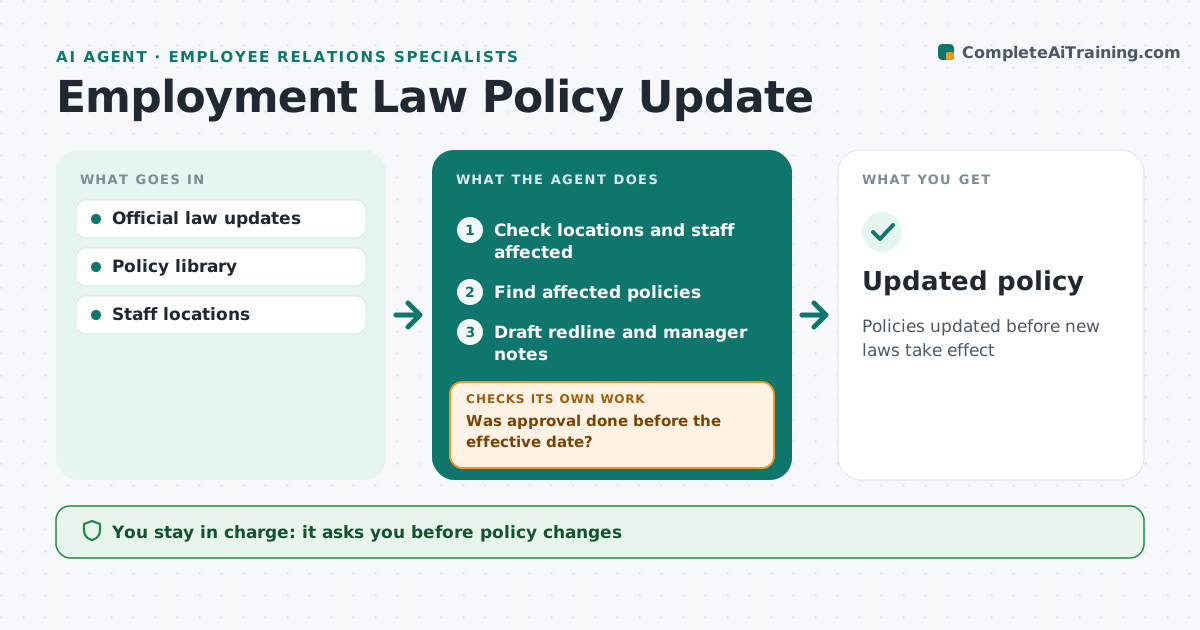
Policies updated before new laws take effect
What it does
Employment laws change often in every place you have staff, and policies stay out of date. This agent watches official sources for changes in locations where the company employs people. It checks which locations and how many staff are affected, since a change in one state applies only to staff there. It matches the change to the policies it touches, such as leave, overtime or harassment. It drafts a redline and notes on what managers need to know. It checks the effective date and the review steps needed, including legal review. If approval is not done in time, it reminds and escalates. After approval it checks the policy was published and managers were told. HR and legal approve every change.
How it works
Follow the arrows from top to bottom. The orange dashed arrow is the loop: when a check fails, the agent goes back and tries again.
Read the steps as a list
- Law change detected
- Check locations and staff affected
- Find affected policies
- Draft redline and manager notes
- Set review steps from the effective date
- Specialist and legal approveThe agent waits here for your OK.
- Was approval done before the effective date?If not: remind and escalate. Back to step 6.
- Was the policy published and managers told?If not: publish and send manager notes. Back to step 4.
- Updated policy
How it decides
It flags laws affecting locations with staff and maps to policies.
- Location-specific rules
- Legal review required
- Effective date tracking
Make it yours
Every agent is a starting point. You choose these settings for your own situation.
- Locations
- Sources
- Lead time
What keeps you in control
It always asks you first
- Policy changes
Hard limits
- Never gives legal advice
It stops when
- Done: published
- Stop: unclear law; ask legal
Set it up
We guide you through the set-up, step by step
Members get the full set-up guide for this agent. No technical skills needed: you copy, paste and upload.
- One set of instructions to paste into your AI, with the clicks for ChatGPT, Claude, Microsoft 365 Copilot, Gemini and Grok
- The agent then walks you through connecting your own data, one source at a time
- A downloadable copy with the flow chart, the rules and the full guide