AI agent for hr business partners
Engagement Survey Action Insights Agent
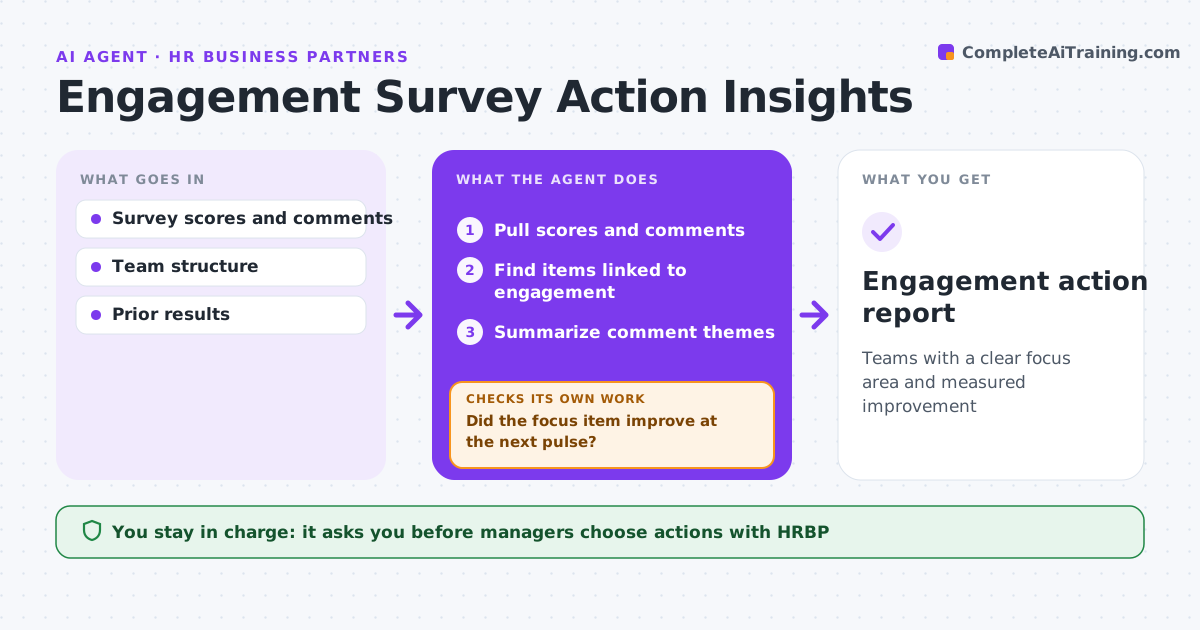
Teams with a clear focus area and measured improvement
What it does
After an engagement survey, managers get results but often do not know which items matter most or what to do next. This agent pulls scores and comments by team, finds the items most linked to overall engagement, and summarizes comment themes without names. It drafts one focus area per team. Teams under the anonymity threshold of 5 get only rolled-up results. HR business partners and managers choose the actions. At the next pulse survey, the agent checks whether the focus item improved. If it did not, it suggests a different approach rather than repeating the same one. Edge case: comments are summarized by theme and never quoted in ways that could identify the writer.
How it works
Follow the arrows from top to bottom. The orange dashed arrow is the loop: when a check fails, the agent goes back and tries again.
Read the steps as a list
- Survey closes
- Pull scores and comments
- Find items linked to engagement
- Summarize comment themes
- Draft focus area per team
- HRBP and managers choose actionsThe agent waits here for your OK.
- Did the focus item improve at the next pulse?If not: suggest another approach. Back to step 5.
- Engagement action report
How it decides
Focus areas are low-scoring items most linked to engagement. Improvement is measured at the next pulse.
- Anonymity threshold of 5
- One focus area per team
- Comments summarized, never quoted with names
Make it yours
Every agent is a starting point. You choose these settings for your own situation.
- Anonymity threshold
- Focus areas per team
- Pulse timing
- Report format
What keeps you in control
It always asks you first
- Managers choose actions with HRBP
Hard limits
- Protects anonymity
- Never shares raw comments with names
It stops when
- Done: focus improved
- Stop: survey program paused
Set it up
We guide you through the set-up, step by step
Members get the full set-up guide for this agent. No technical skills needed: you copy, paste and upload.
- One set of instructions to paste into your AI, with the clicks for ChatGPT, Claude, Microsoft 365 Copilot, Gemini and Grok
- The agent then walks you through connecting your own data, one source at a time
- A downloadable copy with the flow chart, the rules and the full guide