AI agent for production planners
Engineering Change Cutover Agent
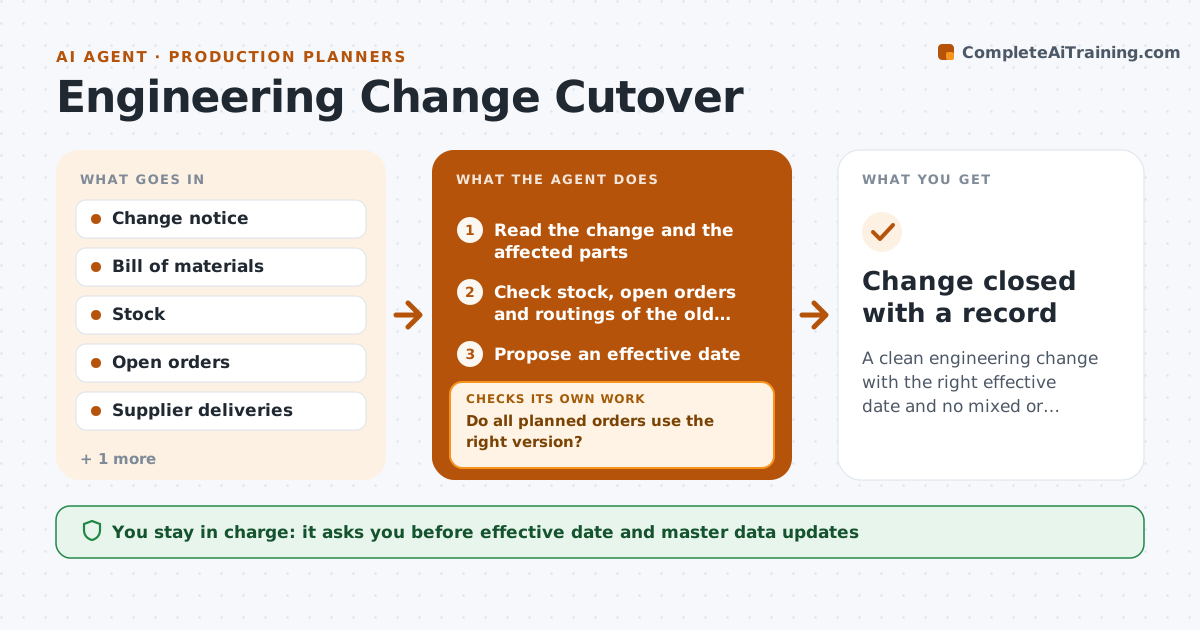
A clean engineering change with the right effective date and no mixed or stranded parts
What it does
Design changes start on the wrong date and leave mixed parts in the plan. This agent reads the change notice and checks stock, open orders and routings for the old and new parts. It sets an effective date that uses up the old stock where sensible. After the change, it checks planned orders to make sure they use the right version and no demand for the old part remains. Anything wrong goes back for revision. The planner approves the date and the updates. Edge case: a supplier delivery of the old part is already in transit, so the agent keeps the old version in the plan until receipt.
How it works
Follow the arrows from top to bottom. The orange dashed arrow is the loop: when a check fails, the agent goes back and tries again.
Read the steps as a list
- An engineering change notice is released
- Read the change and the affected parts
- Check stock, open orders and routings of the old part
- Propose an effective date
- Planner approves the dateThe agent waits here for your OK.
- Update the bill of materials and the routings
- Review planned orders after the update
- Do all planned orders use the right version?If not: correct the orders and rerun the plan. Back to step 3.
- Is any demand for the old part still planned?If not: cancel or move it and check again. Back to step 3.
- Change closed with a record
How it decides
The effective date is the first date when old stock and open orders are used up, or earlier if the change is critical. Planned orders must reference the correct version after the change.
- Use up old stock unless the change is safety critical
- Hold the old version while a delivery is in transit
- Never leave open orders on an obsolete part
- Check planned orders within 2 days after the change
Make it yours
Every agent is a starting point. You choose these settings for your own situation.
- Use-up rule
- Check window (default 2 days)
- Safety critical exceptions
- Items included
What keeps you in control
It always asks you first
- Effective date and master data updates
Hard limits
- Never change master data without approval
- Never cancel orders without approval
It stops when
- Done: change complete and plan clean
- Stop: change notice is withdrawn
Set it up
We guide you through the set-up, step by step
Members get the full set-up guide for this agent. No technical skills needed: you copy, paste and upload.
- One set of instructions to paste into your AI, with the clicks for ChatGPT, Claude, Microsoft 365 Copilot, Gemini and Grok
- The agent then walks you through connecting your own data, one source at a time
- A downloadable copy with the flow chart, the rules and the full guide