AI agent for environmental consultants
Environmental Permit Condition Tracker Agent
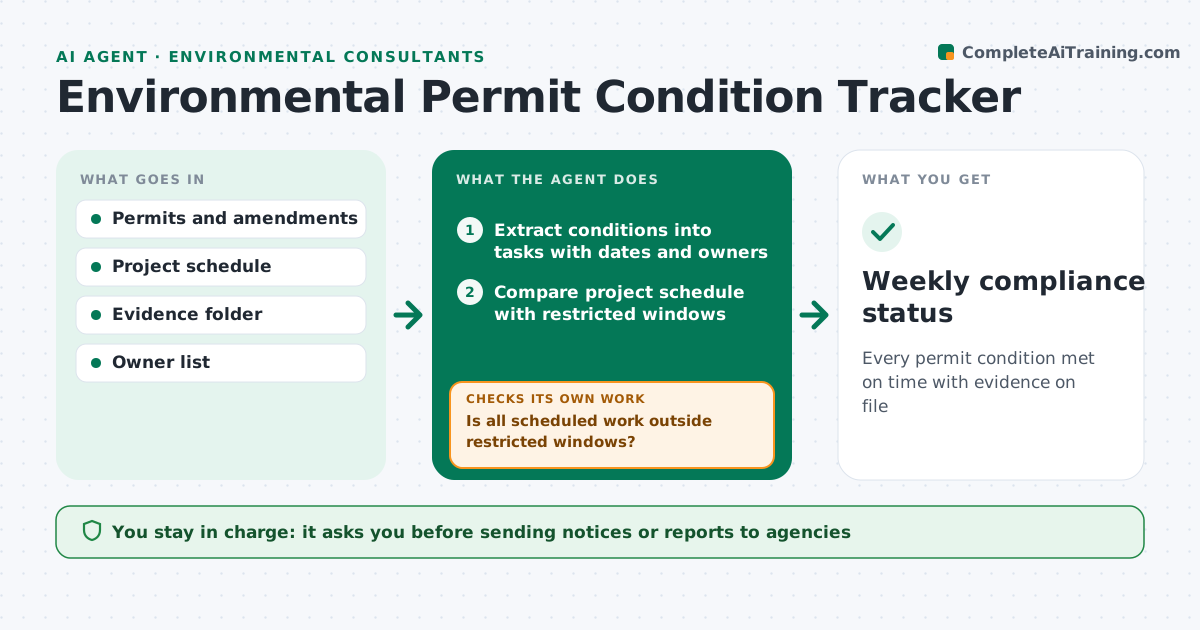
Every permit condition met on time with evidence on file
What it does
Projects often run under several permits, each with its own conditions: work windows, pre-work surveys, notice periods, monitoring and reports. This agent reads each permit and turns every condition into a tracked task with a due date and owner. It compares the project schedule with restricted windows, such as work planned inside a bird nesting season, and flags clashes. It sends reminders before each due date and checks the evidence folder for proof, such as a survey report or a sent notice. A task only counts as done with evidence filed. Missing evidence is chased, and overdue conditions are escalated to the project lead. It drafts notices to agencies, which the project lead approves. Edge case: when a permit is amended, it compares old and new conditions and updates only the changed tasks.
How it works
Follow the arrows from top to bottom. The orange dashed arrow is the loop: when a check fails, the agent goes back and tries again.
Read the steps as a list
- Permit added or weekly check
- Extract conditions into tasks with dates and owners
- Compare project schedule with restricted windows
- Is all scheduled work outside restricted windows?If not: flag the clash and ask the lead to move the work. Back to step 3.
- Send reminders and check the evidence folder
- Is every due condition met with evidence?If not: chase the owner and flag the risk to the project lead. Back to step 5.
- Draft agency notices due this week
- Project lead approves agency noticesThe agent waits here for your OK.
- Weekly compliance status
How it decides
It turns each condition into a task, checks schedules against restricted windows, and marks a task done only when evidence is filed.
- Flag scheduled work inside restricted windows
- Count a task done only with evidence filed
- Escalate overdue conditions after the set days
Make it yours
Every agent is a starting point. You choose these settings for your own situation.
- Reminder lead time (default 14 days)
- Escalation timing
- Owner list
- Status report format
What keeps you in control
It always asks you first
- Sending notices or reports to agencies
- Changing work schedules
Hard limits
- Never sends anything to agencies without approval
- Never marks a condition met without evidence
It stops when
- Done: all due conditions met
- Stop: permit text unclear; ask the permit holder
Set it up
We guide you through the set-up, step by step
Members get the full set-up guide for this agent. No technical skills needed: you copy, paste and upload.
- One set of instructions to paste into your AI, with the clicks for ChatGPT, Claude, Microsoft 365 Copilot, Gemini and Grok
- The agent then walks you through connecting your own data, one source at a time
- A downloadable copy with the flow chart, the rules and the full guide