AI agent for environmental consultants
Environmental Regulation Change Tracker Agent
Clients warned early about rule changes that affect them
What it does
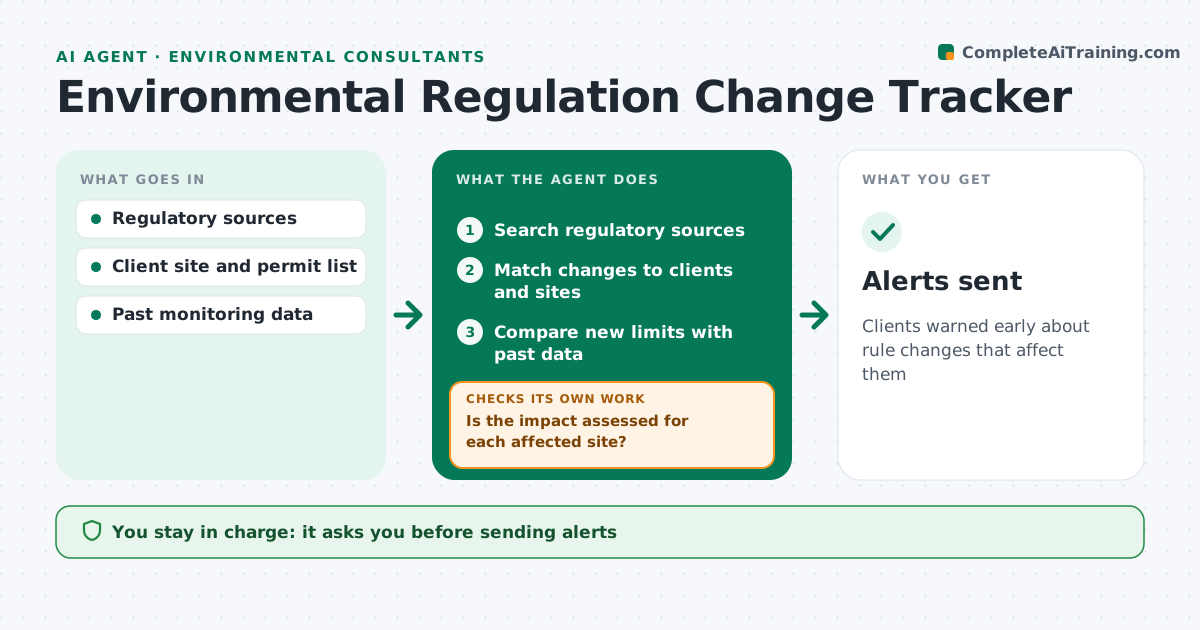
Environmental rules change often at federal, state and local levels, and consultants risk missing one that hits a client's permit. Each week this agent searches regulatory sources for proposed and final rules that match your clients' industries, permits and locations. For each relevant change it summarizes what changes, when it takes effect and which clients and sites are affected. It then checks the effect against each client's current permit and monitoring data, for example a new limit that their past results would exceed. If it lacks data for a site, it lists what is missing and asks for it before finishing the assessment. It drafts client alerts in plain language. You approve every alert before it goes out. Edge case: a proposed rule is labeled as proposed, with its comment deadline, and never presented as a requirement.
How it works
Follow the arrows from top to bottom. The orange dashed arrow is the loop: when a check fails, the agent goes back and tries again.
Read the steps as a list
- Weekly scan
- Search regulatory sources
- Match changes to clients and sites
- Compare new limits with past data
- Is the impact assessed for each affected site?If not: request missing data. Back to step 3.
- Draft client alerts
- Consultant approves alertsThe agent waits here for your OK.
- Alerts sent
How it decides
It flags changes matching client industry, location or permit, and checks impact against past data.
- Label proposed rules clearly
- Check impact with past data
- Group by client
Make it yours
Every agent is a starting point. You choose these settings for your own situation.
- Sources
- Client list
- Alert format
- Scan day
What keeps you in control
It always asks you first
- Sending alerts
Hard limits
- Never gives legal advice
It stops when
- Done: alerts sent
- Stop: no relevant changes
Set it up
We guide you through the set-up, step by step
Members get the full set-up guide for this agent. No technical skills needed: you copy, paste and upload.
- One set of instructions to paste into your AI, with the clicks for ChatGPT, Claude, Microsoft 365 Copilot, Gemini and Grok
- The agent then walks you through connecting your own data, one source at a time
- A downloadable copy with the flow chart, the rules and the full guide