AI agent for ux writers
Error State Copy Coverage Agent
Every user-facing error has clear, helpful copy
What it does
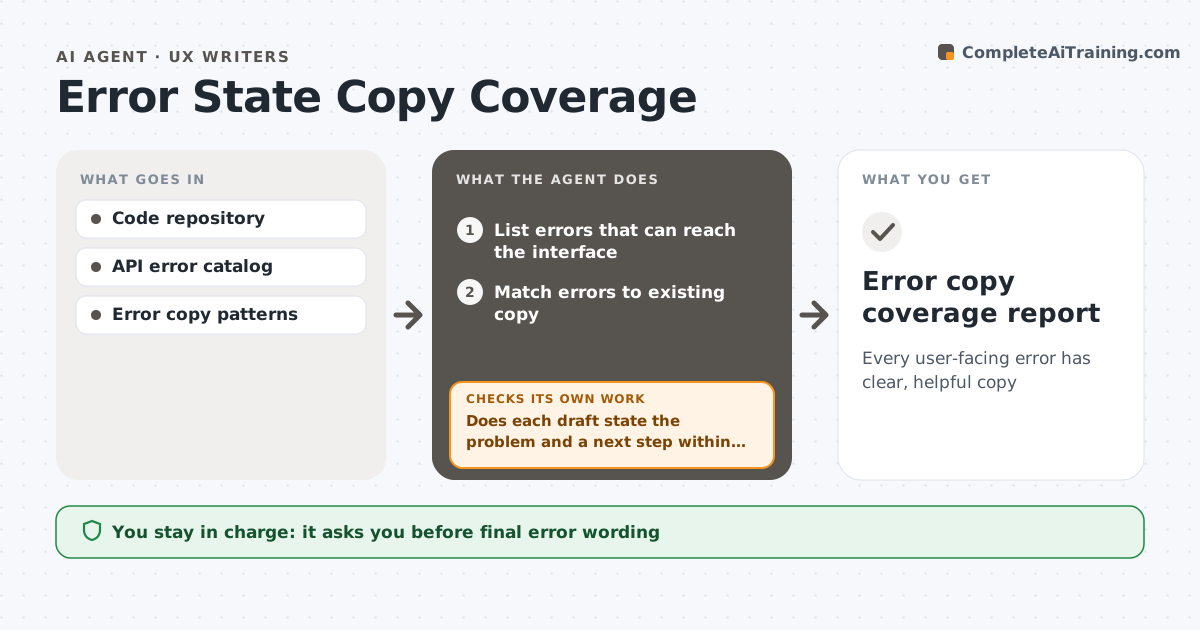
Errors are where users need help most, yet many still show 'Error 500' or a raw code. Each sprint, this agent reads the code and API error lists to find every error a user could see. It matches each one to existing copy and lists those that fall back to raw text. For each missing message, it drafts copy that says what happened and what to do next, following your patterns. It checks each draft for a clear problem statement, a next step and the length limit, and rewrites drafts that fail. The UX writer edits and approves messages. The agent then checks that each approved message appears in a test build. Errors seen most often each week are handled first. Edge case: security errors like failed logins get vague wording on purpose, so they do not reveal which field was wrong.
How it works
Follow the arrows from top to bottom. The orange dashed arrow is the loop: when a check fails, the agent goes back and tries again.
Read the steps as a list
- Sprint review
- List errors that can reach the interface
- Match errors to existing copy
- Draft messages for unmapped errors
- Does each draft state the problem and a next step within length?If not: rewrite the draft to the pattern. Back to step 4.
- UX writer approves messagesThe agent waits here for your OK.
- Check messages appear in a test build
- Error copy coverage report
How it decides
It flags any error code that reaches the UI without a mapped message, and checks drafts against the error pattern.
- Use vague wording for security errors
- Include a next step in every message
- Flag errors shown more than the set times weekly first
Make it yours
Every agent is a starting point. You choose these settings for your own situation.
- Error message pattern
- Length limit (default 120 characters)
- Security error rules
- Sprint schedule
What keeps you in control
It always asks you first
- Final error wording
Hard limits
- Never reveals sensitive details in error text
- Does not change code logic
It stops when
- Done: all errors mapped
- Stop: error list unavailable; ask engineering
Set it up
We guide you through the set-up, step by step
Members get the full set-up guide for this agent. No technical skills needed: you copy, paste and upload.
- One set of instructions to paste into your AI, with the clicks for ChatGPT, Claude, Microsoft 365 Copilot, Gemini and Grok
- The agent then walks you through connecting your own data, one source at a time
- A downloadable copy with the flow chart, the rules and the full guide