AI agent for billing specialists
Event Balance Invoice and Deposit Chase Agent
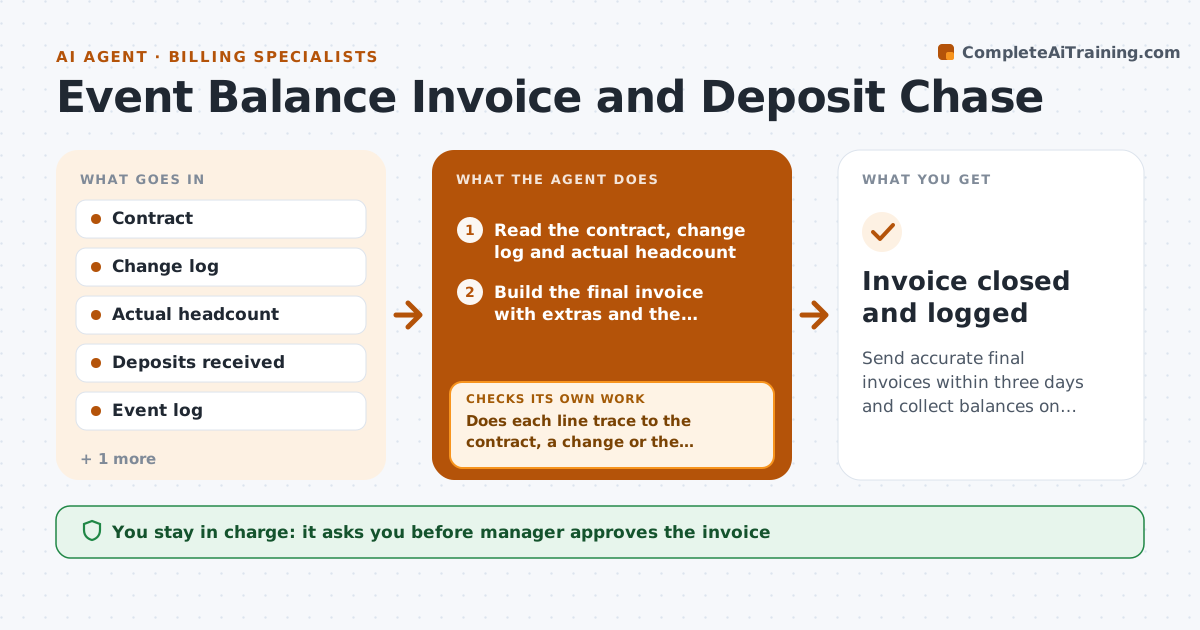
Send accurate final invoices within three days and collect balances on time.
What it does
After the event, the final invoice sits for a week, and then the balance takes another month to arrive. The agent compares the contract with the changes made and the actual headcount, builds the final invoice, and checks that deposits received are credited. It lists extra charges such as overtime, rentals and late additions, each linked to the event log. After the manager approves, it sends the invoice and sets reminders on the due date and after. It watches the bank or accounting system for payment, matches it to the invoice, and chases at set intervals with a firmer tone each time. When payment is partial, it updates the balance. Edge case: a client who disputes a line item. The agent holds reminders and flags the dispute to the manager. The manager approves the invoice and any write-off.
How it works
Follow the arrows from top to bottom. The orange dashed arrow is the loop: when a check fails, the agent goes back and tries again.
Read the steps as a list
- Event ends
- Read the contract, change log and actual headcount
- Build the final invoice with extras and the credited deposit
- Does each line trace to the contract, a change or the event log?If not: remove or correct the line, or ask the manager. Back to step 3.
- Manager approves the invoiceThe agent waits here for your OK.
- Send the invoice and set reminders
- Check the accounting system for payment
- Has the full balance been paid by the due date?If not: send the next reminder, or note a dispute or partial payment and update the balance. Back to step 7.
- Escalate balances overdue 30 days to the manager
- Manager approves any write-off or payment planThe agent waits here for your OK.
- Invoice closed and logged
How it decides
The invoice equals contract price plus approved changes and extra charges, less deposits. Reminders follow the due date schedule, and disputes pause them.
- Send the invoice within 3 days of the event
- Send reminders at the due date, 7 days and 14 days late
- Pause reminders during a dispute
- Escalate at 30 days overdue
Make it yours
Every agent is a starting point. You choose these settings for your own situation.
- Invoice timing (default 3 days)
- Reminder schedule
- Payment terms (default net 14)
- Escalation point
- Tone of reminders
What keeps you in control
It always asks you first
- Manager approves the invoice
- Manager approves write-offs and payment plans
Hard limits
- Never send an invoice without approval
- Do not threaten legal action
It stops when
- Done: balance paid and invoice closed
- Stop: client disputes the invoice, pause and tell the manager
Set it up
We guide you through the set-up, step by step
Members get the full set-up guide for this agent. No technical skills needed: you copy, paste and upload.
- One set of instructions to paste into your AI, with the clicks for ChatGPT, Claude, Microsoft 365 Copilot, Gemini and Grok
- The agent then walks you through connecting your own data, one source at a time
- A downloadable copy with the flow chart, the rules and the full guide