AI agent for sales representatives
Event Registrant Pre-Call Research Agent
Give the SDR a ranked, clean call list with a relevant opener for each top contact
What it does
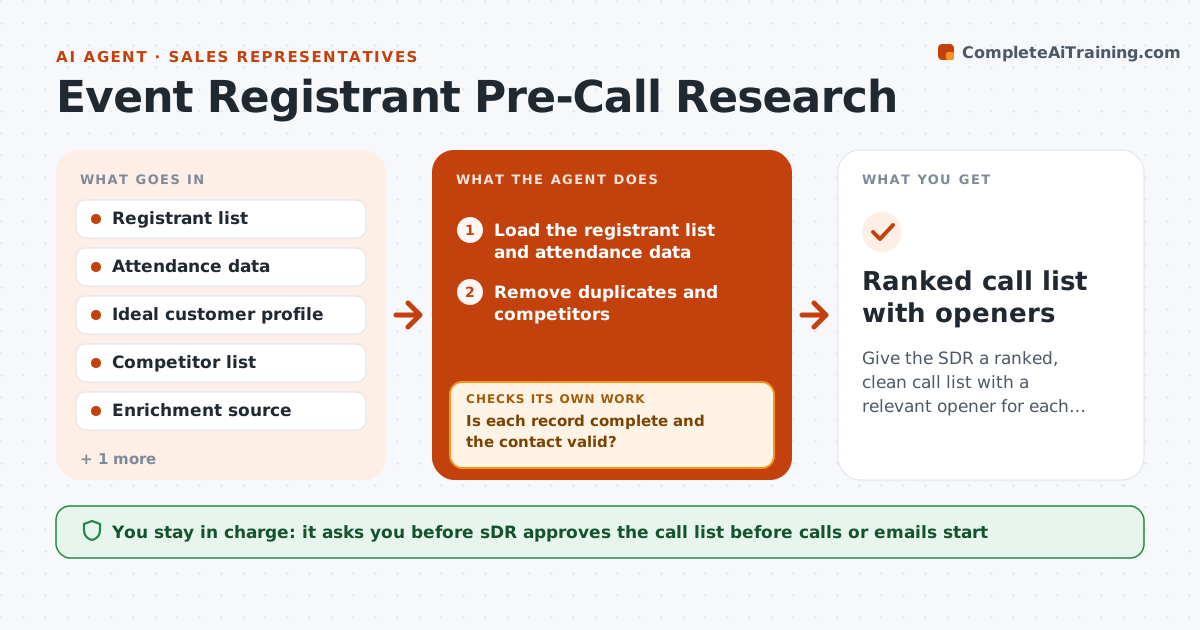
After a webinar the SDR gets a spreadsheet of 400 names with a job title and a company, many duplicates, a few competitors and no sense of who to call first. This agent prepares the list. After registration closes, it enriches each record with company size and role, removes duplicates and competitors, ranks the rest by fit with the ideal customer profile and drafts a call opener for each top contact. It checks for bounced emails and wrong data, and re-enriches records that fail. It also notes attendance, because someone who stayed 50 minutes is warmer than a no-show. The SDR approves the call list. Edge case: a registrant used a personal email. The agent finds the company by name and role and marks it as unverified.
How it works
Follow the arrows from top to bottom. The orange dashed arrow is the loop: when a check fails, the agent goes back and tries again.
Read the steps as a list
- Event or registration closes
- Load the registrant list and attendance data
- Remove duplicates and competitors
- Enrich records with company size, industry and role
- Is each record complete and the contact valid?If not: Re-enrich from another source or mark as unverified. Back to step 4.
- Score fit with the profile and add engagement points
- Rank contacts and draft a call opener for each top contact
- Do the top contacts have no bounced email or wrong role?If not: Fix the record or drop the contact from the top list. Back to step 4.
- SDR approves the call listThe agent waits here for your OK.
- Ranked call list with openers
How it decides
It scores fit by company size, industry and role against the profile, then adds points for attendance and engagement. Competitors and duplicates are removed first.
- Remove competitors and existing customers' open deals from cold calling
- Attendance over 30 minutes adds 20 points
- Top 25 contacts get a personal opener
- Unverified contacts are not ranked in the top 25
Make it yours
Every agent is a starting point. You choose these settings for your own situation.
- Ideal customer profile
- Top list size (default 25)
- Engagement points
- Competitor and exclusion lists
- Opener tone
What keeps you in control
It always asks you first
- SDR approves the call list before calls or emails start
Hard limits
- Uses only data the company is allowed to hold
- Never contacts people itself
It stops when
- Done: call list approved
- Stop: list quality is too low, ask the event team for a better export
Set it up
We guide you through the set-up, step by step
Members get the full set-up guide for this agent. No technical skills needed: you copy, paste and upload.
- One set of instructions to paste into your AI, with the clicks for ChatGPT, Claude, Microsoft 365 Copilot, Gemini and Grok
- The agent then walks you through connecting your own data, one source at a time
- A downloadable copy with the flow chart, the rules and the full guide