AI agent for inventory control specialists
Excess and Obsolete Inventory Review Agent
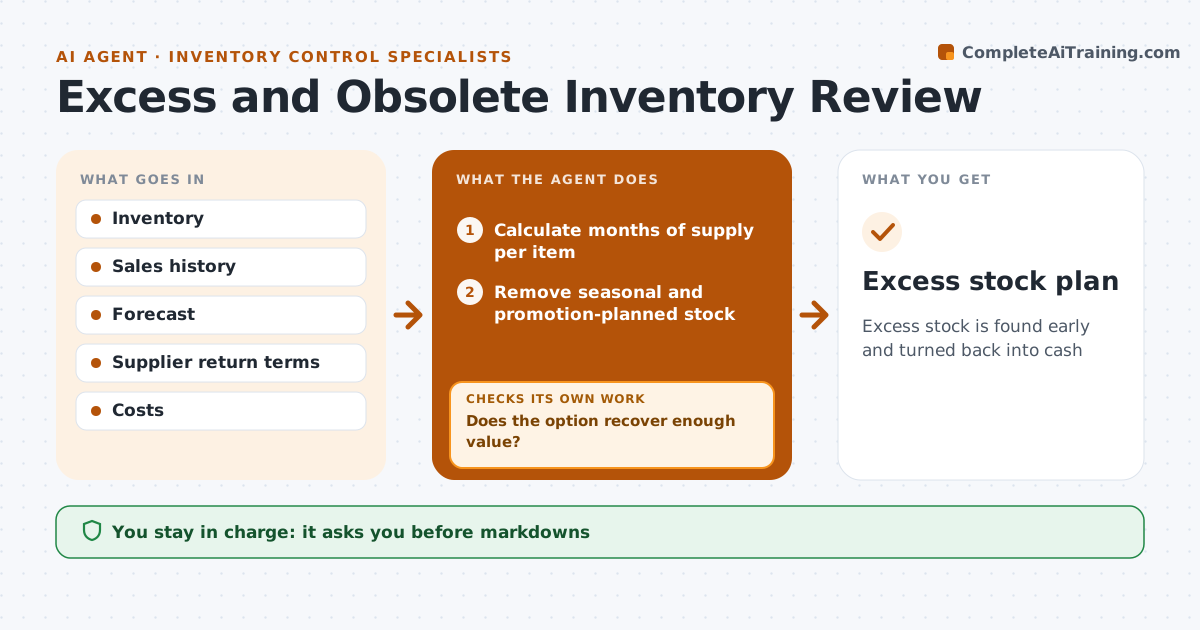
Excess stock is found early and turned back into cash
What it does
Stock that does not sell ties up money and shelf space. Each month this agent calculates months of supply for every item and finds those with more stock than expected demand or no sales for a long time. It removes items with a reason to hold, such as a planned promotion, a backorder or seasonal stock waiting for its season. For the rest, it suggests options in order: return to supplier, bundle, markdown or donate. It estimates the recovery value of each option. If an option does not recover enough, it moves to the next one and checks again. The result is an excess stock plan with values per item. The owner approves any markdown, return or write-off, since those affect margin and the books. Edge case: winter coats in July are not counted as excess, because their selling season has not started yet.
How it works
Follow the arrows from top to bottom. The orange dashed arrow is the loop: when a check fails, the agent goes back and tries again.
Read the steps as a list
- Monthly review
- Calculate months of supply per item
- Remove seasonal and promotion-planned stock
- Suggest options for each excess item
- Estimate recovery value
- Does the option recover enough value?If not: try the next option. Back to step 4.
- Owner approves markdowns or write-offsThe agent waits here for your OK.
- Excess stock plan
How it decides
It flags stock above the set months of supply and suggests the option with the best recovery.
- Over 12 months of supply is excess
- Seasonal items exempt before season
- Supplier returns first
Make it yours
Every agent is a starting point. You choose these settings for your own situation.
- Months of supply limit
- Options allowed
- Seasonal calendar
- Minimum value
What keeps you in control
It always asks you first
- Markdowns
- Write-offs
- Returns
Hard limits
- Never changes prices
It stops when
- Done: plan approved
- Stop: no data
Set it up
We guide you through the set-up, step by step
Members get the full set-up guide for this agent. No technical skills needed: you copy, paste and upload.
- One set of instructions to paste into your AI, with the clicks for ChatGPT, Claude, Microsoft 365 Copilot, Gemini and Grok
- The agent then walks you through connecting your own data, one source at a time
- A downloadable copy with the flow chart, the rules and the full guide