AI agent for chief executing officers
Executive Decision Pre-mortem Agent
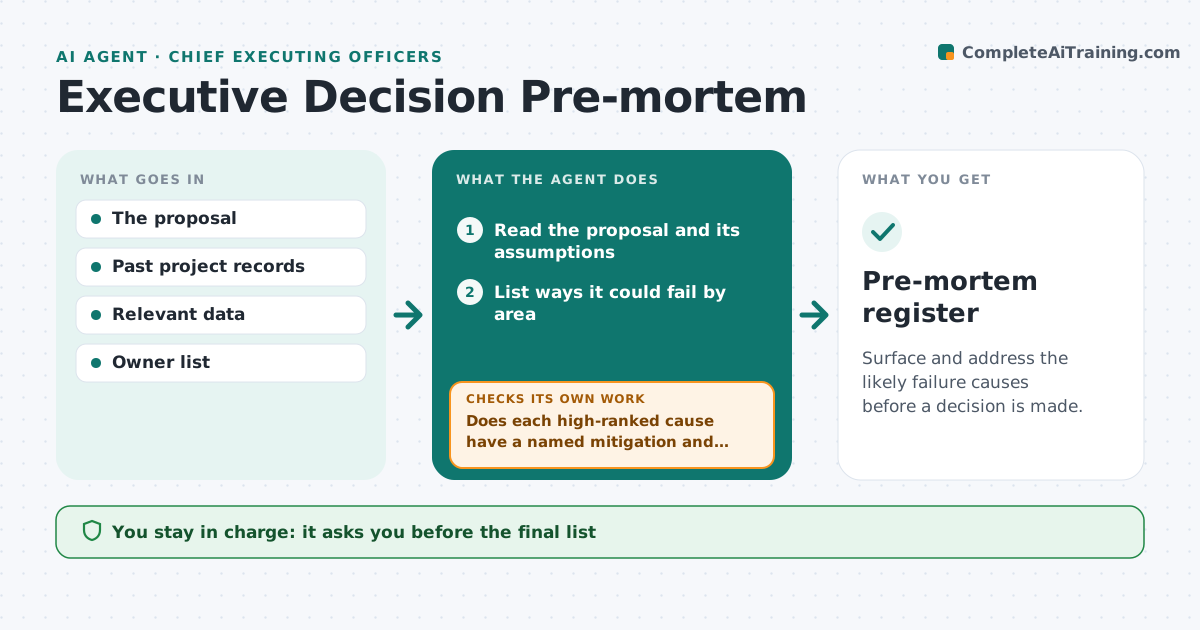
Surface and address the likely failure causes before a decision is made.
What it does
Big decisions are reviewed for benefits, and the risks get a short slide. When the project fails, everyone says they saw it coming. A pre-mortem asks in advance: imagine this failed, why? This agent reads the proposal and lists the ways it could fail. It checks each against data and past projects, such as similar acquisitions that missed their synergies. It asks owners for mitigations, then rechecks that each serious cause has an owner and a date, and that the mitigation is stronger than what failed before. Causes without a real answer go back to their owners. The executive approves the final list. Edge case: a failure cause that appears in two past projects is shown first with the earlier outcome.
How it works
Follow the arrows from top to bottom. The orange dashed arrow is the loop: when a check fails, the agent goes back and tries again.
Read the steps as a list
- A proposal is submitted for decision
- Read the proposal and its assumptions
- List ways it could fail by area
- Check each against data and similar past projects
- Rank causes by likelihood and impact
- Ask owners for mitigations
- Does each high-ranked cause have a named mitigation and owner?If not: Return the open causes to the owners with a deadline. Back to step 6.
- Do the mitigations match the evidence from past projects?If not: Mark them weak and ask for stronger actions. Back to step 4.
- Executive approves the final listThe agent waits here for your OK.
- Pre-mortem register
How it decides
Ranks failure causes by likelihood from past cases and by impact on the goal, and counts a cause as handled only with a named mitigation and owner.
- Cause in two or more past projects is ranked first
- High impact and high likelihood needs a mitigation
- Mitigation needs an owner and a date
- Unmitigated causes are shown in the decision paper
Make it yours
Every agent is a starting point. You choose these settings for your own situation.
- Areas to review
- Past projects to compare
- Risk ranking method
- Deadline for owner replies (default 5 days)
- Decision papers to attach
What keeps you in control
It always asks you first
- The final list
- Any change to the proposal
- Any decision to proceed
Hard limits
- Never decide or approve the proposal
- Never hide a high risk
It stops when
- Done: all high risks have mitigations
- Stop: proposal withdrawn
- Stop: decision made without review
Set it up
We guide you through the set-up, step by step
Members get the full set-up guide for this agent. No technical skills needed: you copy, paste and upload.
- One set of instructions to paste into your AI, with the clicks for ChatGPT, Claude, Microsoft 365 Copilot, Gemini and Grok
- The agent then walks you through connecting your own data, one source at a time
- A downloadable copy with the flow chart, the rules and the full guide