AI agent for sustainability managers
Sustainability Initiative Impact Tracker Agent
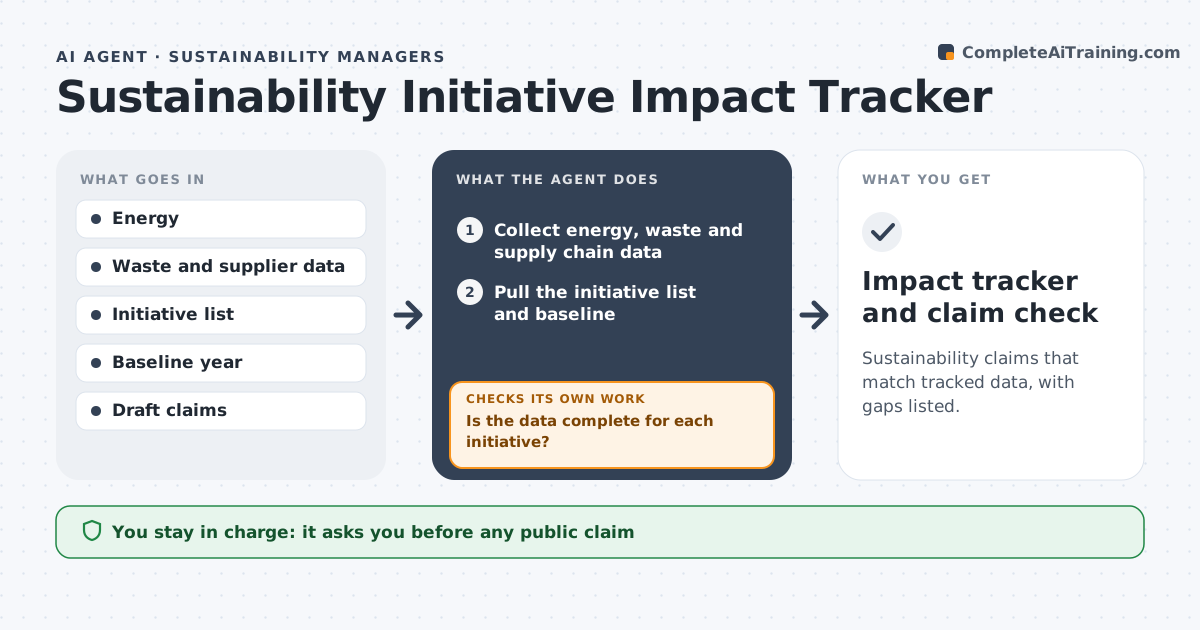
Sustainability claims that match tracked data, with gaps listed.
What it does
A company announces a carbon cut with no data trail to back it. This agent collects data on energy, waste and the supply chain, calculates the impact of each initiative and flags gaps. It checks claims against the numbers and rechecks calculations. It keeps the baseline, the method and every source in one place, so the numbers can be checked later by someone else. Claims that cannot be supported are listed with the missing data and the person who could provide it, and wording is suggested that the numbers do support. Edge case: an initiative's savings came from a closed site, so the agent adjusts the claim. The strategist approves any public claim.
How it works
Follow the arrows from top to bottom. The orange dashed arrow is the loop: when a check fails, the agent goes back and tries again.
Read the steps as a list
- Quarterly impact review
- Collect energy, waste and supply chain data
- Pull the initiative list and baseline
- Calculate impact for each initiative
- Is the data complete for each initiative?If not: list gaps and request data from owners. Back to step 2.
- Compare draft claims with the calculated numbers
- Does every claim match the numbers within 5%?If not: rewrite the claim or mark it unsupported. Back to step 6.
- Adjust for site closures or changes
- Strategist approves any public claimThe agent waits here for your OK.
- Impact tracker and claim check
How it decides
It calculates impact against the baseline and allows a claim only when the data supports it.
- A claim must match the numbers within 5%.
- Compare against the baseline year.
- Adjust for closed or sold sites.
- Mark unsupported claims clearly.
Make it yours
Every agent is a starting point. You choose these settings for your own situation.
- Baseline year
- Tolerance (default 5%)
- Initiatives tracked
- Data sources
- Claim review
What keeps you in control
It always asks you first
- Any public claim
Hard limits
- Do not publish claims.
- Do not estimate missing data silently.
It stops when
- Done: claims are supported and approved
- Stop: baseline data is missing, so the agent asks the owner
Set it up
We guide you through the set-up, step by step
Members get the full set-up guide for this agent. No technical skills needed: you copy, paste and upload.
- One set of instructions to paste into your AI, with the clicks for ChatGPT, Claude, Microsoft 365 Copilot, Gemini and Grok
- The agent then walks you through connecting your own data, one source at a time
- A downloadable copy with the flow chart, the rules and the full guide