AI agent for tax advisors
Extension and Filing Deadline Control Agent
Every unfinished return has an approved extension and a supported payment estimate before the deadline
What it does
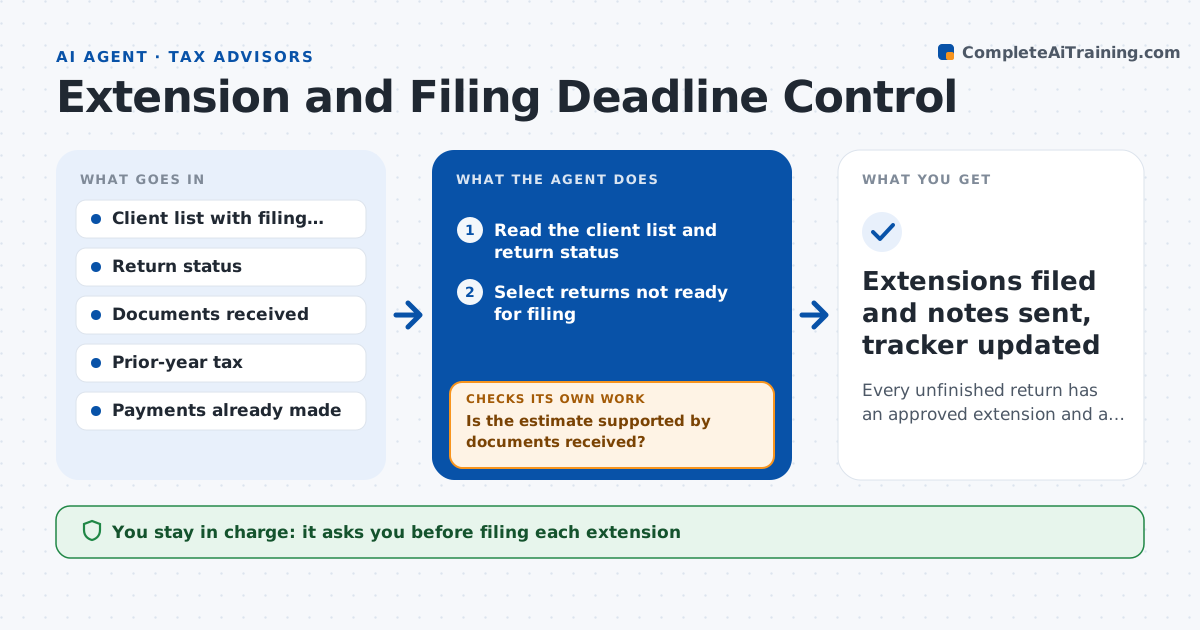
With a hundred or more clients, one forgotten extension means penalties and an unhappy client. This agent keeps a list of every client filing with its deadline and status. Two weeks before each deadline it lists the returns that are not ready. For each one it drafts an extension request and calculates an estimated balance due from the numbers on file. It then checks that the estimate is supported by current documents. If new documents arrived since the last estimate, it recalculates. It also checks that the client has a way to pay the estimate by the deadline. The advisor approves each extension and each client payment note before anything is filed or sent. Edge case: a client who is abroad gets a different extension rule, so the agent routes that file to the advisor first.
How it works
Follow the arrows from top to bottom. The orange dashed arrow is the loop: when a check fails, the agent goes back and tries again.
Read the steps as a list
- Two weeks before the deadline
- Read the client list and return status
- Select returns not ready for filing
- Pull documents, payments made and prior-year tax for each
- Estimate the balance due and draft the extension request
- Is the estimate supported by documents received?If not: recalculate using the new documents, or use prior-year tax and mark the estimate as rough. Back to step 4.
- Draft the client payment note with the amount and due date
- Is every unfinished return covered by a draft extension?If not: add the missing returns and repeat the estimate. Back to step 2.
- Advisor approves each extension and payment noteThe agent waits here for your OK.
- Extensions filed and notes sent, tracker updated
How it decides
A return needs an extension when it is not marked ready by the cutoff date. The estimate must be backed by documents received or fall back to the prior-year tax with a stated reason.
- Draft an extension for any return not ready 10 days before the deadline
- Use prior-year tax as the estimate when no current documents exist, and say so
- Route clients abroad or with foreign accounts to the advisor first
- Escalate daily for any extension not approved 3 days before the deadline
Make it yours
Every agent is a starting point. You choose these settings for your own situation.
- Cutoff days before the deadline (default 10)
- Which return types to track (default all)
- Estimate method when documents are missing
- Reminder schedule to the advisor
What keeps you in control
It always asks you first
- Filing each extension
- Sending each payment note to a client
Hard limits
- Never files an extension without approval
- Never states a payment amount as final
It stops when
- Done: every unfinished return has an approved extension and the tracker is updated
- Stop: the client list is missing deadlines
Set it up
We guide you through the set-up, step by step
Members get the full set-up guide for this agent. No technical skills needed: you copy, paste and upload.
- One set of instructions to paste into your AI, with the clicks for ChatGPT, Claude, Microsoft 365 Copilot, Gemini and Grok
- The agent then walks you through connecting your own data, one source at a time
- A downloadable copy with the flow chart, the rules and the full guide