AI agent for tax advisors
Tax Workpaper Input Completeness Agent
Complete, correctly matched source inputs before tax preparation starts.
What it does
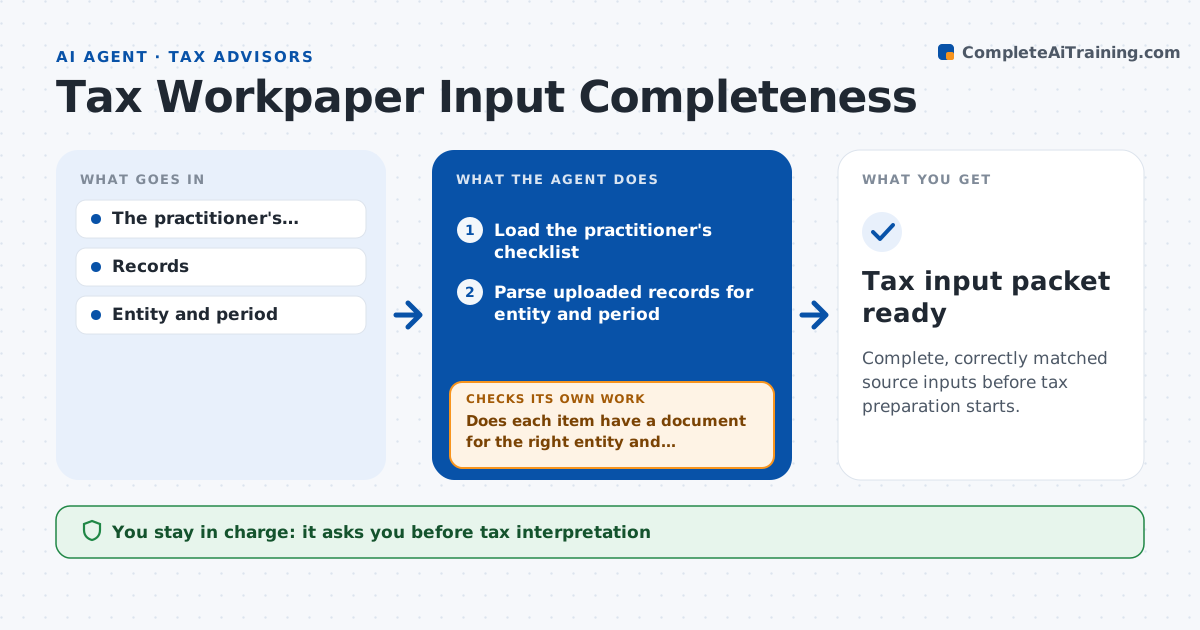
Tax workpapers often start with missing or mismatched source documents. When an engagement opens or new uploads arrive, this agent reads the uploaded records and checks them against the practitioner's checklist. A document only closes a checklist item when both the entity and the period match. It lists the gaps, putting items that block the most work first, and drafts targeted requests for what is missing. After the client uploads more files, it checks again and loops until the checklist is complete. It refreshes the preparation packet for the practitioner. Tax interpretation, liability calculation and filing stay with the practitioner. Edge case: a bank statement belongs to a related entity, so the item stays open and the agent asks for the right one.
How it works
Follow the arrows from top to bottom. The orange dashed arrow is the loop: when a check fails, the agent goes back and tries again.
Read the steps as a list
- Engagement opens or uploads arrive
- Load the practitioner's checklist
- Parse uploaded records for entity and period
- Does each item have a document for the right entity and period?If not: keep the item open and add it to the request list. Back to step 3.
- Order gaps by how much work they block
- Practitioner approves sending requestsThe agent waits here for your OK.
- Refresh the preparation packet
- Tax input packet ready
How it decides
It checks entity and period gaps first and closes items only on a double match.
- A document closes an item only when entity and period both match.
- Request order: items blocking the most work first.
- Documents for related entities are kept but never used to close an item.
- The agent never interprets tax treatment.
Make it yours
Every agent is a starting point. You choose these settings for your own situation.
- Checklist template per return type
- Client portal or folder to watch for uploads
- Reminder schedule for open requests (default every 7 days)
- Who sends requests to the client
- Packet format (index sheet plus linked files)
What keeps you in control
It always asks you first
- Tax interpretation
- Filing
- Liability calculation
Hard limits
- No tax advice.
It stops when
- Done: all items matched.
Set it up
We guide you through the set-up, step by step
Members get the full set-up guide for this agent. No technical skills needed: you copy, paste and upload.
- One set of instructions to paste into your AI, with the clicks for ChatGPT, Claude, Microsoft 365 Copilot, Gemini and Grok
- The agent then walks you through connecting your own data, one source at a time
- A downloadable copy with the flow chart, the rules and the full guide