AI agent for tax analysts
Tax Return Workpaper Tie-out Agent
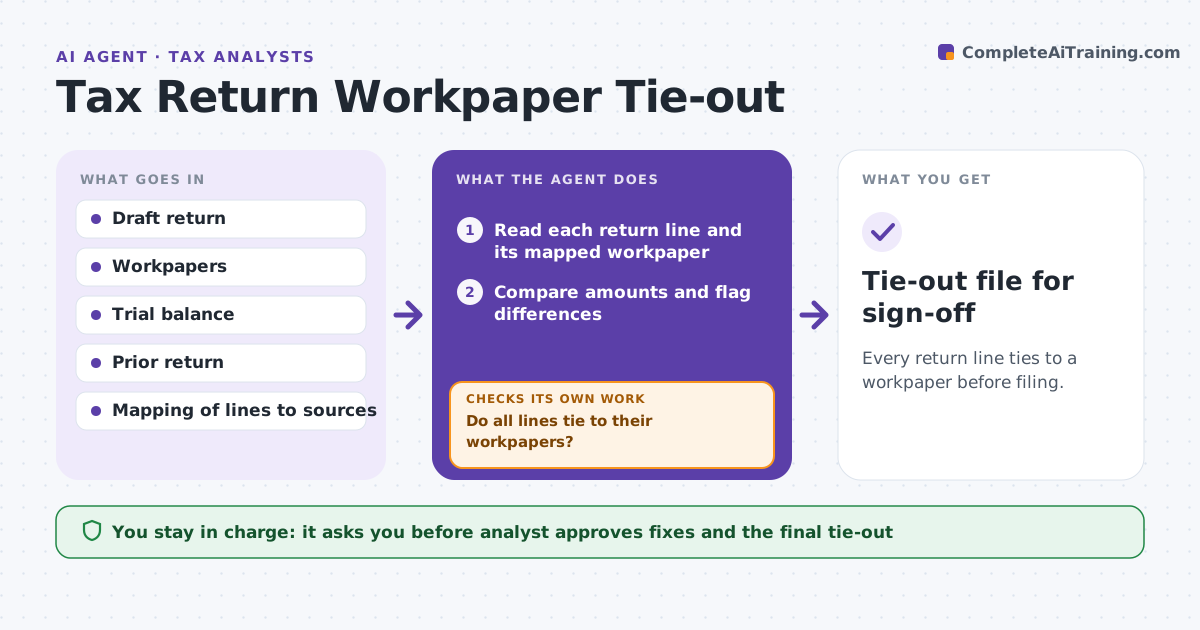
Every return line ties to a workpaper before filing.
What it does
Return numbers must tie to workpapers, and a single mismatch can delay filing. Checking every line by hand is slow. This agent compares each return line to its supporting workpaper, flags differences with the likely cause, proposes fixes and rechecks every line after changes until everything ties. It decides by exact match within a small rounding tolerance and ranks differences by size. The analyst approves before filing. It also checks that each workpaper is dated after the last trial balance update and that totals foot across schedules, since a fix in one place often moves another. It never edits a workpaper itself. Edge case: a line is off by $1,000 because a workpaper uses last quarter's trial balance, so the agent points to the stale source.
How it works
Follow the arrows from top to bottom. The orange dashed arrow is the loop: when a check fails, the agent goes back and tries again.
Read the steps as a list
- Draft return is ready
- Read each return line and its mapped workpaper
- Compare amounts and flag differences
- Find the likely cause for each difference
- Propose fixes ranked by size
- Analyst approves the fixes and updates the filesThe agent waits here for your OK.
- Recompare every line
- Do all lines tie to their workpapers?If not: list the new and remaining differences and repeat. Back to step 3.
- Prepare the tie-out summary
- Tie-out file for sign-off
How it decides
It marks a line tied when the workpaper amount equals the return amount within $1. It ranks differences by size.
- Treat a difference over $1 as a flag
- Check source dates on workpapers
- Check that totals foot
- Rank by absolute amount
Make it yours
Every agent is a starting point. You choose these settings for your own situation.
- Rounding tolerance (default $1)
- Line mapping
- Sources
- Summary format
- Recheck passes
What keeps you in control
It always asks you first
- Analyst approves fixes and the final tie-out
Hard limits
- Never file a return
- Never change a figure without an approved source
It stops when
- Done: all lines tie
- Stop: a source document is missing
Set it up
We guide you through the set-up, step by step
Members get the full set-up guide for this agent. No technical skills needed: you copy, paste and upload.
- One set of instructions to paste into your AI, with the clicks for ChatGPT, Claude, Microsoft 365 Copilot, Gemini and Grok
- The agent then walks you through connecting your own data, one source at a time
- A downloadable copy with the flow chart, the rules and the full guide