AI agent for fashion designers
Factory Production Follow-up Agent
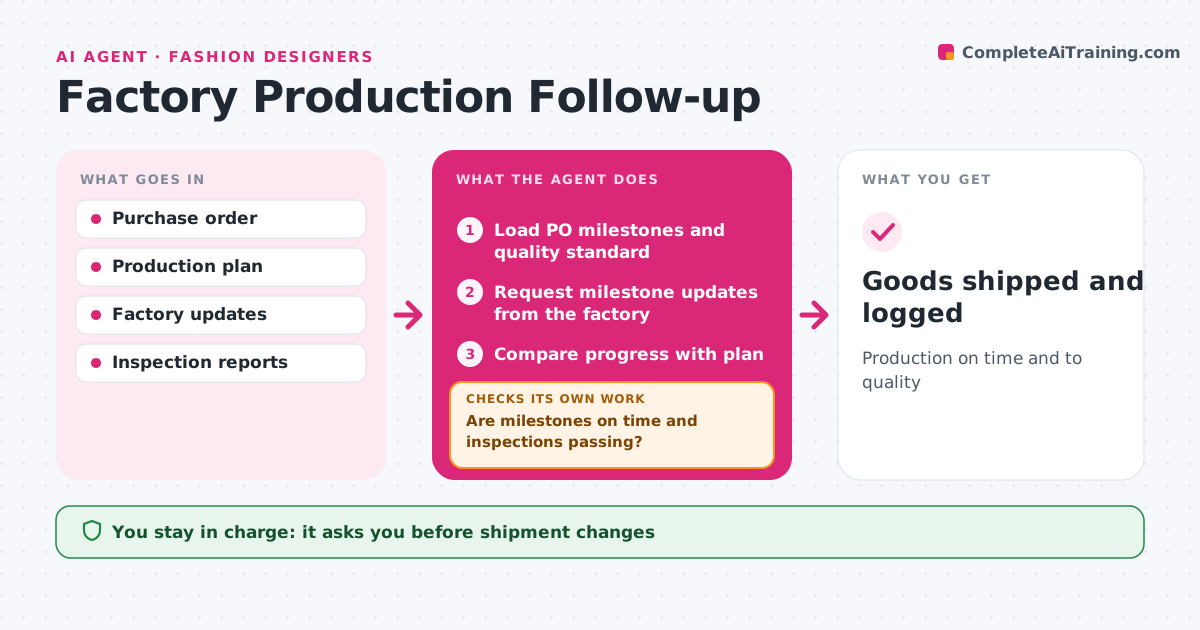
Production on time and to quality
What it does
Once an order is placed, designers often learn about delays and quality problems only when it is too late to act. This agent tracks each purchase order through its milestones: fabric in, cutting, sewing, inspection and shipping. It requests updates from the factory on a set schedule and compares them with the plan. It reads inline and final inspection reports and checks them against the quality standard. When a milestone slips or an inspection fails, it drafts a response asking for a recovery plan and works out the impact on the delivery date. If the date is at risk, it suggests options such as a partial shipment or air freight, with costs. After the factory replies, it checks again. The designer approves any change to the order. Edge case: a defect rate just under the limit but concentrated in one size is still flagged.
How it works
Follow the arrows from top to bottom. The orange dashed arrow is the loop: when a check fails, the agent goes back and tries again.
Read the steps as a list
- PO placed
- Load PO milestones and quality standard
- Request milestone updates from the factory
- Compare progress with plan
- Review inline and final inspection reports
- Are milestones on time and inspections passing?If not: draft options and ask the factory for a recovery plan. Back to step 3.
- Calculate delivery impact and option costs
- Designer approves changesThe agent waits here for your OK.
- Goods shipped and logged
How it decides
It compares progress with milestones and inspection results with the quality limit.
- Delays over 5 days trigger options
- Defects grouped by size are flagged
- Air freight needs approval
Make it yours
Every agent is a starting point. You choose these settings for your own situation.
- Milestones
- Update frequency
- Quality limit
- Escalation options
What keeps you in control
It always asks you first
- Shipment changes
- Accepting failed inspections
Hard limits
- Never changes orders without approval
- Never accepts goods itself
It stops when
- Done: goods received
- Stop: order cancelled
Set it up
We guide you through the set-up, step by step
Members get the full set-up guide for this agent. No technical skills needed: you copy, paste and upload.
- One set of instructions to paste into your AI, with the clicks for ChatGPT, Claude, Microsoft 365 Copilot, Gemini and Grok
- The agent then walks you through connecting your own data, one source at a time
- A downloadable copy with the flow chart, the rules and the full guide