AI agent for pharmaceutical sales representatives
Field Adverse Event Intake Agent
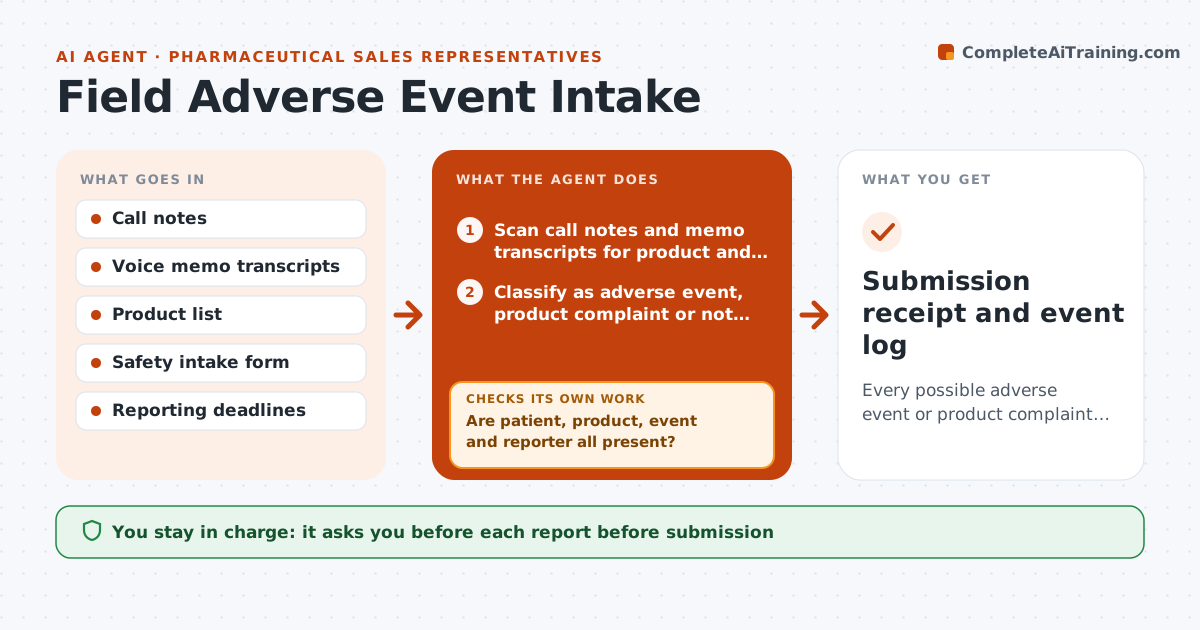
Every possible adverse event or product complaint heard in the field reaches the safety or quality team on time
What it does
Reps are required to pass on any adverse event or product complaint they hear about, usually within one business day, even if the mention was casual. This agent reads your call notes and voice memos after each call and looks for the four reporting elements: a patient, a product, an event and a reporter. When it finds a possible event, it drafts the safety intake form with exactly what was said and marks which elements are present. If an element is missing, it drafts a short follow-up question for the office rather than guessing. It then tracks the clock and checks that the report was submitted within the deadline, escalating to your manager if not. You approve every report before it goes to the safety team. Edge case: a complaint about a broken blister pack is a product complaint, not an adverse event, and goes to quality.
How it works
Follow the arrows from top to bottom. The orange dashed arrow is the loop: when a check fails, the agent goes back and tries again.
Read the steps as a list
- Rep logs a call or ends the day
- Scan call notes and memo transcripts for product and health event mentions
- Classify as adverse event, product complaint or not reportable
- Draft intake form with the exact words heard
- Are patient, product, event and reporter all present?If not: draft a follow-up question to the office and submit what is known if the clock is near. Back to step 4.
- Rep approves the report before submissionThe agent waits here for your OK.
- Submit to the safety or quality intake system
- Was it submitted within one business day of the call?If not: alert the rep and district manager and log the late reason. Back to step 6.
- Submission receipt and event log
How it decides
A note is flagged when it mentions a company product with any health effect or product defect. Reports with all four elements go to safety; defects without a health effect go to quality.
- Any health effect mentioned with a company product is flagged, even if the rep thinks it is unrelated
- Defects without health effects go to quality, not safety
- A report with missing elements is still submitted before the deadline
- Escalate to the manager when 20 hours have passed without submission
Make it yours
Every agent is a starting point. You choose these settings for your own situation.
- Reporting deadline (default one business day)
- Escalation time before deadline (default 4 hours left)
- Which note sources to scan (default CRM notes and voice memos)
- Manager to notify (default district manager)
What keeps you in control
It always asks you first
- Each report before submission
Hard limits
- Never decides that an event is unrelated to the product
- Never contacts patients directly
It stops when
- Done: report submitted and receipt logged
- Stop: rep marks the note as not reportable with a reason, logged for audit
Set it up
We guide you through the set-up, step by step
Members get the full set-up guide for this agent. No technical skills needed: you copy, paste and upload.
- One set of instructions to paste into your AI, with the clicks for ChatGPT, Claude, Microsoft 365 Copilot, Gemini and Grok
- The agent then walks you through connecting your own data, one source at a time
- A downloadable copy with the flow chart, the rules and the full guide