AI agent for pharmaceutical sales representatives
Prescriber Call Note Compliance Agent
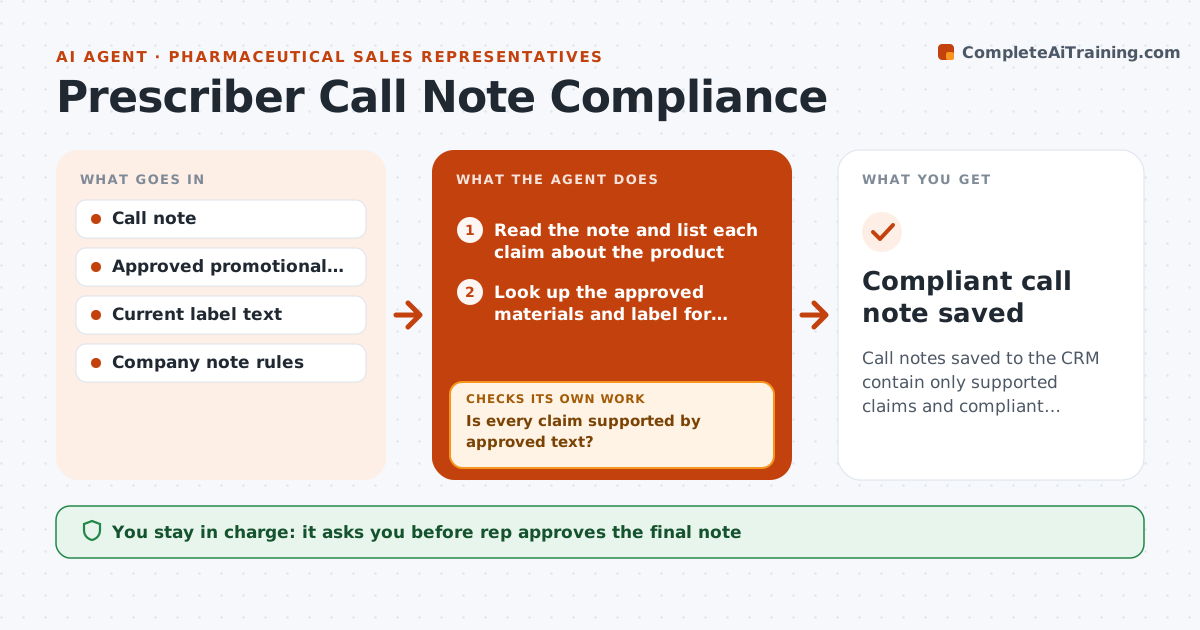
Call notes saved to the CRM contain only supported claims and compliant wording
What it does
Notes from a call with a prescriber are saved in the CRM, and a stray claim about a medicine can become a compliance problem. Reps write quickly, and a phrase like 'works better than' can slip in. After each call this agent reads the note and checks each claim against approved materials and label language. It flags words that go beyond the label, comparative claims, off-label topics and uncertain statements. For each flagged line it proposes compliant wording quoted from the approved source, and rechecks the corrected note. If a claim cannot be supported, it suggests removing it. The rep approves what is saved. Edge case: the prescriber raised an off-label question, so the agent records that it was asked and that no information was given, and flags it for medical information.
How it works
Follow the arrows from top to bottom. The orange dashed arrow is the loop: when a check fails, the agent goes back and tries again.
Read the steps as a list
- Rep finishes a call note
- Read the note and list each claim about the product
- Look up the approved materials and label for each claim
- Mark each claim as supported, needs rewording or not supported
- Is every claim supported by approved text?If not: propose compliant wording quoted from the approved source, or removal. Back to step 3.
- Rewrite the note with the changes
- Does the corrected note pass the same check?If not: revise the wording and recheck. Back to step 3.
- Mark off-label questions for medical information follow-up
- Rep approves what is saved to the CRMThe agent waits here for your OK.
- Compliant call note saved
How it decides
A claim is accepted only when it matches approved text. Off-label, comparative or unsupported claims are flagged, then reworded or removed.
- Accept only claims that match approved language
- Flag comparative claims and superlatives
- Record off-label questions as asked and not answered
- Remove claims with no approved source
Make it yours
Every agent is a starting point. You choose these settings for your own situation.
- Approved source library
- Claims flagged
- Compliance contact
- Note format
What keeps you in control
It always asks you first
- Rep approves the final note
- Rep approves any report to medical information
Hard limits
- Never give medical advice
- Do not invent approved wording
- Keep an audit of changes
It stops when
- Done: corrected note saved
- Stop: a possible compliance issue goes to the compliance team
Set it up
We guide you through the set-up, step by step
Members get the full set-up guide for this agent. No technical skills needed: you copy, paste and upload.
- One set of instructions to paste into your AI, with the clicks for ChatGPT, Claude, Microsoft 365 Copilot, Gemini and Grok
- The agent then walks you through connecting your own data, one source at a time
- A downloadable copy with the flow chart, the rules and the full guide