AI agent for agricultural scientists
Field Plot Sampling Schedule Optimizer Agent
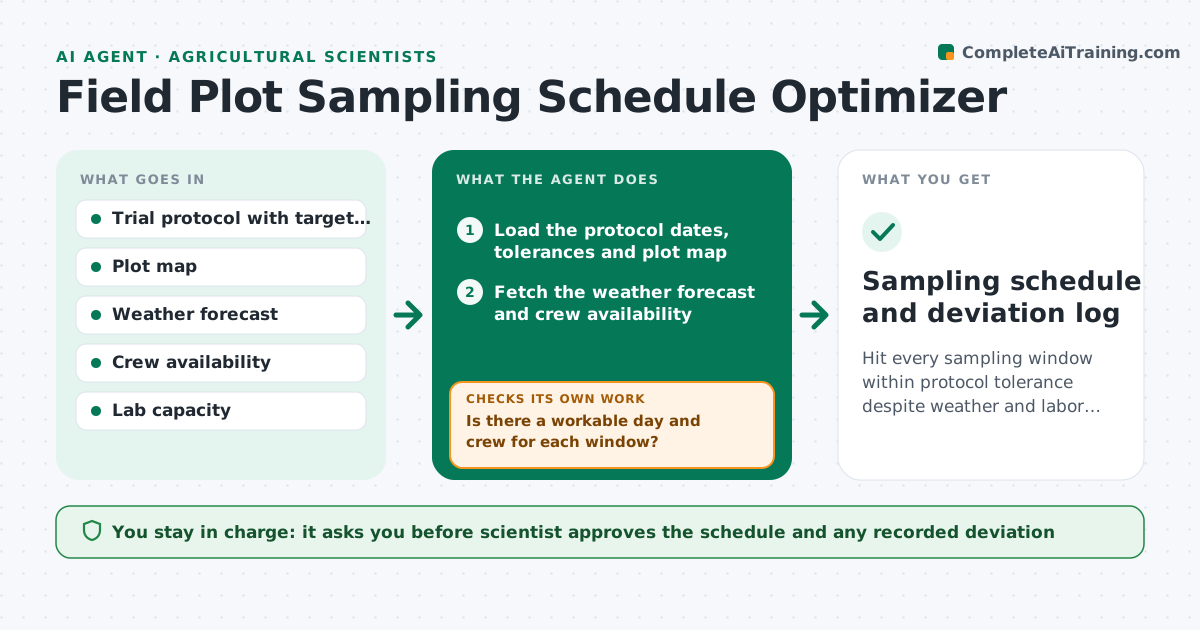
Hit every sampling window within protocol tolerance despite weather and labor limits
What it does
A field trial requires soil and plant samples at set growth stages, and a rainy week or a short crew can push sampling outside the protocol window. The data then cannot be compared. This agent plans the sampling. It reads the protocol dates and allowed tolerance, the weather forecast and the crew calendar, and schedules each sampling window. When the weather changes, it reschedules and checks that each date stays within the protocol's timing tolerance. It also notes lab capacity for sample processing. The scientist approves the schedule. Edge case: the only workable day is a day after the tolerance window. The agent flags a protocol deviation to record.
How it works
Follow the arrows from top to bottom. The orange dashed arrow is the loop: when a check fails, the agent goes back and tries again.
Read the steps as a list
- Trial season starts or a window nears
- Load the protocol dates, tolerances and plot map
- Fetch the weather forecast and crew availability
- List the days inside each tolerance window where sampling is possible
- Is there a workable day and crew for each window?If not: Propose the least bad day, add crew options and flag a deviation. Back to step 4.
- Check lab capacity for the sample load per day
- Draft the schedule with backup days
- Scientist approves the scheduleThe agent waits here for your OK.
- Notify the crew and lab
- Does the forecast update keep each date workable and within tolerance?If not: Reschedule and notify the crew and the scientist. Back to step 4.
- Sampling schedule and deviation log
How it decides
It picks days inside the tolerance window when conditions allow sampling and crew is available. If none exist, it proposes the least bad day and records a deviation.
- Sampling happens only on days meeting the soil and rain conditions
- Dates must stay within the protocol tolerance
- A date outside tolerance is recorded as a deviation
- No more than the lab's daily sample limit per day
Make it yours
Every agent is a starting point. You choose these settings for your own situation.
- Tolerance per growth stage
- Weather conditions allowed for sampling
- Crew size and calendar
- Lab daily limit
- Forecast sources
What keeps you in control
It always asks you first
- Scientist approves the schedule and any recorded deviation
Hard limits
- Never changes protocol tolerance
- Does not skip a window without approval
It stops when
- Done: all windows sampled within tolerance
- Stop: crew cannot cover a critical window, ask the scientist for options
Set it up
We guide you through the set-up, step by step
Members get the full set-up guide for this agent. No technical skills needed: you copy, paste and upload.
- One set of instructions to paste into your AI, with the clicks for ChatGPT, Claude, Microsoft 365 Copilot, Gemini and Grok
- The agent then walks you through connecting your own data, one source at a time
- A downloadable copy with the flow chart, the rules and the full guide