AI agent for embedded systems engineers
Firmware Interrupt Latency Regression Agent
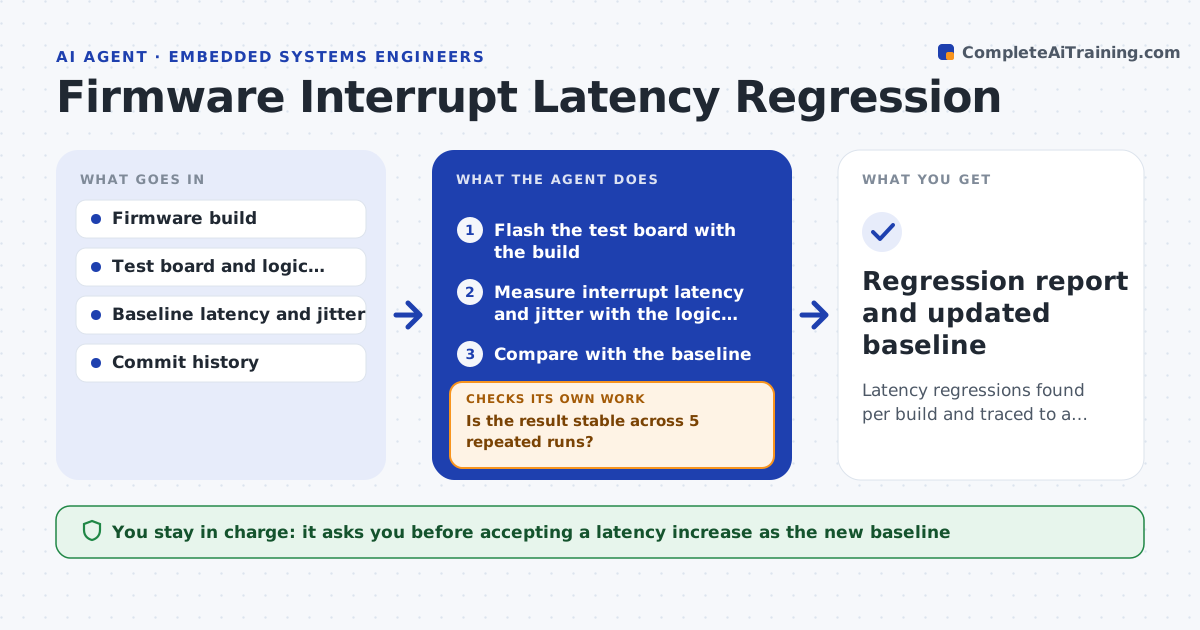
Latency regressions found per build and traced to a specific commit with measurements
What it does
A small change in a driver can add 40 microseconds to an interrupt that has a 100 microsecond budget, and nobody notices until the product misbehaves. On each build this agent flashes a test board and measures interrupt latency and jitter with a logic analyzer, running the same stimulus each time. It compares results with the stored baseline. When the numbers grow past the allowed margin, it bisects the commits between the last good build and the current one, flashing and measuring at each step, until it finds the offending change. It then reports the commit, the measured difference and likely cause. The engineer decides whether to fix it or accept the cost. Edge case: a result outside the baseline on only one run is repeated before it is trusted.
How it works
Follow the arrows from top to bottom. The orange dashed arrow is the loop: when a check fails, the agent goes back and tries again.
Read the steps as a list
- New firmware build
- Flash the test board with the build
- Measure interrupt latency and jitter with the logic analyzer
- Is the result stable across 5 repeated runs?If not: rerun the measurement after a board reset and discard outliers. Back to step 3.
- Compare with the baseline
- Is latency within the allowed margin?If not: start a bisect between the last good and the current build. Back to step 2.
- Flash and measure the midpoint commit
- Narrow the range until one commit is found
- Write a report with the commit, numbers and likely cause
- Engineer approves a fix or accepts the costThe agent waits here for your OK.
- Regression report and updated baseline
How it decides
A regression is a median or worst-case latency beyond the margin over baseline in repeated runs. Bisection continues until one commit is isolated.
- Call a regression when median latency rises over 10 percent or worst case exceeds the budget
- Run each measurement 5 times
- Bisect only when the first and last build clearly differ
- Update the baseline only with an approved change
Make it yours
Every agent is a starting point. You choose these settings for your own situation.
- Latency margin over baseline (default 10 percent)
- Repeats per measurement (default 5)
- Interrupts and signals to measure
- Test board and capture settings
What keeps you in control
It always asks you first
- Accepting a latency increase as the new baseline
- Any fix merged into the firmware
Hard limits
- Never changes firmware source
- Never updates the baseline without approval
It stops when
- Done: the regressing commit is identified or the build passes
- Stop: the board fails to flash or measure after 2 resets
Set it up
We guide you through the set-up, step by step
Members get the full set-up guide for this agent. No technical skills needed: you copy, paste and upload.
- One set of instructions to paste into your AI, with the clicks for ChatGPT, Claude, Microsoft 365 Copilot, Gemini and Grok
- The agent then walks you through connecting your own data, one source at a time
- A downloadable copy with the flow chart, the rules and the full guide