AI agent for transportation managers
Fleet Emissions Reporting Agent
Accurate emissions report with reduction ideas
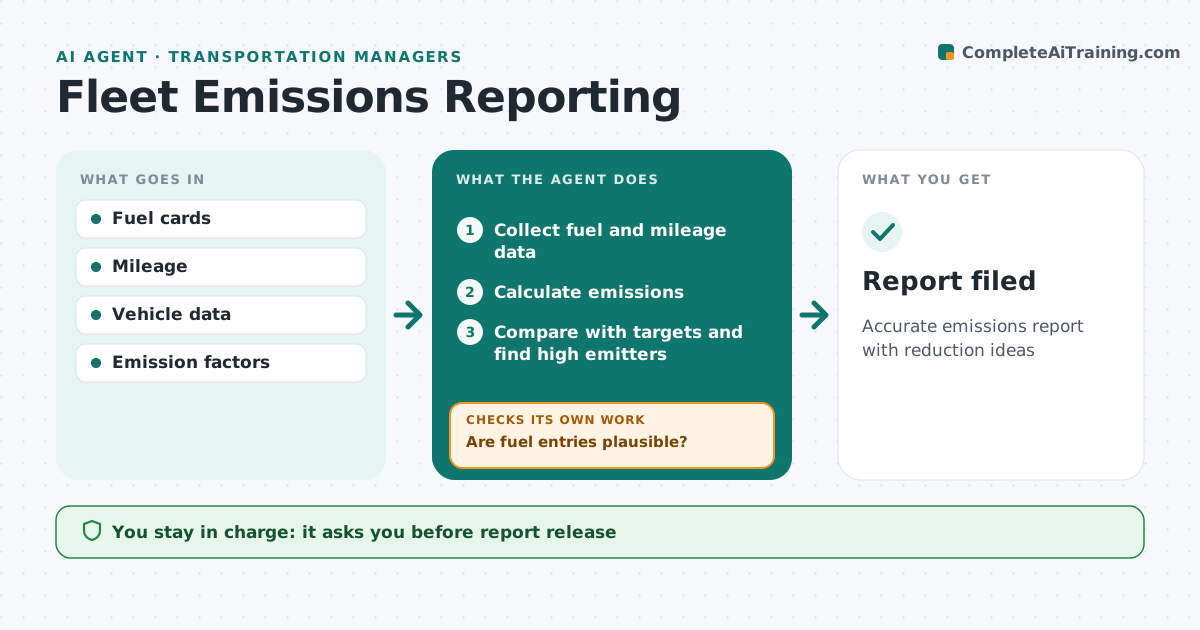
What it does
Companies must report transport emissions to customers and regulators, and bad fuel data makes the numbers unreliable. Each month this agent collects fuel card data, mileage and vehicle types. It first checks entries are plausible, such as fuel volumes larger than the tank, and sends anomalies to the fuel card team before calculating. It then calculates emissions with approved factors only, compares with last period and targets, and finds the top 10% of emitters per km. For those it suggests actions like driver coaching or replacement. It drafts the report with charts and notes. The manager approves the report before it is filed. Edge case: a vehicle switched to biodiesel, so the agent applies the right factor for that fuel.
How it works
Follow the arrows from top to bottom. The orange dashed arrow is the loop: when a check fails, the agent goes back and tries again.
Read the steps as a list
- Month ends
- Collect fuel and mileage data
- Are fuel entries plausible?If not: send anomalies to fuel card team. Back to step 2.
- Calculate emissions
- Compare with targets and find high emitters
- Draft report
- Manager approves reportThe agent waits here for your OK.
- Report filed
How it decides
It calculates emissions with approved factors and flags anomalies.
- Fuel over tank size flagged
- Approved factors only
- High emitters top 10%
Make it yours
Every agent is a starting point. You choose these settings for your own situation.
- Emission factors
- Targets
- Report format
- High emitter threshold
What keeps you in control
It always asks you first
- Report release
Hard limits
- Approved factors
- No driver penalties
It stops when
- Done: report filed
- Stop: data missing
Set it up
We guide you through the set-up, step by step
Members get the full set-up guide for this agent. No technical skills needed: you copy, paste and upload.
- One set of instructions to paste into your AI, with the clicks for ChatGPT, Claude, Microsoft 365 Copilot, Gemini and Grok
- The agent then walks you through connecting your own data, one source at a time
- A downloadable copy with the flow chart, the rules and the full guide