AI agent for fraud analysts
Fraud Alert Triage Agent
Alerts ranked with evidence so analysts work real fraud first
What it does
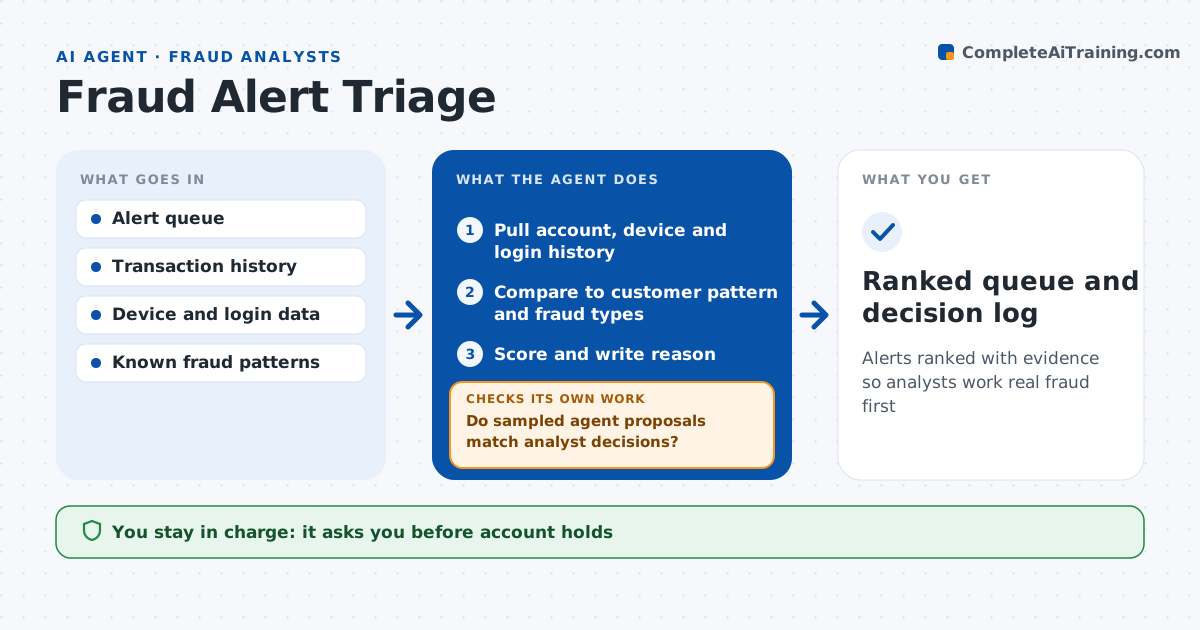
Fraud teams face hundreds of alerts a day, and real attacks can sit in the queue behind false alarms. Each hour this agent works through new alerts. For each one it pulls account history, device and location data, recent changes such as new payees or password resets, and linked accounts. It compares the activity to the customer's normal pattern and known fraud patterns, then gives each alert a priority and a short reason. Low-risk alerts with a clear normal explanation are proposed for closing. High-risk ones go to the top with a suggested action such as a temporary hold. Analysts approve every hold and closure. Each week it samples its closed proposals against analyst decisions and tightens its rules if agreement drops below 90%. Edge case: a customer logs in from a new country where their card was also just used, so the risk drops.
How it works
Follow the arrows from top to bottom. The orange dashed arrow is the loop: when a check fails, the agent goes back and tries again.
Read the steps as a list
- New alerts in queue
- Pull account, device and login history
- Compare to customer pattern and fraud types
- Score and write reason
- Analyst approves closures and holdsThe agent waits here for your OK.
- Do sampled agent proposals match analyst decisions?If not: adjust scoring rules and rescore open alerts. Back to step 3.
- Ranked queue and decision log
How it decides
It scores each alert on how far activity departs from the customer's pattern and how closely it matches known fraud types.
- New payee plus new device within 24 hours: high priority
- Activity matches travel pattern: lower priority
- Agreement with analysts under 90%: review rules
Make it yours
Every agent is a starting point. You choose these settings for your own situation.
- Priority rules
- Sample size for quality checks
- Run frequency
- Actions it may suggest
What keeps you in control
It always asks you first
- Account holds
- Closing alerts
Hard limits
- Never blocks an account without approval
- Never contacts customers
It stops when
- Done: queue ranked
- Stop: data feeds down
Set it up
We guide you through the set-up, step by step
Members get the full set-up guide for this agent. No technical skills needed: you copy, paste and upload.
- One set of instructions to paste into your AI, with the clicks for ChatGPT, Claude, Microsoft 365 Copilot, Gemini and Grok
- The agent then walks you through connecting your own data, one source at a time
- A downloadable copy with the flow chart, the rules and the full guide