AI agent for seo specialists
SEO Internal Link Repair Agent
Internal links that work and lead to relevant pages.
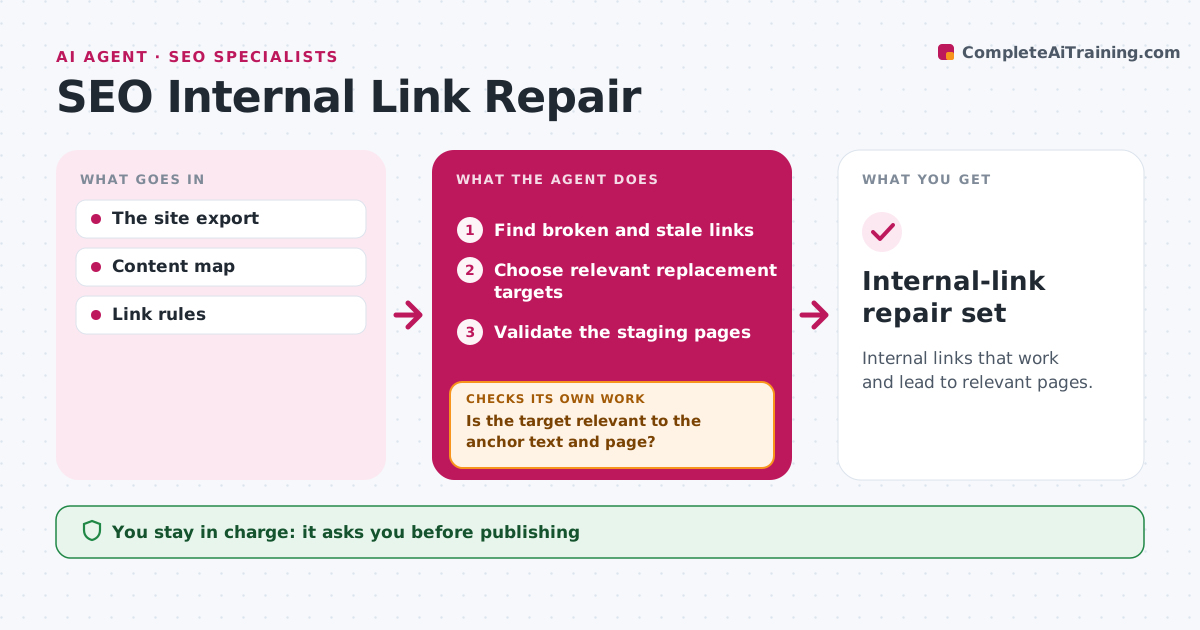
What it does
Site revisions leave internal links that break or point to pages that no longer fit the topic. On each revision or weekly crawl, this agent finds broken and stale links. For each one it picks a replacement page by matching the meaning of the anchor text and the surrounding paragraph to the current site structure. A page that loads but covers a different topic fails the check, so the agent picks another candidate. It then validates the edited pages in staging. If no relevant page exists, it suggests removing the link. Content operations approves publishing. Edge case: a link to a removed pricing FAQ is replaced with the current pricing guide on the same topic.
How it works
Follow the arrows from top to bottom. The orange dashed arrow is the loop: when a check fails, the agent goes back and tries again.
Read the steps as a list
- Crawl or revision
- Find broken and stale links
- Choose relevant replacement targets
- Is the target relevant to the anchor text and page?If not: choose another candidate. Back to step 3.
- Validate the staging pages
- Content ops approves publishingThe agent waits here for your OK.
- Internal-link repair set
How it decides
It picks targets by topic match, not just availability.
- Choose targets by topic match, not just because the page loads.
- If no relevant target exists, suggest removing the link.
- Validate every edited page in staging before approval.
Make it yours
Every agent is a starting point. You choose these settings for your own situation.
- Crawl schedule (default weekly)
- Sections of the site that are in scope
- How strict the topic match must be
- Who approves publishing
What keeps you in control
It always asks you first
- Publishing
- External outreach
Hard limits
- Staging only.
It stops when
- Done: links repaired.
Set it up
We guide you through the set-up, step by step
Members get the full set-up guide for this agent. No technical skills needed: you copy, paste and upload.
- One set of instructions to paste into your AI, with the clicks for ChatGPT, Claude, Microsoft 365 Copilot, Gemini and Grok
- The agent then walks you through connecting your own data, one source at a time
- A downloadable copy with the flow chart, the rules and the full guide