AI agent for laboratory technicians
Freezer Excursion Impact Agent
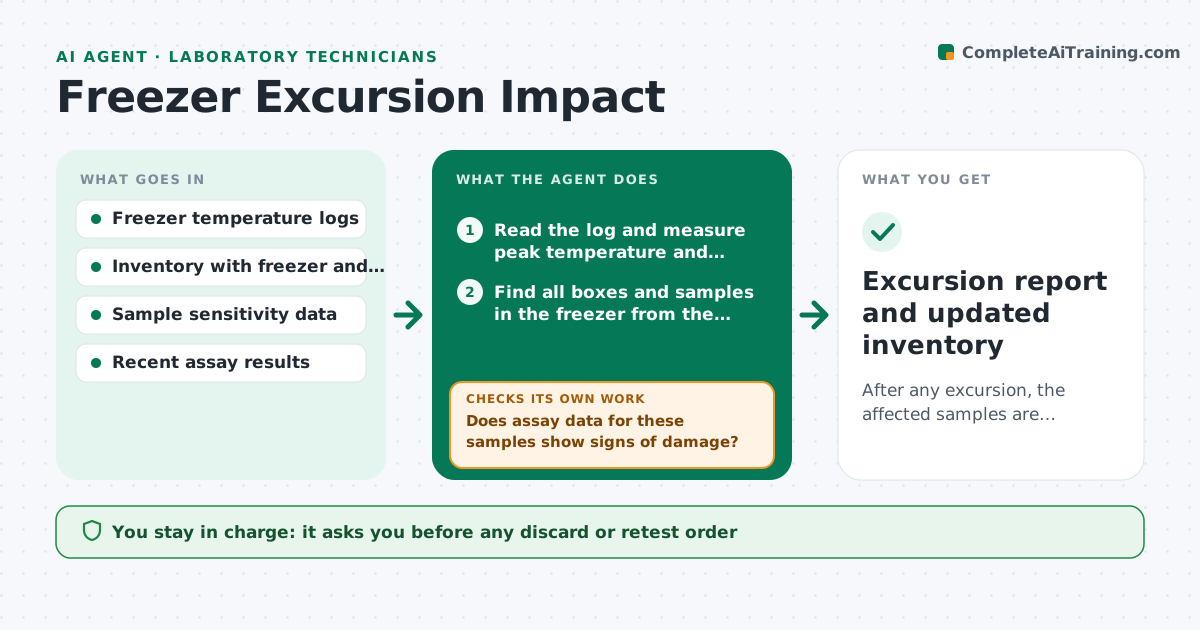
After any excursion, the affected samples are identified, assessed and decided on within a day.
What it does
A freezer alarm goes off at 3 a.m., someone resets it, and nobody knows which samples were affected. This agent reads the freezer temperature logs and finds each excursion by size and duration. It looks up the affected freezer in the inventory to find every box and sample inside, rated by position and how sensitive the material is, such as enzymes versus DNA. It checks later assay data for signs of damage, like falling activity, and builds a quarantine list. You approve what to discard, keep or retest. After retests it updates the list. Edge case: samples in an ultralow freezer with a door-open spike of under 5 minutes are rated low risk.
How it works
Follow the arrows from top to bottom. The orange dashed arrow is the loop: when a check fails, the agent goes back and tries again.
Read the steps as a list
- Temperature outside limit detected
- Read the log and measure peak temperature and duration
- Find all boxes and samples in the freezer from the inventory
- Rate each sample's risk by sensitivity and exposure
- Does assay data for these samples show signs of damage?If not: request a quick activity test on a sentinel sample and reassess. Back to step 4.
- Build the quarantine list with risk ratings
- Scientist approves discard, keep or retest decisionsThe agent waits here for your OK.
- Read retest results
- Did retested samples stay within acceptance limits?If not: raise the risk for similar samples and extend the quarantine. Back to step 4.
- Update the inventory with decisions and record the incident
- Excursion report and updated inventory
How it decides
Risk depends on peak temperature, time above the limit and the sensitivity of each sample type. Higher risk goes to retest or discard.
- Peak above minus 60 degrees for over 30 minutes in an ultralow freezer: rate enzymes and proteins high risk
- Door spike under 5 minutes: low risk, log only
- Sample has no backup copy: retest before any discard
- Same freezer excursion twice in a month: recommend a service call
Make it yours
Every agent is a starting point. You choose these settings for your own situation.
- Temperature limit and duration by freezer
- Sample sensitivity classes
- Door spike allowance in minutes
- Acceptance criteria for retests
- Alert recipients
What keeps you in control
It always asks you first
- Any discard or retest order
- Moving samples out of quarantine
Hard limits
- Never discard samples
- Never edit raw temperature data
It stops when
- Done: all affected samples decided
- Stop: log data missing, ask staff for readings
Set it up
We guide you through the set-up, step by step
Members get the full set-up guide for this agent. No technical skills needed: you copy, paste and upload.
- One set of instructions to paste into your AI, with the clicks for ChatGPT, Claude, Microsoft 365 Copilot, Gemini and Grok
- The agent then walks you through connecting your own data, one source at a time
- A downloadable copy with the flow chart, the rules and the full guide