AI agent for receptionists
Front Desk Daily Briefing Agent
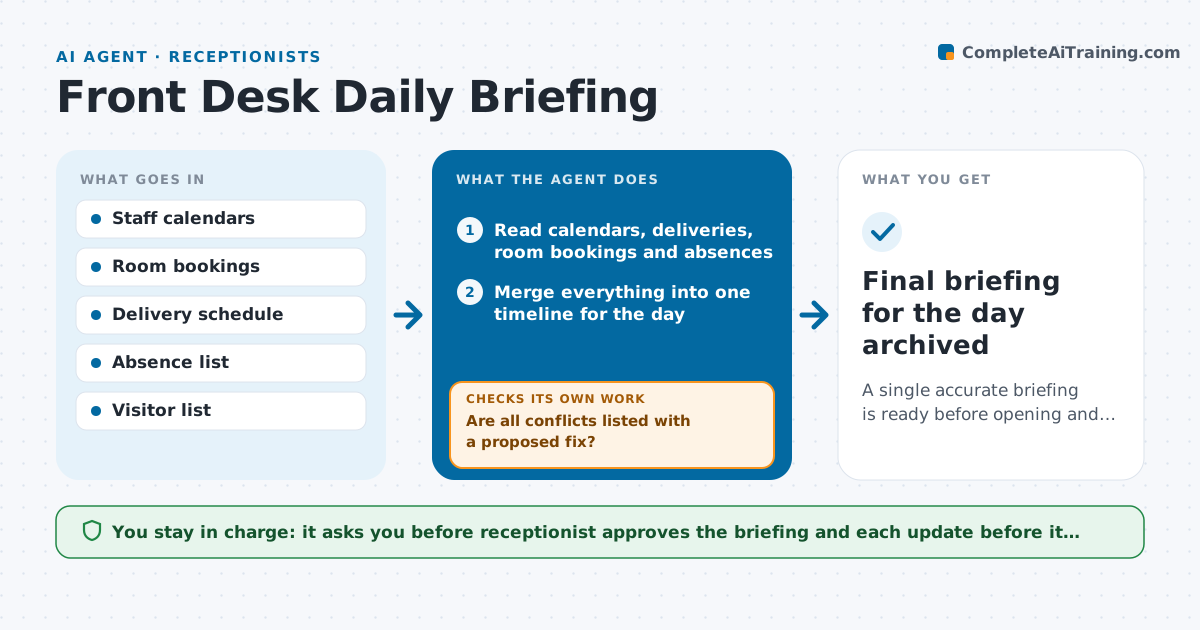
A single accurate briefing is ready before opening and stays correct as the day changes.
What it does
Each morning the receptionist opens calendars, a delivery sheet, the room booking system and an absence list to see what the day holds. The agent does the gathering. It reads all four sources, builds one briefing with meetings, visitors, deliveries, room use and who is out, and flags conflicts such as a room booked twice, a delivery arriving while the receptionist is on a break, or a visitor meeting with a host marked absent. After the briefing goes out it keeps rechecking every hour and updates the document when something changes. It also decides what is urgent and puts it at the top. The receptionist approves the final briefing before it is shared. Edge case: a last minute absence that cancels three visitor meetings.
How it works
Follow the arrows from top to bottom. The orange dashed arrow is the loop: when a check fails, the agent goes back and tries again.
Read the steps as a list
- Morning run
- Read calendars, deliveries, room bookings and absences
- Merge everything into one timeline for the day
- Check for conflicts between visitors, hosts, rooms and absences
- Are all conflicts listed with a proposed fix?If not: Mark each unresolved item and note what information is missing. Back to step 4.
- Rank items by urgency and put the top five first
- Receptionist reviews and approves the briefingThe agent waits here for your OK.
- Share the briefing with the team
- Recheck sources each hour for changes
- Has anything changed since the last version?If not: Rebuild the affected items, mark changes and ask for approval of the update. Back to step 9.
- Final briefing for the day archived
How it decides
It ranks each item by how soon it affects someone and how hard it is to fix, and raises conflicts above routine entries.
- A host who is absent triggers a flag on all their meetings
- A room double booked is a top item
- Deliveries are flagged when no one is assigned to receive them
- Re-send the briefing only when something changes
Make it yours
Every agent is a starting point. You choose these settings for your own situation.
- Sources to read
- Time of the morning run (default 7:30)
- Update frequency (default hourly)
- Who receives the briefing
- What counts as urgent
What keeps you in control
It always asks you first
- Receptionist approves the briefing and each update before it is shared
Hard limits
- Never share personal absence reasons
- Do not change bookings itself
It stops when
- Done: briefing approved and shared, hourly checks complete at close
- Stop: a source cannot be read and the receptionist must supply it
Set it up
We guide you through the set-up, step by step
Members get the full set-up guide for this agent. No technical skills needed: you copy, paste and upload.
- One set of instructions to paste into your AI, with the clicks for ChatGPT, Claude, Microsoft 365 Copilot, Gemini and Grok
- The agent then walks you through connecting your own data, one source at a time
- A downloadable copy with the flow chart, the rules and the full guide