AI agent for fundraisers
Fundraising Event Sponsor Fulfillment Agent
Deliver every promised sponsor benefit and report it back
What it does
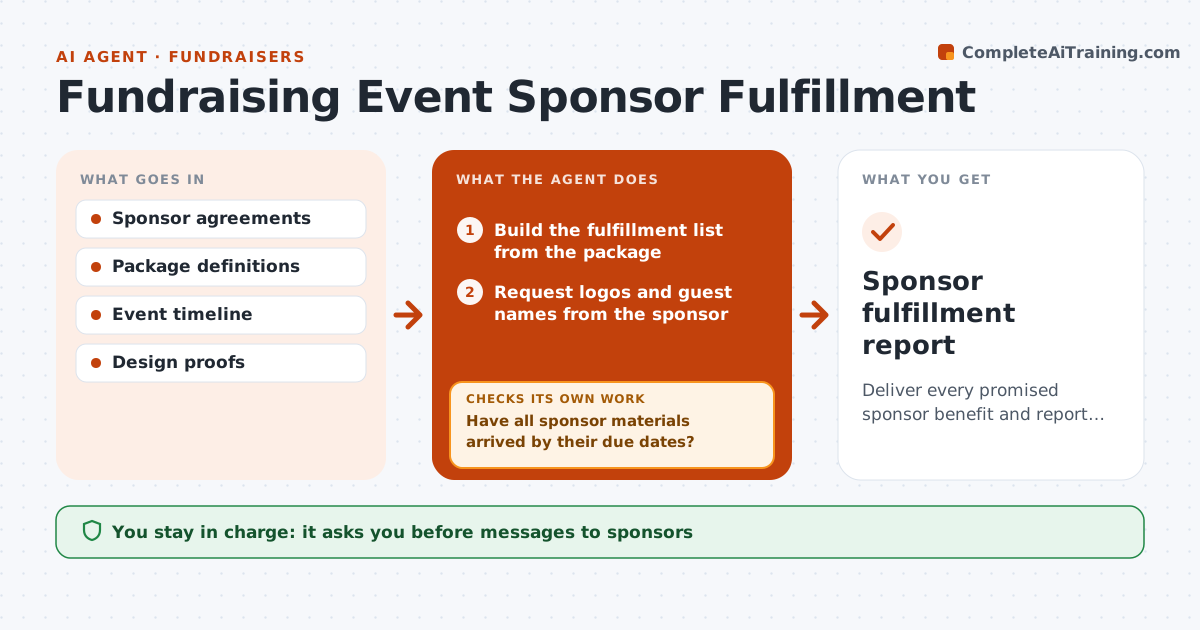
Event sponsors pay for specific benefits, and missing one hurts the relationship and next year's renewal. This agent reads each sponsor's package and builds a fulfillment list: logo on signage and website, ticket count, program ad and stage mention, each with a due date. It requests logos six weeks before the print deadline and asks for guest names. It tracks what has arrived and checks signage, website and program proofs for each sponsor's logo, exact name and level. Missing items get a reminder, and errors go back to the designer, with proofs checked again. After the event it drafts a thank-you report showing how each benefit was delivered. The fundraiser approves sponsor messages and final proofs. Edge case: a sponsor who upgrades after printing gets a digital recognition plan instead.
How it works
Follow the arrows from top to bottom. The orange dashed arrow is the loop: when a check fails, the agent goes back and tries again.
Read the steps as a list
- Sponsorship confirmed
- Build the fulfillment list from the package
- Request logos and guest names from the sponsor
- Have all sponsor materials arrived by their due dates?If not: send reminders for missing items. Back to step 3.
- Check signage, website and program proofs
- Is every benefit present with the exact name and level?If not: send corrections to the designer and recheck proofs. Back to step 5.
- Fundraiser approves sponsor messages and final proofsThe agent waits here for your OK.
- Draft post-event thank-you reports
- Sponsor fulfillment report
How it decides
Each benefit becomes a task with a due date. Proofs must show the exact sponsor name and level.
- Logo requests go out 6 weeks before print deadline
- Name spelling must match the agreement
- Late upgrades get digital recognition
Make it yours
Every agent is a starting point. You choose these settings for your own situation.
- Package benefit list
- Reminder timing
- Report format
- Proof checks required
What keeps you in control
It always asks you first
- Messages to sponsors
- Final print proofs
Hard limits
- Never changes sponsor agreements
- Never sends to sponsors without approval
It stops when
- Done: report sent
- Stop: sponsorship cancelled
Set it up
We guide you through the set-up, step by step
Members get the full set-up guide for this agent. No technical skills needed: you copy, paste and upload.
- One set of instructions to paste into your AI, with the clicks for ChatGPT, Claude, Microsoft 365 Copilot, Gemini and Grok
- The agent then walks you through connecting your own data, one source at a time
- A downloadable copy with the flow chart, the rules and the full guide