AI agent for traders
Futures Roll Agent
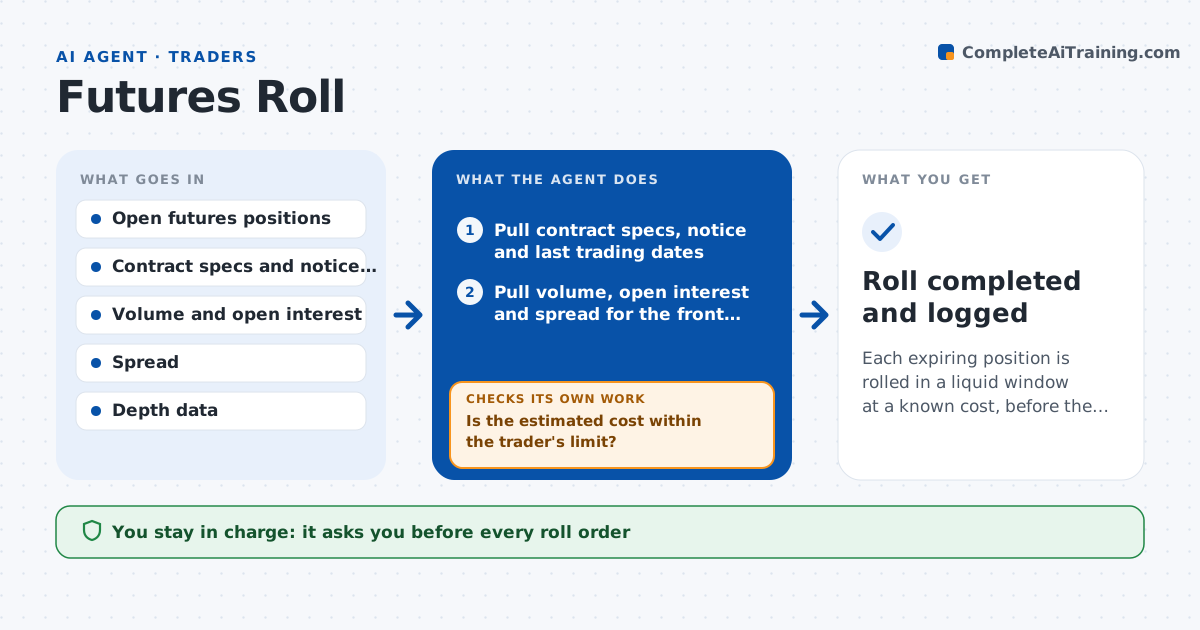
Each expiring position is rolled in a liquid window at a known cost, before the notice or expiry date
What it does
A futures position needs to move to the next contract before expiry, and rolling too early or too late costs money. Volume migrates to the next contract at different times, and the spread between the two contracts changes the cost. This agent tracks each position's expiry and notice dates. Every day it compares volume and open interest between the front and next contract and watches the calendar spread. It proposes a roll window and size, then estimates the cost using bid and ask depth for both legs and checks that the next contract can absorb the size without a large move. If liquidity changes and the cost rises, it recalculates and adjusts the proposal. It warns before first notice or last trading day. The trader approves every order. Edge case: a physically delivered contract has a notice date earlier than expiry, and the agent uses that date.
How it works
Follow the arrows from top to bottom. The orange dashed arrow is the loop: when a check fails, the agent goes back and tries again.
Read the steps as a list
- A position is 10 days from its notice date
- Pull contract specs, notice and last trading dates
- Pull volume, open interest and spread for the front and next contract
- Estimate the best roll window from volume migration
- Calculate the roll cost from spread and depth for the position size
- Is the estimated cost within the trader's limit?If not: split the roll into parts or move the window and recalculate. Back to step 3.
- Write the roll proposal with timing, size and cost
- Trader approves the roll orderThe agent waits here for your OK.
- Check fills and the new position after the order
- Does the new position match the old size and the intended contract?If not: alert the trader with the difference and propose a correcting order. Back to step 8.
- Roll completed and logged
How it decides
It recommends rolling when next-contract volume exceeds the front or the notice date is near, and it sizes the roll to the displayed depth to keep slippage low.
- Roll when next-contract volume exceeds the front contract
- Never hold a physically delivered contract past its notice date
- Split rolls above 10% of displayed depth
- Alert 3 days before the notice date
Make it yours
Every agent is a starting point. You choose these settings for your own situation.
- Cost limit (default 4 cents per barrel or an amount you set)
- Days before notice to start
- Contracts tracked
- Order splitting rule
What keeps you in control
It always asks you first
- Every roll order
Hard limits
- Never places orders
- Warns before any notice date
- Marks cost estimates as estimates
It stops when
- Done: position is rolled and matches the target
- Stop: data is stale or the notice date is passed
Set it up
We guide you through the set-up, step by step
Members get the full set-up guide for this agent. No technical skills needed: you copy, paste and upload.
- One set of instructions to paste into your AI, with the clicks for ChatGPT, Claude, Microsoft 365 Copilot, Gemini and Grok
- The agent then walks you through connecting your own data, one source at a time
- A downloadable copy with the flow chart, the rules and the full guide