AI agent for students
Grade Target and Final Score Planner Agent
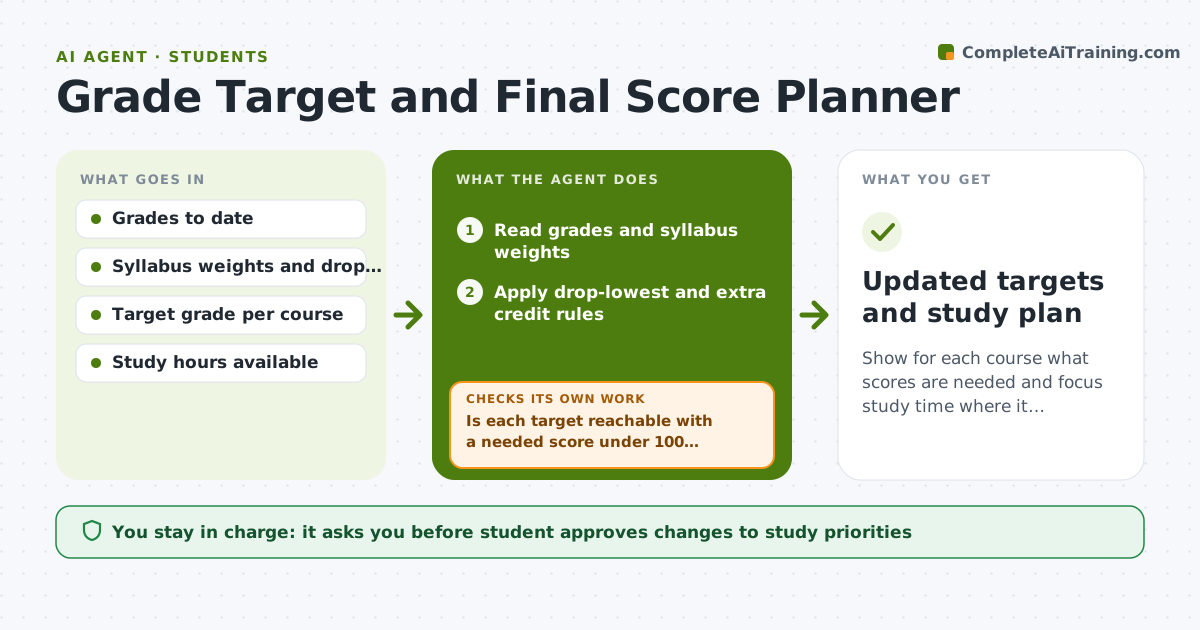
Show for each course what scores are needed and focus study time where it improves outcomes most
What it does
A student has a 78 percent in a course and wants a B plus, but no idea what the final must score. This agent reads the grades so far and the syllabus weights. For each course it calculates the scores needed on every remaining item to hit the student's target and checks whether the target is realistic, for example needing 105 percent on the final is not. When a new grade arrives, it recalculates and updates the study time plan, moving hours to the course where each hour matters most. If a target is not reachable, it shows the best possible result and suggests an alternate target. The student approves changes to study priorities. Edge case: if a professor drops the lowest quiz, it applies that rule before calculating.
How it works
Follow the arrows from top to bottom. The orange dashed arrow is the loop: when a check fails, the agent goes back and tries again.
Read the steps as a list
- New grade posted or term begins
- Read grades and syllabus weights
- Apply drop-lowest and extra credit rules
- Calculate the scores needed on remaining items for each target
- Is each target reachable with a needed score under 100 percent?If not: Show the best possible grade and suggest a realistic alternate target. Back to step 3.
- Allocate study hours across courses by marginal gain
- Does the plan fit the student's weekly hours?If not: Reduce hours in courses already safe and recheck. Back to step 6.
- Student approves changes to study prioritiesThe agent waits here for your OK.
- Updated targets and study plan
How it decides
It computes required scores on remaining items and compares them with the student's typical scores. A target is realistic only if the needed average is under 100 percent.
- Call a target unrealistic when it needs over 100 percent
- Move study hours toward courses with the largest grade effect per hour
- Apply drop and extra credit rules before calculating
- Recalculate after every new grade
Make it yours
Every agent is a starting point. You choose these settings for your own situation.
- Target grade per course (default B plus)
- Weekly study hours (default 20)
- Recalculation trigger (default each new grade)
- Drop rules applied (default per syllabus)
What keeps you in control
It always asks you first
- Student approves changes to study priorities
Hard limits
- Never alter or submit grades
- Use only the numbers the student provides
- Do not promise outcomes
It stops when
- Done: Plan approved and updated after each grade
- Stop: Term ends or the student changes targets
Set it up
We guide you through the set-up, step by step
Members get the full set-up guide for this agent. No technical skills needed: you copy, paste and upload.
- One set of instructions to paste into your AI, with the clicks for ChatGPT, Claude, Microsoft 365 Copilot, Gemini and Grok
- The agent then walks you through connecting your own data, one source at a time
- A downloadable copy with the flow chart, the rules and the full guide