AI agent for teaching assistants
Grading Consistency Agent
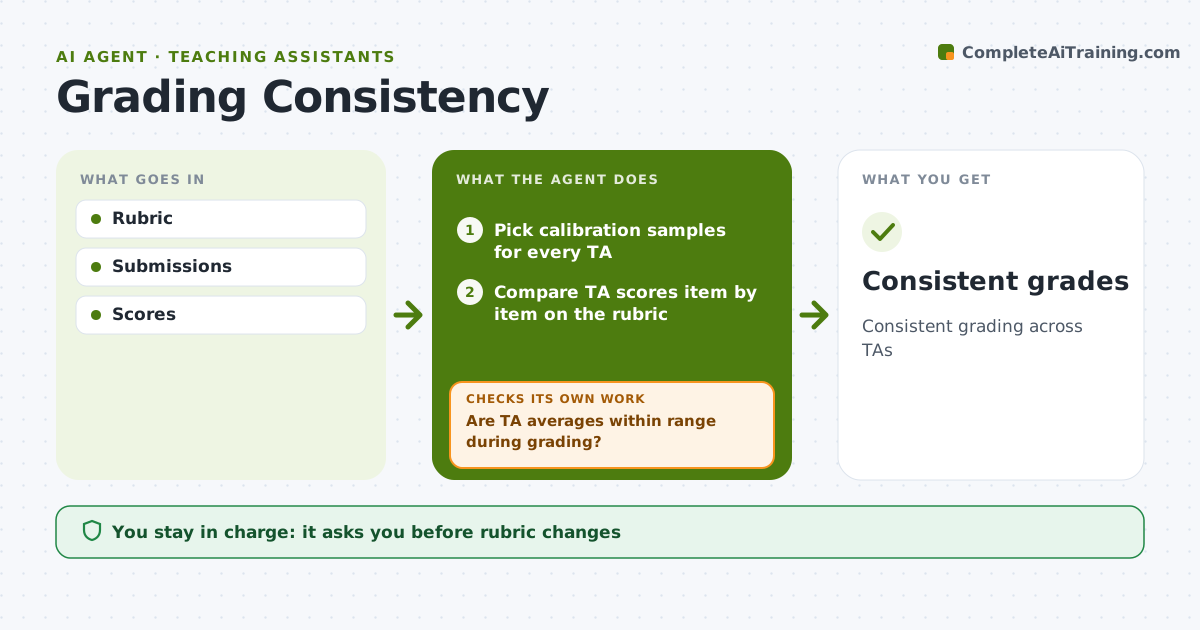
Consistent grading across TAs
What it does
When several teaching assistants grade the same assignment, scores drift and students notice. Before grading starts, this agent picks a few sample submissions for every TA to grade, compares their scores item by item on the rubric, and shows where they disagree most. A difference over one point on an item is flagged. It drafts rubric clarifications and example answers for the instructor to approve. During grading it compares each TA's average per rubric item. When one drifts out of range, it prompts a short recalibration on the shared samples and checks again on the next batch. The instructor approves rubric changes and any grade changes. Edge case: TAs grading sections with very different students are compared using the shared samples rather than raw averages, so a strong section is not mistaken for lenient grading.
How it works
Follow the arrows from top to bottom. The orange dashed arrow is the loop: when a check fails, the agent goes back and tries again.
Read the steps as a list
- Assignment due
- Pick calibration samples for every TA
- Compare TA scores item by item on the rubric
- Draft rubric clarifications and example answers
- Instructor approves rubric clarificationsThe agent waits here for your OK.
- Track each TA's average per rubric item during grading
- Are TA averages within range during grading?If not: prompt a short recalibration on shared samples. Back to step 3.
- Instructor approves final gradesThe agent waits here for your OK.
- Consistent grades
How it decides
Differences per rubric item.
- Difference over 1 point flags
- Clarify rubric
- Section differences noted
Make it yours
Every agent is a starting point. You choose these settings for your own situation.
- Sample size
- Threshold
- Rubric
- Report
What keeps you in control
It always asks you first
- Rubric changes
- Grade changes
Hard limits
- Instructor approves grades
It stops when
- Done: grades released
- Stop: none
Set it up
We guide you through the set-up, step by step
Members get the full set-up guide for this agent. No technical skills needed: you copy, paste and upload.
- One set of instructions to paste into your AI, with the clicks for ChatGPT, Claude, Microsoft 365 Copilot, Gemini and Grok
- The agent then walks you through connecting your own data, one source at a time
- A downloadable copy with the flow chart, the rules and the full guide