AI agent for travel agents
Group Booking Payment and Passenger Data Chaser Agent
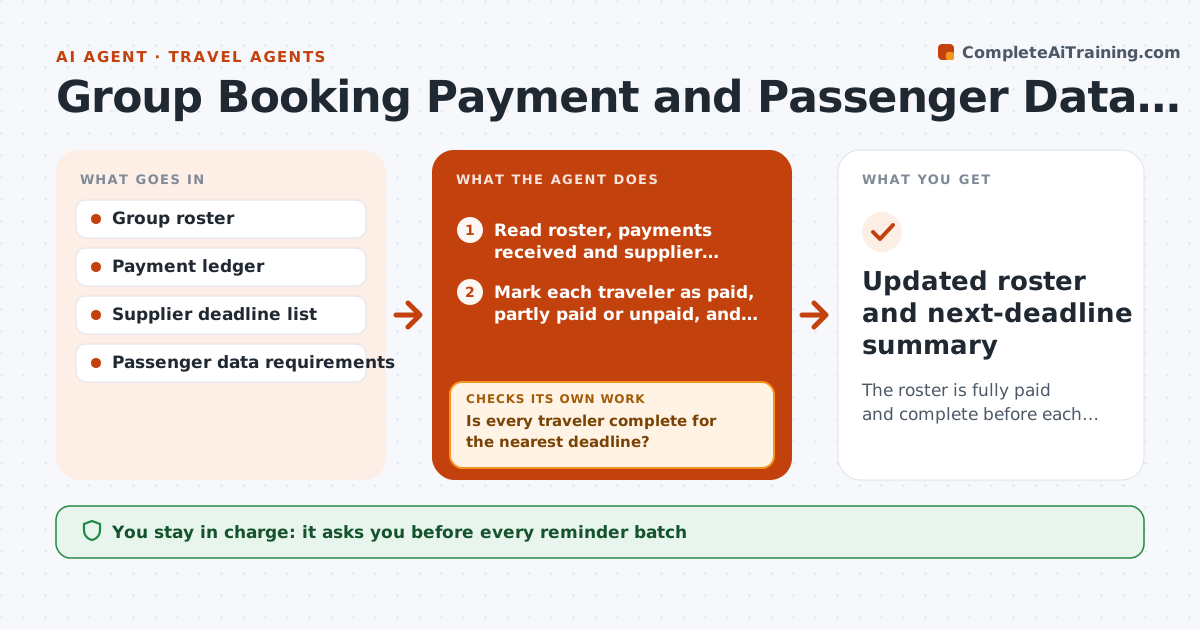
The roster is fully paid and complete before each supplier deadline, with no surprises on release dates.
What it does
A group of 38 wedding guests means 38 deposits, 38 passport names and a pile of dietary notes, all due before supplier deadlines. This agent reads the group roster and compares each traveler to what is paid and what data is complete. It also reads the supplier deadlines for rooms, seats and name changes. It drafts a reminder to each person who is missing something, written for that person and naming only what they owe. As replies arrive it updates the roster and checks completeness again against the nearest deadline. Names still missing close to a deadline are escalated to you with a clear list. The agent never releases rooms or seats itself; you approve that. Edge case: two travelers with the same surname are matched by booking reference, not name.
How it works
Follow the arrows from top to bottom. The orange dashed arrow is the loop: when a check fails, the agent goes back and tries again.
Read the steps as a list
- Daily run during collection period
- Read roster, payments received and supplier deadlines
- Mark each traveler as paid, partly paid or unpaid, and data complete or missing
- Is every traveler complete for the nearest deadline?If not: list gaps by traveler and days left, then continue to reminders. Back to step 2.
- Draft a personal reminder naming only what that traveler still owes
- Travel agent approves the reminders batchThe agent waits here for your OK.
- Read replies and new payments, update the roster
- Does passport name match the booking and the payment clear the balance?If not: flag the mismatch and draft a clarifying question. Back to step 7.
- Escalate names still missing inside the escalation window
- Travel agent decides on releasing rooms or seatsThe agent waits here for your OK.
- Updated roster and next-deadline summary
How it decides
It ranks each missing item by days to the nearest deadline. Items due within the escalation window go to the travel agent; others get a normal reminder.
- More than 14 days to the deadline: weekly reminder only
- Within 7 days: daily reminder plus escalation to the agent
- Passport name differs from the booking by any letter: hold the ticket and ask the traveler to confirm
- Payment short by under 5 dollars: accept and note it, otherwise remind for the balance
Make it yours
Every agent is a starting point. You choose these settings for your own situation.
- Reminder frequency before and inside the escalation window
- Escalation window in days (default 7)
- Data fields required per traveler
- Tone of reminders
- Late payment grace amount
What keeps you in control
It always asks you first
- Every reminder batch
- Releasing rooms or seats
- Any change to the name on a ticket
Hard limits
- Never release or cancel a room or seat without approval
- Never share one traveler's data with another
It stops when
- Done: all travelers paid and data complete
- Stop: deadline passed, agent decides next step
Set it up
We guide you through the set-up, step by step
Members get the full set-up guide for this agent. No technical skills needed: you copy, paste and upload.
- One set of instructions to paste into your AI, with the clicks for ChatGPT, Claude, Microsoft 365 Copilot, Gemini and Grok
- The agent then walks you through connecting your own data, one source at a time
- A downloadable copy with the flow chart, the rules and the full guide