AI agent for human resources specialists
Handbook Policy Conflict Finder Agent
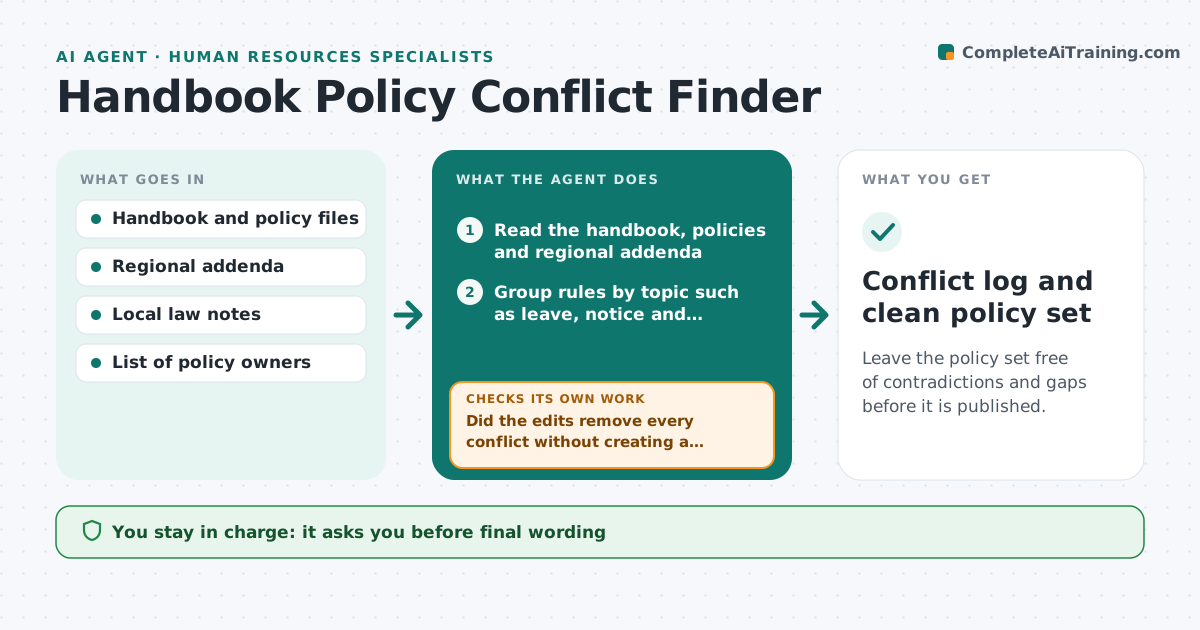
Leave the policy set free of contradictions and gaps before it is published.
What it does
Over the years a handbook grows. The leave policy says one thing, the travel policy another, and a regional addendum a third. Employees and managers find the conflict only when a dispute starts. This agent reads the handbook and linked policies, groups the rules that cover the same topic, and compares them. It lists real conflicts, such as two different notice periods, and gaps, such as a topic with no rule for one country. It adds a note on local law where a rule might fall short. Then it drafts harmonized wording for the policy owner. After the owner edits, it reads the new text and checks that no new conflict appeared. Edge case: a rule that is intentionally stricter for one region is marked as a valid exception, not a conflict.
How it works
Follow the arrows from top to bottom. The orange dashed arrow is the loop: when a check fails, the agent goes back and tries again.
Read the steps as a list
- Policy review starts
- Read the handbook, policies and regional addenda
- Group rules by topic such as leave, notice and expenses
- Compare rules inside each topic for different numbers or conditions
- Check flagged rules against the local law notes
- Draft harmonized wording for each conflict and gap
- Policy owner reviews and edits the wordingThe agent waits here for your OK.
- Reread the edited policies
- Did the edits remove every conflict without creating a new one?If not: Flag each remaining or new conflict and redraft the wording. Back to step 4.
- Owner approves publicationThe agent waits here for your OK.
- Conflict log and clean policy set
How it decides
Matches rules by topic and compares numbers, conditions and scope; a difference is a conflict unless an exception is documented in the policy.
- Different numbers on the same topic are always a conflict unless an exception is stated
- A topic with no rule for a country with employees there is a gap
- Any rule weaker than the local law note is flagged as a legal risk
- Wording changes never alter a benefit without the owner's decision
Make it yours
Every agent is a starting point. You choose these settings for your own situation.
- Policy folders to read
- Countries covered
- Topics to check first
- Formatting of the conflict log
- Who owns each policy
What keeps you in control
It always asks you first
- Final wording
- Publication of any policy
- Any change in a benefit or entitlement
Hard limits
- Never publish or change a policy itself
- Never give legal advice, only flag for review
It stops when
- Done: no conflicts or gaps remain
- Stop: a legal question needs counsel
- Stop: owner defers the change
Set it up
We guide you through the set-up, step by step
Members get the full set-up guide for this agent. No technical skills needed: you copy, paste and upload.
- One set of instructions to paste into your AI, with the clicks for ChatGPT, Claude, Microsoft 365 Copilot, Gemini and Grok
- The agent then walks you through connecting your own data, one source at a time
- A downloadable copy with the flow chart, the rules and the full guide