AI agent for plant managers
Hazardous Waste Manifest Agent
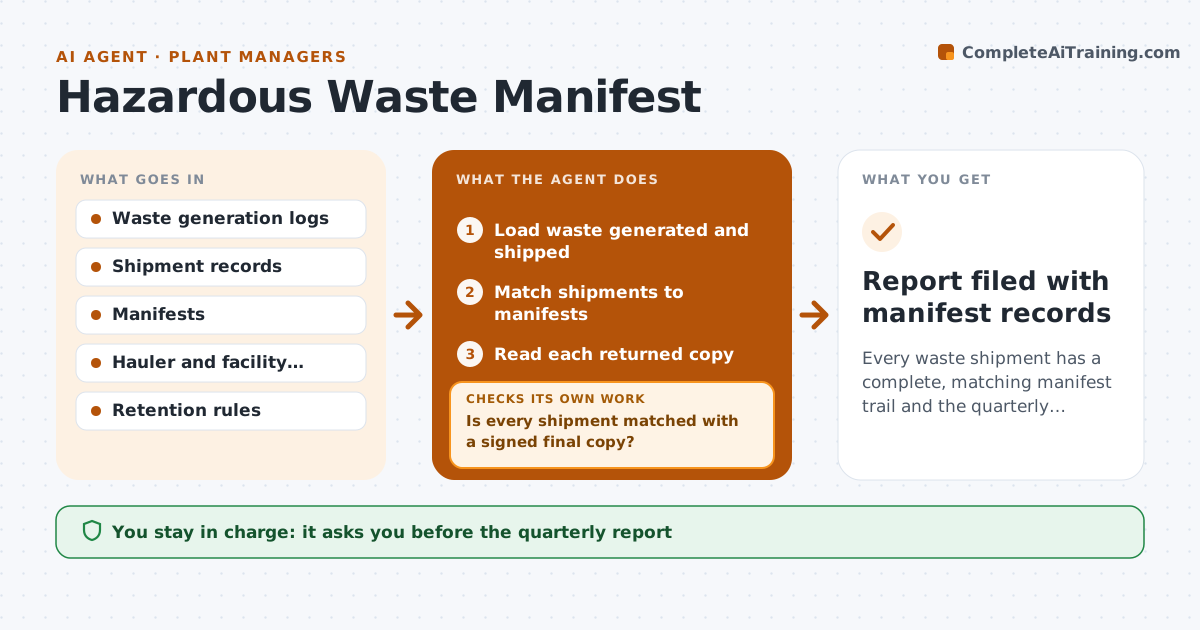
Every waste shipment has a complete, matching manifest trail and the quarterly report is ready
What it does
Waste manifests and returned copies are often incomplete when an audit comes. This agent reconciles the waste generated, the shipments and the manifests returned. It flags missing signed copies and chases the hauler or facility until the final copy arrives. It checks each returned copy for signatures, quantities and dates against the shipment record. Gaps and errors go back for correction. It then prepares the quarterly report. The manager approves the report. The tracker shows each shipment's status so the manager sees gaps before an auditor does. Edge case: a returned manifest lists a different quantity from what was shipped, so the agent requests a correction before filing it.
How it works
Follow the arrows from top to bottom. The orange dashed arrow is the loop: when a check fails, the agent goes back and tries again.
Read the steps as a list
- Weekly manifest review
- Load waste generated and shipped
- Match shipments to manifests
- Is every shipment matched with a signed final copy?If not: chase the hauler or facility and recheck on the next date. Back to step 2.
- Read each returned copy
- Do the quantities, dates and signatures match?If not: request a correction from the sender. Back to step 5.
- Update the manifest tracker
- Prepare the quarterly summary
- Manager approves the quarterly reportThe agent waits here for your OK.
- Report filed with manifest records
How it decides
A shipment is complete when the signed final copy is on file and its quantity and date match the shipment record.
- Chase a missing final copy after 35 days
- Require signature, date and quantity on every copy
- Escalate to the hauler's manager after 45 days
- Retain the records for the required period
Make it yours
Every agent is a starting point. You choose these settings for your own situation.
- Chase days (default 35 and 45)
- Waste types
- Haulers covered
- Report format
What keeps you in control
It always asks you first
- The quarterly report
- Reports to authorities
Hard limits
- Never file a report without approval
- Never edit a manifest
It stops when
- Done: all manifests matched and the report approved
- Stop: waste records are missing
Set it up
We guide you through the set-up, step by step
Members get the full set-up guide for this agent. No technical skills needed: you copy, paste and upload.
- One set of instructions to paste into your AI, with the clicks for ChatGPT, Claude, Microsoft 365 Copilot, Gemini and Grok
- The agent then walks you through connecting your own data, one source at a time
- A downloadable copy with the flow chart, the rules and the full guide