AI agent for pharmaceutical sales representatives
HCP Weekly Call Plan Agent
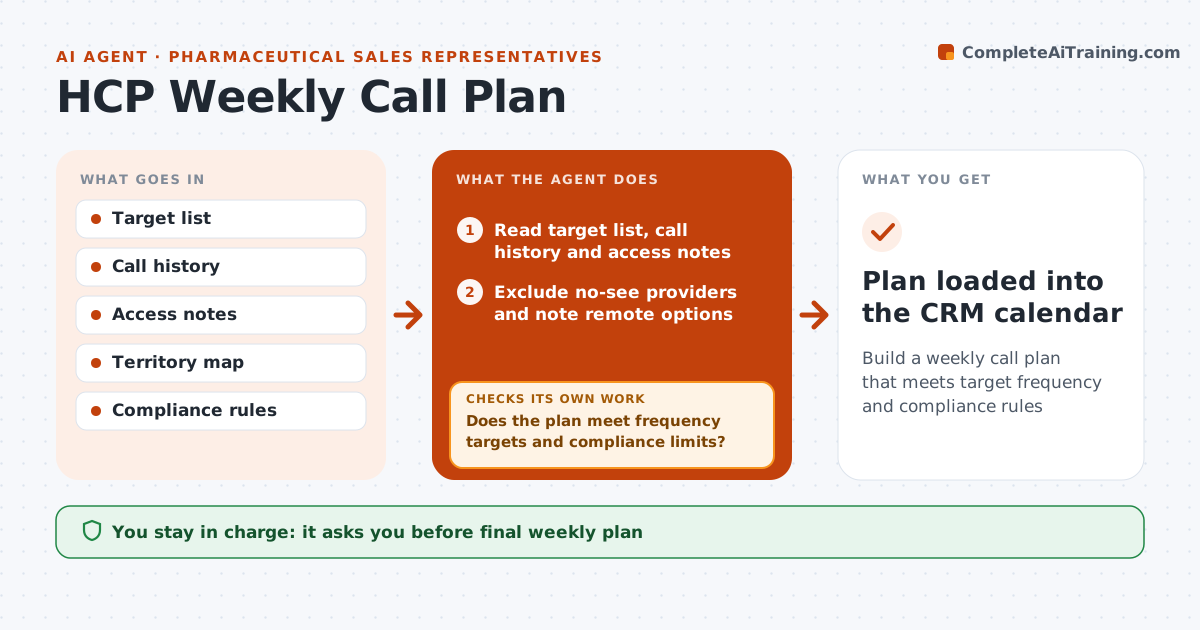
Build a weekly call plan that meets target frequency and compliance rules
What it does
Pharmaceutical reps must see the right health care providers at the right frequency, but planning routes by hand takes hours each week. Every Friday this agent reads the rep's target list with priority tiers, call history, office access notes and approved focus for the cycle. It calculates who is due by tier, such as tier 1 every 2 weeks, and excludes no-see providers, suggesting a remote option where allowed. It groups visits into daily routes that reduce driving and respect office hours. It then checks the plan meets frequency targets and compliance limits such as meal spend caps. Gaps are filled by swapping lower-priority calls for overdue ones, and limits are rechecked. The rep reviews and adjusts the plan. Edge case: a no-see provider is excluded and a remote option suggested if allowed.
How it works
Follow the arrows from top to bottom. The orange dashed arrow is the loop: when a check fails, the agent goes back and tries again.
Read the steps as a list
- Friday planning
- Read target list, call history and access notes
- Exclude no-see providers and note remote options
- Calculate who is due for a call by tier
- Group visits into daily routes within office hours
- Does the plan meet frequency targets and compliance limits?If not: swap lower priority calls for overdue ones and recheck limits. Back to step 4.
- Rep reviews the planThe agent waits here for your OK.
- Plan loaded into the CRM calendar
How it decides
Priority tiers set required call frequency. Routes minimize travel within office access windows.
- Tier 1 providers every 2 weeks
- No-see providers excluded
- Meal spend checked against caps
Make it yours
Every agent is a starting point. You choose these settings for your own situation.
- Tier frequencies
- Working hours and area
- Compliance caps
- Plan format
What keeps you in control
It always asks you first
- Final weekly plan
- Any meal or event spend
Hard limits
- Never books meals without approval
- Never contacts providers directly
It stops when
- Done: plan approved
- Stop: target list not updated for the cycle
Set it up
We guide you through the set-up, step by step
Members get the full set-up guide for this agent. No technical skills needed: you copy, paste and upload.
- One set of instructions to paste into your AI, with the clicks for ChatGPT, Claude, Microsoft 365 Copilot, Gemini and Grok
- The agent then walks you through connecting your own data, one source at a time
- A downloadable copy with the flow chart, the rules and the full guide