AI agent for vacation rental hosts
Hotel Room Inspection Evidence Agent
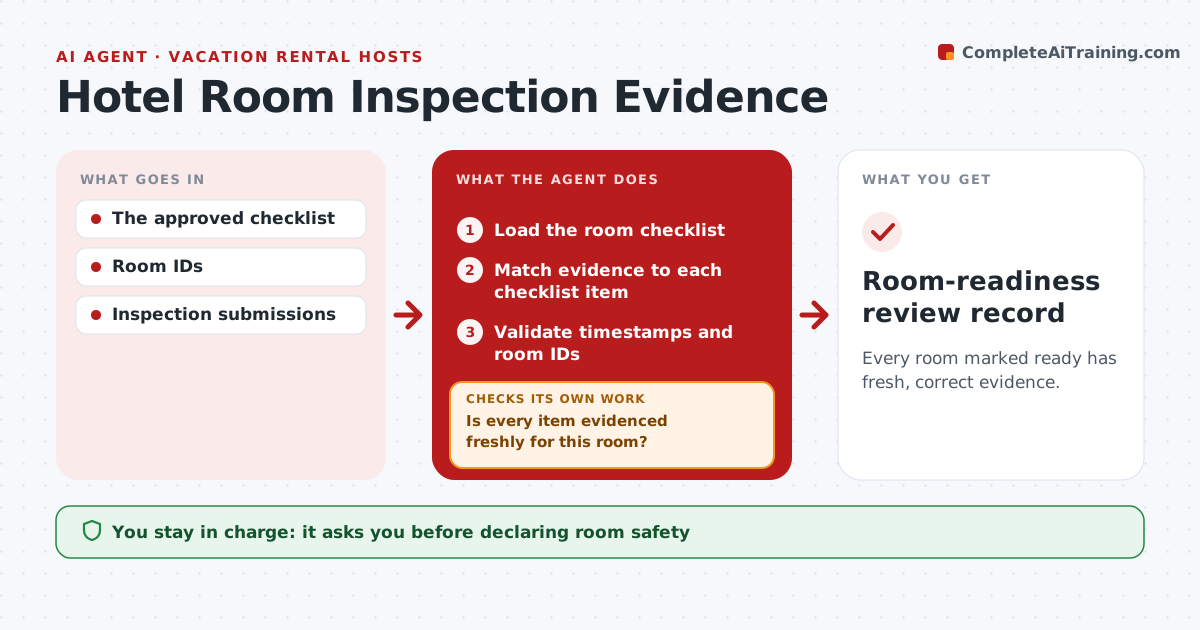
Every room marked ready has fresh, correct evidence.
What it does
Housekeeping readiness checklists often rest on weak evidence: missing photos, images reused from an earlier day, or photos of another room. When a room is marked ready, this agent checks each checklist item for evidence. It validates photo timestamps against the current turnover window and confirms the room ID shown in the photo or its metadata. For any missing, reused or wrong-room evidence, it creates a follow-up task for fresh evidence and keeps the item open. When new photos arrive, it checks again. The supervisor confirms readiness, and room safety and guest assignment stay with staff. Edge case: a photo has no timestamp at all, so it is treated as missing rather than accepted.
How it works
Follow the arrows from top to bottom. The orange dashed arrow is the loop: when a check fails, the agent goes back and tries again.
Read the steps as a list
- Room marked ready
- Load the room checklist
- Match evidence to each checklist item
- Validate timestamps and room IDs
- Is every item evidenced freshly for this room?If not: create a fresh-evidence task and keep the item open. Back to step 3.
- Summarize the room record for the supervisor
- Supervisor confirms readinessThe agent waits here for your OK.
- Room-readiness review record
How it decides
It checks the next missing item, validates timestamps and room IDs, and keeps items open when evidence is reused.
- Fresh means the timestamp falls in this turnover window.
- Correct room means the room ID matches.
- Photos without timestamps count as missing.
- Readiness is confirmed only by the supervisor.
Make it yours
Every agent is a starting point. You choose these settings for your own situation.
- Checklist items that need photo evidence
- Turnover window used for timestamps
- Minutes to wait for fresh evidence before alerting the supervisor (default 20)
- Who confirms readiness
- Record format
What keeps you in control
It always asks you first
- Declaring room safety
- Guest assignment
Hard limits
- No guest assignment.
It stops when
- Done: evidence complete.
Set it up
We guide you through the set-up, step by step
Members get the full set-up guide for this agent. No technical skills needed: you copy, paste and upload.
- One set of instructions to paste into your AI, with the clicks for ChatGPT, Claude, Microsoft 365 Copilot, Gemini and Grok
- The agent then walks you through connecting your own data, one source at a time
- A downloadable copy with the flow chart, the rules and the full guide