AI agent for restaurant managers
Food Handler Certification Expiry Agent
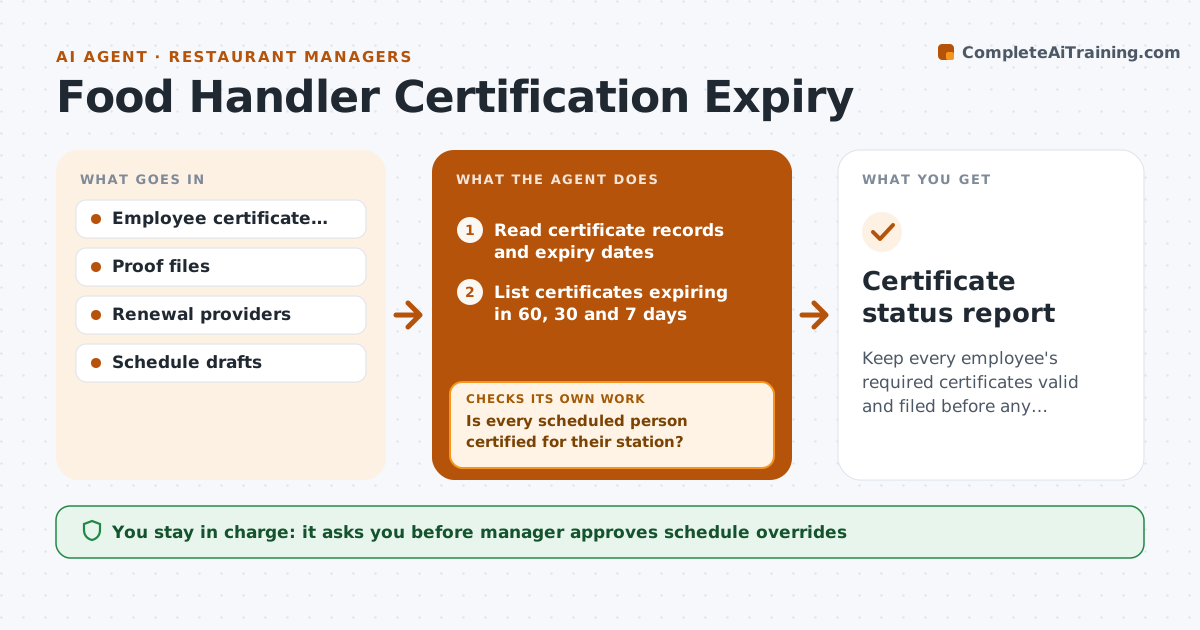
Keep every employee's required certificates valid and filed before any inspection.
What it does
A health inspector asks for the food handler card of a cook and it expired two months ago. The agent keeps a record of every employee's food handler, allergen and any alcohol service certificates, with issue and expiry dates and a copy of the proof. It warns each person and the manager at 60, 30 and 7 days before expiry, and offers booking options for renewals. After the renewal it checks that new proof has been filed with the right dates and name, and updates the record. When the schedule is built, it blocks suggestions that place a person with an expired certificate on a station that requires one. Edge case: a certificate from another region that is not valid locally. The manager approves any schedule override.
How it works
Follow the arrows from top to bottom. The orange dashed arrow is the loop: when a check fails, the agent goes back and tries again.
Read the steps as a list
- Daily expiry check
- Read certificate records and expiry dates
- List certificates expiring in 60, 30 and 7 days
- Send warnings to the employee and the manager with renewal options
- Check the schedule draft for people on stations needing a certificate
- Is every scheduled person certified for their station?If not: propose a replacement who is certified and block the unqualified shift. Back to step 4.
- Manager approves any schedule overrideThe agent waits here for your OK.
- After renewal, read the new proof file
- Does the proof show the right name, type and dates?If not: ask the employee for a correct copy. Back to step 8.
- Update the record and clear the warning
- Certificate status report
How it decides
A certificate is valid when its date has not passed and a proof file exists. Station rules say which roles need which certificate.
- Warn at 60, 30 and 7 days before expiry
- Treat a missing proof file as invalid
- Block scheduling suggestions for expired certificates
- Accept only certificates valid for the local authority
Make it yours
Every agent is a starting point. You choose these settings for your own situation.
- Warning timing (default 60, 30, 7 days)
- Certificate types
- Stations that need them
- Proof storage
- Who gets warnings
What keeps you in control
It always asks you first
- Manager approves schedule overrides
- Manager approves paying for renewal courses
Hard limits
- Never schedule an expired person without approval
- Do not store more personal data than needed
It stops when
- Done: all certificates valid and filed
- Stop: a certificate type is not recognized locally, ask the manager
Set it up
We guide you through the set-up, step by step
Members get the full set-up guide for this agent. No technical skills needed: you copy, paste and upload.
- One set of instructions to paste into your AI, with the clicks for ChatGPT, Claude, Microsoft 365 Copilot, Gemini and Grok
- The agent then walks you through connecting your own data, one source at a time
- A downloadable copy with the flow chart, the rules and the full guide